
HeroBlocks-Mods
Bundles several helpful quality-of-life features for HeroBlocks: a Furnace Overlay, Quests Overlay, a Farm Timer including display/history, and a map preview in tooltips. All modules can be fine-tuned in the in-game config menu.
Screenshots


About this Mod
This mod bundles several helpful quality-of-life features for the German server HeroBlocks.de: a Furnace Overlay, Quests Overlay, a Farm Timer including display/history, and a map preview in tooltips. All modules can be fine-tuned in the in-game config menu.
English Description
✅ Features
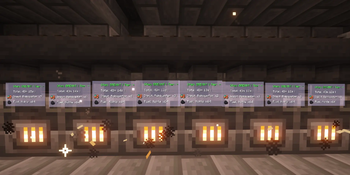
🔥 Furnace Overlay
Shows relevant furnace info directly in the HUD
Mark furnaces via hotkey (crosshair) for quick tracking
Clear, easy to read, with configurable visuals
📜 Quests Overlay
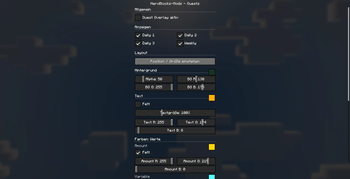
Displays quest blocks (e.g., Daily/Weekly – depending on setup)
Extra colors for value ranges (Amount / Variable / Progress)
Optional bold styling per section
Extensive HUD options (text, background, layout)
⛏️ Farm Timer (Overlay + History)
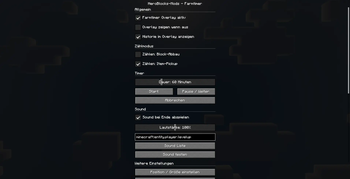
Start/pause/stop a farm timer session (hotkeys + buttons)
Counting mode: block breaking or item pickup (mutually exclusive)
Displays resources with icons and amounts
Money/minimum drop calculation (Mark) + HUD display
Session history with table + delete functions
💰 Container Value Overlay
Shows the total “ore value” of a container directly as an on-screen overlay
Optional top-items breakdown (with icons or item names)
Fully configurable: position & size, background color + transparency, text color + text size
📦 QDrive / ME Storage Display
Client-side ME Storage scanner/viewer (Shulker-based network display)
Search + sorting + type filters + favorites
Configurable menu background (color + transparency)
Configurable grid size via sliders (rows + columns)
Optional: mute Shulker open/close sounds while using the QDrive UI / scanning
🗺️ MapTip (Map preview in tooltip)
Map preview directly in the tooltip on hover
Optional / depending on version: support for maps in bundles (Bundles) + paging (A/D)
⚙️ Configuration
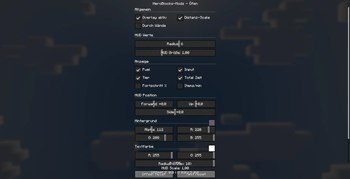
Central in-game menu with a clean structure
Master toggle for the entire mod pack
Per feature:
Overlay on/off
Position & size
Background color + transparency
Text color + text size
Reset buttons (depending on overlay/menu)
⌨️ Default Hotkeys (Example)
O = enable/disable mod
I = open menu
H = furnace mark (crosshair)
P = farm timer start/stop
L = farm timer pause/resume
G = QDrive / ME Storage open/scan
(Hotkeys are set as keybinds and can be adjusted depending on your setup.)
Deutsche Beschreibung
✅ Features
🔥 Öfen-Overlay
Zeigt relevante Ofen-Infos direkt im HUD
Öfen per Hotkey markieren (Fadenkreuz) für schnelles Tracking
Übersichtlich, gut lesbar, mit konfigurierbarer Optik
📜 Quests-Overlay
Anzeige von Quest-Blöcken (z.B. Daily/Weekly – je nach Setup)
Extra Farben für Wert-Bereiche (Amount / Variable / Fortschritt)
Optional fett je Bereich
Umfangreiche HUD-Optionen (Text, Background, Layout)
⛏️ Farmtimer (Overlay + Historie)
Farmtimer Session starten/pausieren/stoppen (Hotkeys + Buttons)
Zählmodus: Block-Abbau oder Item-Pickup (exklusiv)
Anzeige von Ressourcen mit Icons und Mengen
Geld-/Mindestdrop-Berechnung (Mark) + HUD-Anzeige
Session-Historie mit Tabelle + Löschfunktionen
💰 Kisten-Wert Overlay
Zeigt den Gesamtwert (Erze/Mark) eines Containers als Overlay an
Optional: Top-Items Auflistung (mit Icons oder Itemnamen)
Voll konfigurierbar: Position & Größe, Hintergrundfarbe + Transparenz, Textfarbe + Textgröße
📦 QDrive / ME Storage Anzeige
Clientseitiger ME-Storage Scanner/Viewer (Shulker-basiertes Network-Display)
Suche + Sortierung + Typ-Filter + Favoriten
Menü-Hintergrund konfigurierbar (Farbe + Transparenz)
Grid-Größe per Regler konfigurierbar (Zeilen + Spalten)
Optional: Shulker Öffnen/Schließen-Sounds im QDrive-Menü/Scan stummschalten
🗺️ MapTip (Karten-Vorschau im Tooltip)
Karten-Vorschau direkt im Tooltip beim Darüberfahren
Optional/je nach Version: Support für Karten in Bündeln (Bundles) + Blättern (A/D)
⚙️ Konfiguration
Master-Toggle für das komplette Mod-Pack
Pro Feature:
Overlay an/aus
Position & Größe
Hintergrundfarbe + Transparenz
Textfarbe + Textgröße
Reset-Buttons (je nach Overlay/Menü)
⌨️ Standard-Hotkeys (Beispiel)
O = Mod aktivieren/deaktivieren
I = Menü öffnen
H = Ofen markieren (Fadenkreuz)
P = Farmtimer Start/Stop
L = Farmtimer Pause/Weiter
G = QDrive / ME Storage öffnen/scan
(Hotkeys sind als Keybinds gesetzt und können je nach Setup angepasst werden.)
Available Versions
How to Install HeroBlocks-Mods on Your Server
Order Server
Order a Minecraft Java server with at least 3 GB RAM (4 GB recommended).
Set fabric Loader
In the panel under "Egg", select the fabric loader and matching Minecraft version (1.21.11).
Install Mod
Open the mod browser in the dashboard and search for "HeroBlocks-Mods". Click "Install" – done! Alternatively, upload the .jar via SFTP to the /mods folder.
Compatibility
Mod Loaders
Minecraft Versions
1.21.11
Server-side
~ OptionalRecommended RAM
4 GB(min. 3 GB)Frequently Asked Questions
HeroBlocks-Mods server crashes on startup – what to do?
Most common cause: wrong fabric version or insufficient RAM. Check the server log (latest.log) for "OutOfMemoryError" or "Mixin" errors. With Mado Hosting: ensure at least 3 GB RAM is allocated and the loader matches the mod version (1.21.11). You can switch loaders with one click in the panel.
Is HeroBlocks-Mods compatible with fabric?
HeroBlocks-Mods officially supports fabric for Minecraft 1.21.11. The Mado dashboard automatically detects incompatible loader combinations.
Server lagging with HeroBlocks-Mods – how to optimize performance?
Recommended RAM: 4 GB (per 8 players). Use /spark profiler to check if HeroBlocks-Mods consumes the most tick time. Common fixes: reduce server view-distance to 8-10, install "performant" or "starlight" as supplementary mods on Forge. With Mado Hosting, your server runs on NVMe SSDs with dedicated CPU cores for minimal latency.
Similar Mods




![CobbleDollars [Cobblemon Addon]](https://cdn.modrinth.com/data/s7N7AsqL/684040a264fc1d7f9b856ec5d2da39767398c7ad.png)
Rent Modded Server
Install HeroBlocks-Mods with just one click on your server.