
Herobrines Omen
A myth that comes to life within your world. He’s watching you...
Screenshots
About this Mod
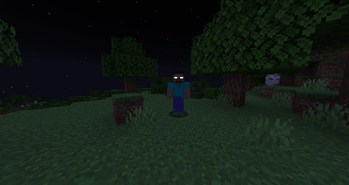
Herobrine’s Omen brings new levels of terror to Minecraft by introducing multiple versions of Herobrine, each with their own behavior. Some will stalk you from a distance. Others will attack without warning, or even mine through the world to reach you. Over time, herobrine will become more active. Nowhere is truly safe.
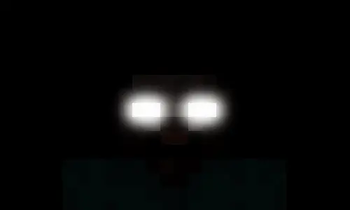
Discover mysterious structures and events that hint at Herobrine’s presence, and brace yourself for sudden jumpscares. Some Jumpscares are so powerful that they can even kick you out of your own world. You thought he was just a myth… but now, he’s here.
Updates continue on Curseforge
- A mod made by Zcoper
- Mod created with MCreator!
- Requires Geckolib
● Visit my Discord Server!
https://discord.gg/akP56NtmVQ
● Important FaQ
Spoiler
► [OLD] What is my console spaming?
Most mobs use special spawning conditions, which means that these mobs can only appear under certain conditions. If the spawning conditions work, this spam is created in the console.
► [OLD] Why can't I summon a mob?
Spawning Conditions determine which conditions must be met in order to spawn certain mobs. Some mobs only spawn above Y level 60. Some below. Most mobs can only spawn in the overworld than in other dimensions.
► Why are features missing in different versions?
It is recommended to play the newest versions of higher minecraft versions.
Not all features of MCreator available or the same in different versions.
For example: Version 1.19.2 doesn't have the feature of shield, better structure generation or custom villagers, but Version 1.20.1 does have them.
► How does the Phases work?
Through the phases that increase up to phase 4, Herobrine becomes more aggressive.
Phase 0
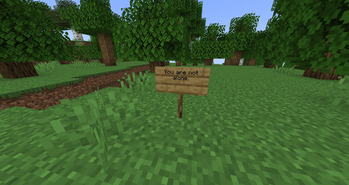
Mossy Cobblestone pyramids, Redstone torch tunnels, mysterious signs, fake Bedrock crosses can occur.
Phase 1
Herobrine Stalkers appear, new eerie events occur.
Phase 2
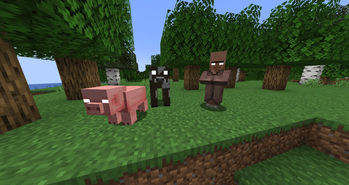
Cursed Animals, Weeping Herobrine, Sky Stalker Herobrine, additional new events.
Phase 3
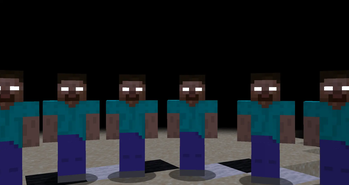
Herobrine Builder, Herobrine Knockbacker, Herobrine Stalker Near, Herobrine Circle, new events and Herobrine short jumpscare can occur.
Phase 4
Herobrine Hunter and Herobrine Mage appear, Herobrine Boss can be summoned, new events, Herobrine long jumpscare can occur.
► How to change phases?
Phases are reset to 0 if the Herobrine Boss got defeated by a player.
Alternatively, you can use the command "herobrine_add_phases" to increase the phase by one.
The phases are reset to 0 with the command “herobrine_reset_phases”.
► How to disable Herobrine Buildings?
Herobrine Buildings can be switched off using the gamerule "herobrineBuilderBuilds" if it is set to false.
► How to disable being kicked out?
Being kicked out can be switched off using the gamerule "kickOutFromWorld" if it is set to false.
► How to disable Herobrine Jumpscares?
Herobrine Jumpscares can be switched off using the gamerule "herobrineJumpscares" if it is set to false.
► How to summon the Herobrine Boss?
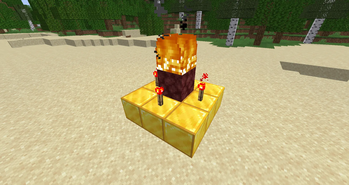
To summon the Herobrine Boss, the player must already be in Phase 4. The summoning process requires constructing a special altar:
Place a Mossy Cobblestone as the center block.
Surround it with Gold Blocks on all four sides.
Place Netherrack on top of the Mossy Cobblestone.
Place Redstone Torches next to the Netherrack on the Gold Blocks.
Light the Netherrack on fire.
► Events
From Phase 0:
Mossy Cobblestone Pyramids
Signs with various messages
Underground tunnels with Redstone torches
Crosses made of Fake Bedrock blocks
Redstone torches appearing under the player
Message: "Player [Name] not found."
Message: "[ERROR] Failed to remove entity 72-69-82-79-66-82-73-78-69"
Message: "[Name] joined the game"
Message: "[Name] left the game"
From Phase 1:
Title: "Who are you?"
Fake Bedrock floating in the air
Chest with Redstone Dust spelling "Hi"
Footstep sounds behind the player
Creeper sound behing a player
Random Cave Sound
Message: [Render thread/Warn]: Invalid render entity (ID: -1)
Message: Local game hosted on port [58642]
Message: Herobrine joined the gameAnswer within 30 seconds with Herobrine or hi/hey/hello... will eventually kick you from the world or getting a reply
Unknown Entity with a Nametag can spawn
From Phase 2:
Fake Diamond Block that explodes when mined
Breathing sound
Actionbar: "Now Playing: C418 - Die"
Random damage
Message:Hello Answer within 30 seconds with Herobrine or hi/hey/hello... will eventually kick you from the world or getting a reply
From Phase 3:
Title: "You can't hide"
Message: "Shutting down internal server..."
Disc 13 starts playing
Random Herobrine Scream
Message: OpenGL Error: 1282 (Invalid operation)With following messages
From Phase 4:
Title: "LEAVE LEAVE LEAVE LEAVE LEAVE"
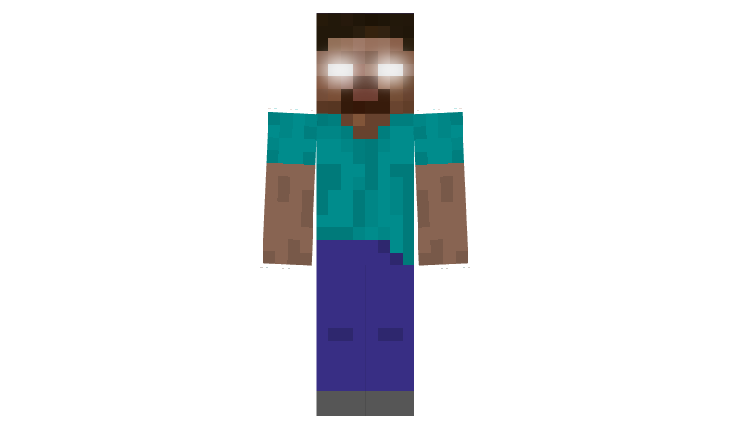
Herobrine is a terrifying presence that can take on different forms, each with its own behavior depending on what phase he is. Immune to many types of attacks, Herobrine can randomly appear in front of or behind the player, occasionally triggering jumpscares. Depending on the variant, it might be fast, incredibly strong, or able to withstand significant damage, and when defeated, it can drop a variety of random loot.
- Config File not inculed.
- You are all allowed to use this mod in your modpacks!
- Do not port my mods without permission!
Available Versions
How to Install Herobrines Omen on Your Server
Order Server
Order a Minecraft Java server with at least 4 GB RAM (6 GB recommended).
Set forge Loader
In the panel under "Egg", select the forge loader and matching Minecraft version (1.20.1).
Install Mod
Open the mod browser in the dashboard and search for "Herobrines Omen". Click "Install" – done! Alternatively, upload the .jar via SFTP to the /mods folder.
Compatibility
Mod Loaders
Minecraft Versions
1.20.1, 1.19.4, 1.19.2
Server-side
✓ RequiredRecommended RAM
6 GB(min. 4 GB)Frequently Asked Questions
Herobrines Omen server crashes on startup – what to do?
Most common cause: wrong forge version or insufficient RAM. Check the server log (latest.log) for "OutOfMemoryError" or "Mixin" errors. With Mado Hosting: ensure at least 4 GB RAM is allocated and the loader matches the mod version (1.20.1). You can switch loaders with one click in the panel.
Is Herobrines Omen compatible with forge?
Herobrines Omen officially supports forge for Minecraft 1.20.1, 1.19.4, 1.19.2. The Mado dashboard automatically detects incompatible loader combinations.
Server lagging with Herobrines Omen – how to optimize performance?
Recommended RAM: 6 GB (per 5 players). Use /spark profiler to check if Herobrines Omen consumes the most tick time. Common fixes: reduce server view-distance to 8-10, install "performant" or "starlight" as supplementary mods on Forge. With Mado Hosting, your server runs on NVMe SSDs with dedicated CPU cores for minimal latency.
Similar Mods




Rent Modded Server
Install Herobrines Omen with just one click on your server.