
High Voltage
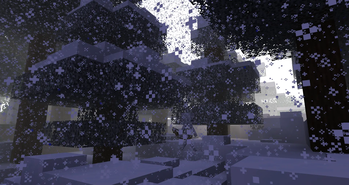
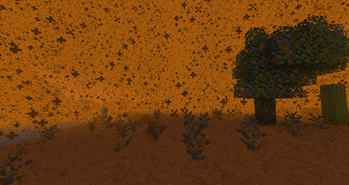
Data driven biome weather profiles with custom precipitation, fog, lightning, and effects. Presets are added, but with a data pack more can be added.
Screenshots



About this Mod

A weather overhaul that makes storms more immersive, atmospheric, and dangerous.
High Voltage expands Minecraft's weather system with custom precipitation, atmospheric fog, biome-specific climates, environmental hazards, and dynamic storm effects.
The mod includes a complete set of built-in weather profiles out of the box, so no configuration is required. Simply install the mod and experience a more varied and immersive world.
For players, High Voltage is a weather overhaul.
For pack makers, it's a fully data-driven weather framework.
Vanilla+ Weather
High Voltage is designed to feel like a natural extension of Minecraft's weather system.
Instead of adding tornadoes, survival mechanics, or complicated weather simulations, High Voltage focuses on making storms more interesting, atmospheric, and biome-specific while staying true to vanilla gameplay.
You'll still recognize Minecraft's weather but now different regions of the world can have their own identity.
A snowy biome might experience freezing blizzards.
A swamp might become covered in dense fog.
A forest storm might bring increased lightning activity.
The goal isn't to replace Minecraft's weather with an entire overhaul.
It's to make it feel like it was always meant to be this way.
Features
Built In Weather Overhaul
High Voltage comes with its own weather profiles and environmental effects, adding variety to storms across the world without requiring any setup.
Different biomes can experience unique weather conditions with their own visuals, atmosphere, and gameplay effects.
Custom Precipitation
Weather is no longer limited to vanilla rain and snow.
High Voltage supports:
- Custom precipitation textures
- Colored precipitation
- Variable fall speeds
- Landing particles
- Landing sounds
- Rain-like or entirely custom weather behavior
Atmospheric Fog
Storms can dramatically alter visibility using custom fog rendering.
Examples include:
- Dense blizzards
- Coastal mist
- Swamp haze
- Volcanic ash clouds
- Magical fog banks
Dynamic Weather Effects
Weather can directly impact gameplay.
Built-in effects include:
- Freezing
- Burning
- Damage over time
- Status effects
- Lightning events
- Entity summoning
- Attribute modification
- Sound events
- Command execution
Storms become more than visual decoration, they become hazards.
Biome-Specific Climates
Each biome can have its own weather profile.
A snowy mountain may experience blizzards while a nearby swamp is covered in thick fog.
Weather becomes part of a biome's identity instead of a global effect.
Datapack Support
Everything used by High Voltage's built-in weather system is exposed through data-driven codecs.
Modpack creators and datapack authors can:
- Create entirely new weather profiles
- Customize existing profiles
- Add custom weather effects
- Change precipitation visuals
- Configure fog behavior
- Control lightning frequency
- Target specific biome groups
No coding required.
Weather profiles are loaded from:
data/<namespace>/weather_profiles/
Documentation: High Voltage Documentation
Built In Diagnostics
High Voltage includes datapack error reporting.
When a weather effect fails to load, the game can automatically detect:
- Missing effect types
- Invalid IDs
- Misspelled parameters
- Unexpected fields
- Parsing failures
Making weather profile creation significantly easier to debug.
Perfect For
- Vanilla+
- Adventure packs
- RPG modpacks
- Fantasy worlds
- Custom dimensions
- Biome overhauls
Whether you want a weather overhaul or a fully customizable climate system, High Voltage provides both.
Available Versions
How to Install High Voltage on Your Server
Order Server
Order a Minecraft Java server with at least 3 GB RAM (4 GB recommended).
Set forge Loader
In the panel under "Egg", select the forge loader and matching Minecraft version (1.19.4).
Install Mod
Open the mod browser in the dashboard and search for "High Voltage". Click "Install" – done! Alternatively, upload the .jar via SFTP to the /mods folder.
Compatibility
Mod Loaders
Minecraft Versions
1.19.4, 1.19.3, 1.19.2
Server-side
✓ RequiredRecommended RAM
4 GB(min. 3 GB)Frequently Asked Questions
High Voltage server crashes on startup – what to do?
Most common cause: wrong forge version or insufficient RAM. Check the server log (latest.log) for "OutOfMemoryError" or "Mixin" errors. With Mado Hosting: ensure at least 3 GB RAM is allocated and the loader matches the mod version (1.19.4). You can switch loaders with one click in the panel.
Is High Voltage compatible with forge?
High Voltage officially supports forge for Minecraft 1.19.4, 1.19.3, 1.19.2. The Mado dashboard automatically detects incompatible loader combinations.
Server lagging with High Voltage – how to optimize performance?
Recommended RAM: 4 GB (per 8 players). Use /spark profiler to check if High Voltage consumes the most tick time. Common fixes: reduce server view-distance to 8-10, install "performant" or "starlight" as supplementary mods on Forge. With Mado Hosting, your server runs on NVMe SSDs with dedicated CPU cores for minimal latency.
Similar Mods




Rent Modded Server
Install High Voltage with just one click on your server.