
HolyChatFIlter
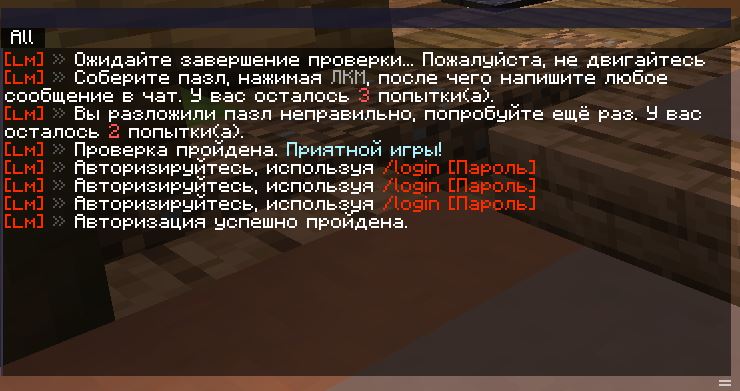
A complete replacement for Minecraft's default chat with tabs, filters, and flexible layouts.
Screenshots
About this Mod
RU:
HolyChatFilter
Полная замена стандартного чата Minecraft с поддержкой вкладок, фильтров и гибкой настройки.
Возможности
📑 Вкладки и группы
- Создавай неограниченное количество вкладок
- Объединяй вкладки в группы — переключайся между ними одним кликом
- Выноси вкладку из группы простым перетаскиванием
🖱️ Перетаскивание
- Перемещай панели чата в любую точку экрана
- Перетащи группу близко к другой — они автоматически объединятся
- Изменяй размер каждой панели потянув за правый нижний угол
🔍 Фильтры сообщений
- Несколько фильтров на вкладку с логикой OR
- Типы фильтров:
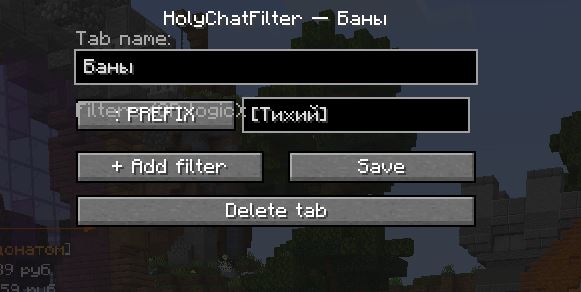
ALL,PREFIX,CONTAINS,REGEX - Правый клик по вкладке → мгновенный редактор фильтров
💬 Поведение как в оригинале
- На HUD показываются только новые сообщения (как в ванильном чате)
- При открытии чата (T) — полный интерфейс со скроллом
- Кликабельные ссылки, команды и hover-подсказки
- Полная поддержка цветов и форматирования текста
⚙️ Прочее
- Конфигурация сохраняется автоматически в
config/holychatfilter.json - Скролл колёсиком мыши
- Не мешает Tab-complete и полю ввода
Использование
| Действие | Результат |
|---|---|
| ЛКМ по заголовку панели | Перетащить панель |
| ЛКМ по вкладке | Переключить вкладку |
| ЛКМ по вкладке + drag наружу | Вынести в отдельную группу |
| ПКМ по вкладке | Редактор фильтров |
Кнопка + Tab (правый нижний угол) |
Создать новую группу |
| Колесо мыши на чате | Прокрутка сообщений |
| Resize-хэндл (правый нижний угол панели) | Изменить размер |
Требования
- Minecraft 1.20.1
- Fabric Loader ≥ 0.14.22
- Fabric API
EN:
HolyChatFilter
A complete replacement for Minecraft's default chat with tabs, filters, and flexible layouts.
Features
📑 Tabs & Groups
- Create unlimited chat tabs
- Group tabs together and switch between them with a single click
- Detach a tab from a group by dragging it outside
🖱️ Drag & Drop
- Move any chat panel anywhere on screen
- Drag a group near another to merge them automatically
- Resize any panel by dragging the bottom-right corner
🔍 Message Filters
- Multiple filters per tab with OR logic
- Filter types:
ALL,PREFIX,CONTAINS,REGEX - Right-click any tab to instantly open the filter editor
💬 Vanilla-faithful behavior
- HUD shows only recent messages (just like vanilla chat)
- Opening chat (T) reveals the full interface with scrolling
- Clickable links, commands, and hover tooltips all work
- Full color and text formatting support preserved
⚙️ Other
- Config auto-saved to
config/holychatfilter.json - Mouse wheel scrolling with a scroll bar
- Doesn't interfere with Tab-complete or the chat input field
Usage
| Action | Result |
|---|---|
| LMB on panel header | Drag panel |
| LMB on tab | Switch tab |
| LMB on tab + drag outside | Detach to new group |
| RMB on tab | Open filter editor |
+ Tab button (bottom-right) |
Create new group |
| Scroll wheel on chat | Scroll messages |
| Resize handle (panel bottom-right) | Resize panel |
Requirements
- Minecraft 1.20.1
- Fabric Loader ≥ 0.14.22
- Fabric API
Available Versions
How to Install HolyChatFIlter on Your Server
Order Server
Order a Minecraft Java server with at least 3 GB RAM (4 GB recommended).
Set fabric Loader
In the panel under "Egg", select the fabric loader and matching Minecraft version (1.20.6).
Install Mod
Open the mod browser in the dashboard and search for "HolyChatFIlter". Click "Install" – done! Alternatively, upload the .jar via SFTP to the /mods folder.
Compatibility
Mod Loaders
Minecraft Versions
1.20.6, 1.20.5, 1.20.4 (+3 more)
Server-side
✗ UnsupportedRecommended RAM
4 GB(min. 3 GB)Frequently Asked Questions
HolyChatFIlter server crashes on startup – what to do?
Most common cause: wrong fabric version or insufficient RAM. Check the server log (latest.log) for "OutOfMemoryError" or "Mixin" errors. With Mado Hosting: ensure at least 3 GB RAM is allocated and the loader matches the mod version (1.20.6). You can switch loaders with one click in the panel.
Is HolyChatFIlter compatible with fabric?
HolyChatFIlter officially supports fabric for Minecraft 1.20.6, 1.20.5, 1.20.4. The Mado dashboard automatically detects incompatible loader combinations.
Server lagging with HolyChatFIlter – how to optimize performance?
Recommended RAM: 4 GB (per 8 players). Use /spark profiler to check if HolyChatFIlter consumes the most tick time. Common fixes: reduce server view-distance to 8-10, install "performant" or "starlight" as supplementary mods on Forge. With Mado Hosting, your server runs on NVMe SSDs with dedicated CPU cores for minimal latency.
Rent Modded Server
Install HolyChatFIlter with just one click on your server.