
Homabric
🏠 Little yet powerful home management mod for Fabric
Screenshots
About this Mod
Homabric
Little yet powerful home management mod for Fabric
⚠️This mod is in early stage of development, you can use all functions that are listed below, but they may be changed in future. Code quality might be very poor sometimes and it will be improved in future.
Features
- ⭐ Sharing homes with players.
- ⭐ Max home limits per group or player via permissions.
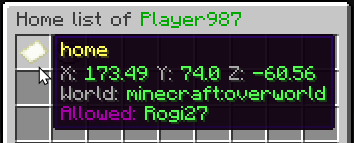
- ⭐ Using GUI for teleportation and viewing all home information.
- ⭐ Editing home icons for GUI with support for modded items.
- ⭐ Ability to easily configure the mod and view player locations.
- ⭐ Teleport timeout with ability to prevent teleportation if player moved or got damaged.
Planned features
- Ability to define teleport timeout using permissions.
- Ability to define
/homecommand aliases in config. - Rewrite code for better readability.
Languages
- 🇬🇧 English
- 🇷🇺 Russian
- 🇨🇳 Chinese (@Neubulae)
Commands
You can use homabric.teleport.bypass permission to bypass teleport timeout.
Players
- /h OR /home
homabric.base.use - /h <name?>
homabric.base.byName - /h set <name?>
homabric.base.set - /h remove <home>
homabric.base.remove - /h p <player> <home>
homabric.base.others - /h list
homabric.base.list - /h allow <player> <home>
homabric.base.allow - /h disallow <player> <home>
homabric.base.disallow - /h setIcon <home> <item identificator>
homabric.base.setIcon
Admins
You can access to admin commands by using /homabric.
- /homabric
homabric.admin.use - /homabric reload
homabric.admin.reload - /homabric teleport <player> <home>
homabric.admin.teleport - /homabric set <player> <home>
homabric.admin.set - /homabric remove <player> <home>
homabric.admin.remove - /homabric list <player>
homabric.admin.list
Classic Commands
You can disable these commands in configuration file by setting enableClassicCommands to false.
- /sethome <name>
homabric.base.set - /removehome <home>
homabric.base.remove - /playerhome <player> <home>
homabric.base.others - /listhome
homabric.base.list - /allowhome <player> <home>
homabric.base.allow - /disallowhome <player> <home>
homabric.base.disallow
Configuration
I developed this mod with simplicity in mind, I decided to store home data inside the configuration file instead of NBT in Entity or World, this allows server owners fast migration between maps without loosing data and editing them which saves a lot of time.
⚠️ Starting from version 2.0.0 the configuration file are now split into two different ones.
homabric.config.conf
This file stores Homabric settings.
# Do not touch this value, it allows mod to
# check if config file is outdated or not.
configVersion=3
# This option enables alternative command variants like /sethome, /removehome and etc.
enableClassicCommands=true
# Sets the maximum amount of homes per player.
homesLimit=21
# You can define permissions that will override home limit for the players if they have them.
# Permission names are transformed to permissions like 'homabric.homelimit.<permissionName>'
# Example permission: vip: { max-homes=6 }
permissionsHomeLimit {}
# Sets the timeout in seconds before player will be teleported home.
# You can disable this feature by setting it to 0.
teleportCooldown=5
homabric.homes.conf
This file contains all homes that are created by players.
players {
        # Player nickname (not a DisplayName)
        ExamplePlayer {
            # List of player homes
            homes {
                # Name of the home
                "village" {
                    # Players that can access this home
                    allowed-players=[]
                    # Icon must be an identifier, for example 'minecraft:cobblestone'
                    icon="minecraft:map"
                    # World where home is located
                    world="minecraft:overworld"
                    # Coordinates, including head position
                    pitch=7.15
                    x=160.66
                    y=72.0
                    yaw=-51.45
                    z=-76.45
                }
                # Example of home with allowed player 'Rogi27'
                home {
                    allowed-players=[
                        Rogi27
                    ]
                    icon="minecraft:iron_shovel"
                    pitch=8.25
                    world="minecraft:overworld"
                    x=1337.3
                    y=172.0
                    yaw=123.1
                    z=276.45
                }
            }
        }
    }
Migration from 1.x.x
Due to breaking changes in 2.0.0 you are required to manually edit your config file and move players section from original config to new one called homabric.homes.conf.
Available Versions
How to Install Homabric on Your Server
Order Server
Order a Minecraft Java server with at least 3 GB RAM (4 GB recommended).
Set fabric Loader
In the panel under "Egg", select the fabric loader and matching Minecraft version (1.20.1).
Install Mod
Open the mod browser in the dashboard and search for "Homabric". Click "Install" – done! Alternatively, upload the .jar via SFTP to the /mods folder.
Compatibility
Mod Loaders
Minecraft Versions
1.20.1, 1.20, 1.19.4 (+28 more)
Server-side
~ OptionalRecommended RAM
4 GB(min. 3 GB)Frequently Asked Questions
Homabric server crashes on startup – what to do?
Most common cause: wrong fabric version or insufficient RAM. Check the server log (latest.log) for "OutOfMemoryError" or "Mixin" errors. With Mado Hosting: ensure at least 3 GB RAM is allocated and the loader matches the mod version (1.20.1). You can switch loaders with one click in the panel.
Is Homabric compatible with fabric and quilt?
Homabric officially supports fabric, quilt for Minecraft 1.20.1, 1.20, 1.19.4. The Mado dashboard automatically detects incompatible loader combinations.
Server lagging with Homabric – how to optimize performance?
Recommended RAM: 4 GB (per 8 players). Use /spark profiler to check if Homabric consumes the most tick time. Common fixes: reduce server view-distance to 8-10, install "performant" or "starlight" as supplementary mods on Forge. With Mado Hosting, your server runs on NVMe SSDs with dedicated CPU cores for minimal latency.
Similar Mods




Rent Modded Server
Install Homabric with just one click on your server.