
Home Lawn Security
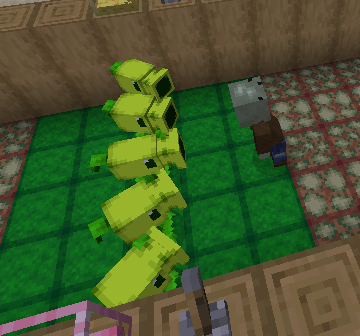
A mod that aims to add Plants vs Zombies' versus mode to the game.
Screenshots
About this Mod
Home Lawn Security
A PvZ mod for Minecraft heavily inspired by JaizPvZ.
This mod intends to function similarly to PvZ's Versus Mode from the console versions, as well as a bit of PvZ Adventures. If you want to play against another player, I hope this Minecraft mod should suffice.
This mod is currently in alpha, so nothing is final.
Features
Blocks
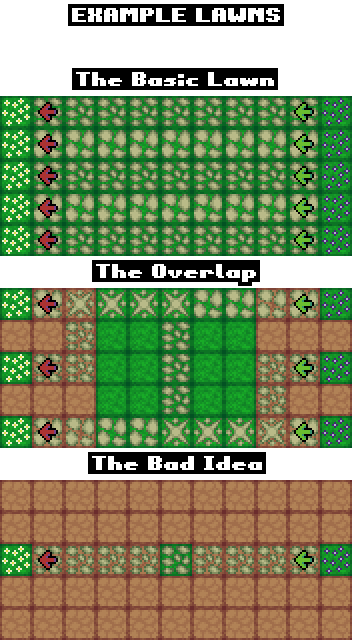
- Lawn, Garden, & Graveyard Blocks - These blocks are intended for building your lawn with. Zombies will try to stay on the path they were spawned on, so if you intend to put paths next to each other, use different path types so that the zombies know the difference, and use an intersection if the paths cross over. You can add paths to your lawn by using the lawn gadget. Put garden blocks at the end of your paths, and put graveyard blocks at the start.
- Markers - Place these on top of blocks to override their functionality. They come in all the same kinds as the blocks for building your lawn and are invisible, so use these if you don't like the way the normal lawn blocks look.
- Sun Spawner & Brainpower Beacon - Use these to spawn sun or brainpower from the sky during daytime. If powered with redstone, they will stop.
Items
- Sun & Brainpower - The currency for placing plants and zombies. Throwable, then collectable with the appropriate currency bag. Not spendable in plain item form. The item forms are not obtainable in survival mode, as they have no use besides depositing them into a bag.
- Bags of Sun & Brainpower - If you have one of these in your inventory, you can collect its corresponding currency and eventually spend said currency by using a seed packet.
- Shovel - Used to remove plants and zombies. You can remove plants honorably by pressing the use button, but isn't it tempting to slam a shovel into Sunflower's face?
- Lawn Gadget - Used to add, remove, and modify the paths on lawn blocks. Punch to switch modes, and sneak to affect markers.
- Turf - Use on an unsodded lawn block to combine the two. Use shears to get the turf item back.
- Brain - Dropped by vanilla zombies. Feed this to one of your own zombies to get a duplicate seed packet. You can also do the same with plants by using bone meal instead.
- Seed Packets - Used for placing plants and zombies. Some plants can only be placed on turf (like Peashooter, Sunflower, and Fume-shroom), while others can only be placed on paths (like Wall-nut, Spikeweed, and Pumpkin), but any plant can be placed on a sodded lawn block with a path as long as it doesn't belong in water. Zombies can only be placed on paths. Seed packets are obtained through the Wandering Trader or feeding existing plants and zombies.
Credits
Main Credits
dombomb64 - Made this mod
Kaupenjoe - Fabric modding tutorials
Burby - Ripped PvZ sounds
RandomTalkingBush - Ripped PvZ sounds
Inspirations
Jaiz - Made JaizPvZ
Available Versions
How to Install Home Lawn Security on Your Server
Order Server
Order a Minecraft Java server with at least 3 GB RAM (4 GB recommended).
Set fabric Loader
In the panel under "Egg", select the fabric loader and matching Minecraft version (1.21.11).
Install Mod
Open the mod browser in the dashboard and search for "Home Lawn Security". Click "Install" – done! Alternatively, upload the .jar via SFTP to the /mods folder.
Compatibility
Mod Loaders
Minecraft Versions
1.21.11, 1.21.10, 1.21.6 (+5 more)
Server-side
✓ RequiredRecommended RAM
4 GB(min. 3 GB)Frequently Asked Questions
Home Lawn Security server crashes on startup – what to do?
Most common cause: wrong fabric version or insufficient RAM. Check the server log (latest.log) for "OutOfMemoryError" or "Mixin" errors. With Mado Hosting: ensure at least 3 GB RAM is allocated and the loader matches the mod version (1.21.11). You can switch loaders with one click in the panel.
Is Home Lawn Security compatible with fabric?
Home Lawn Security officially supports fabric for Minecraft 1.21.11, 1.21.10, 1.21.6. The Mado dashboard automatically detects incompatible loader combinations.
Server lagging with Home Lawn Security – how to optimize performance?
Recommended RAM: 4 GB (per 8 players). Use /spark profiler to check if Home Lawn Security consumes the most tick time. Common fixes: reduce server view-distance to 8-10, install "performant" or "starlight" as supplementary mods on Forge. With Mado Hosting, your server runs on NVMe SSDs with dedicated CPU cores for minimal latency.
Similar Mods





Rent Modded Server
Install Home Lawn Security with just one click on your server.