
Homebound
A more balanced approach to teleporting home.
Screenshots
About this Mod

Homebound adds items that allow you to set a home and teleport there without completely trivializing transportation and danger in Minecraft.
Website - Make sure to check out the website to get all of the information you could need.
About
I've found that most home mods make the game too easy. Having access to instant teleportation or teleportation to too many places stops you from ever needing to solve many fun creative problems in the game. It also makes it too easy to escape death with a quick `/home`. This mod solved that issue for me, hopefully you enjoy it as well!
Almost everything about the mod and the items it adds are configurable. Make it exactly what you want.
Homebound was designed to have minimal impact on performance and should be compatible with all other mods. If you have any issues please let me know in the comments or add an issue to the issue tracker.
Instructions
Setting a home: When you have a Homebound item in your hand you can set your home by crouching, looking at any block, and using the item.
Teleporting Home: Using a homebound item, or pressing 'h' (by default) with a homebound stone in your inventory or curios slot, will begin the teleport process. Most items take around 10 seconds to use by default, this can be changed in the configs or modified with enchantments.
Hovering over the item and pressing `Shift` will give you more information about it, like any restrictions, use time, and cooldown.
If you are mounted on a pet that you own then it will teleport with you.
When you teleport you trigger a global cooldown based on the item you used. Some items have longer cooldowns than others. This cooldown is shared across all homebound items. You can't just build multiple stones and use them in turn.
Note: If you take damage while channeling the warp it cancels it and adds a 5 second cooldown (this is configurable) so you can no longer cheat death so easily like the old days.

Items
Each homebound item has a combination of cooldown, warp distance restrictions, dimensional travel restrictions, and/or use times. Upgraded items will remove these restrictions or reduce cooldowns and use times.
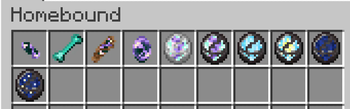
Here's a few of the items you can create:
Homeward Stone | The basic home warping item. It will take some exploration to find the materials to make but it will be worth it. It has a 1 hour cooldown.
Haven Stone | An upgrade to the homeward stone that removes the dimensional teleport restriction. It requires 2 netherite ingots and 6 nether brick though, requiring you to adventure through the nether a bit before you can make it.
Homeward Bone | Teleports you home from anywhere but it is consumed on use and has a hefty 2 hour cooldown. It is fairly easy to make on the fly from killing mobs, so if you're out adventuring and don't have your homeward stone handy you can craft this to get out of a bad situation.
Hearthwood | Can only be used within 160 blocks (10 chunks) of your home and is not enchantable, but only has a 10 minute cooldown and a 2 second use time. It's meant to make moving around your base a little easier.
Dusk Stone | This is one of 2 upgrade paths from the Haven Stone. The cooldown of the item is scaled based on the distance away from home you are, with a minimum cooldown of 15 minutes no matter what. For every 50 blocks away from home it increases the cooldown by 1 minute, up to 1 hour max. It's direct upgrade, the Twilight Stone, is only very slightly better stat wise, but also doesn't drop on death.
There are a few more items to discover and a few more planned, detailed below in planned features. I recommend using JEI/REI to make crafting easier!
Enchantments
- Haste - Decreases the use time of the item by 10% per level. 3 Levels.
- Cooldown - Decreases the warp cooldown of the item by 5% per level. 4 Levels.
Commands
As an admin you can clear a players cooldown or home by using:
/homebound admin <target> clear cooldown
/homebound admin <target> clear home
As a normal player you can view your home information, like dimension and x, y, and z coordinates, as well as cooldown remaining if there is one with:
/homebound info
Planned Features
Make it so owners that are riding pets they own teleport with themAdd Configs- DoneAdd Curios integration- DoneAdd a keybind that uses first homebound item found in inventory / curios slot- Done- Add player attributes that also reduce cooldown and cast time.
- Possibly add new upgraded stones.
FAQ
Q: Will you make this for Fabric?
A: This is a Forge only mod for now. I don't have the time to learn Fabric at the moment with a newborn in the house and a full time job. If things (ever) calm down I will revisit it. I will probably jump ship to NeoForged when it is more mature, as will most developers probably.
Q: Will you backport this to older minecraft version?
A: Same answer as porting this to Fabric. It would probably be rather easy to backport to 1.19 and maybe even 1.18 but I don't have the time as I'm working on other mods and a custom modpack. The more traction this gets the more likely I will add some back ports though. I would not go further back than 1.18 however.
Q: Can I use this on my server or madpack?
A: Of course, that's why I made it! Just please give credit if possible. You may not use this to make money off of in any way.
Huge shout out to Kaupenjoe for the great tutorials, the NeoForged discord for answering a ton of questions, and to all the mod makers who share their source code. I learned a ton digging around in there!
This is my first released mod and I am continuing to play-test and balance it, as well as add new features. It is fairly feature complete at this point as far as baseline functionality goes. If you have suggestions feel free to leave them in the comments.
Available Versions
How to Install Homebound on Your Server
Order Server
Order a Minecraft Java server with at least 3 GB RAM (4 GB recommended).
Set forge Loader
In the panel under "Egg", select the forge loader and matching Minecraft version (1.21.1).
Install Mod
Open the mod browser in the dashboard and search for "Homebound". Click "Install" – done! Alternatively, upload the .jar via SFTP to the /mods folder.
Compatibility
Mod Loaders
Minecraft Versions
1.21.1, 1.20.6, 1.20.5 (+4 more)
Server-side
✓ RequiredRecommended RAM
4 GB(min. 3 GB)Frequently Asked Questions
Homebound server crashes on startup – what to do?
Most common cause: wrong forge version or insufficient RAM. Check the server log (latest.log) for "OutOfMemoryError" or "Mixin" errors. With Mado Hosting: ensure at least 3 GB RAM is allocated and the loader matches the mod version (1.21.1). You can switch loaders with one click in the panel.
Is Homebound compatible with forge and neoforge?
Homebound officially supports forge, neoforge for Minecraft 1.21.1, 1.20.6, 1.20.5. The Mado dashboard automatically detects incompatible loader combinations.
Server lagging with Homebound – how to optimize performance?
Recommended RAM: 4 GB (per 8 players). Use /spark profiler to check if Homebound consumes the most tick time. Common fixes: reduce server view-distance to 8-10, install "performant" or "starlight" as supplementary mods on Forge. With Mado Hosting, your server runs on NVMe SSDs with dedicated CPU cores for minimal latency.
Similar Mods




![[TaCZ] Timeless and Classics Zero](https://cdn.modrinth.com/data/SzzJttH8/fd27766d2bb8390d284696b1dbd358f87e081439_96.webp)

Rent Modded Server
Install Homebound with just one click on your server.