
Hotkey Profiles
Hotkey Profiles is a client-side Fabric mod that lets you save your Minecraft keybinds as named profiles and switch between them instantly. Perfect for quickly swapping setups for PvP, building, redstone, or Elytra.
Screenshots
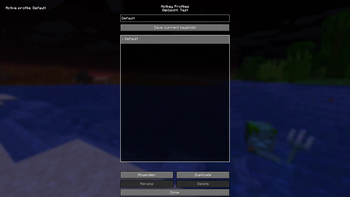
About this Mod
Hotkey Profiles is a client-side Fabric mod for Minecraft Java that lets you save your current keybind setup as named profiles and switch between them instantly. It’s ideal if you regularly change your controls for different activities such as PvP, building, redstone, Elytra flight, or creative work.
Features
- Save keybind profiles from your current controls at any time
- Apply profiles instantly (keybinds update immediately and your options are saved)
- Scrollable profile list that stays usable even with many profiles
- Duplicate profiles to create variants quickly
- Rename profiles (with safe handling of name collisions)
- Delete profiles (the Default profile is protected)
- Overwrite confirmation: if you try to save a profile name that already exists, the mod asks before overwriting
- Uses stable keybind identifiers (works with vanilla and modded keybinds as long as they use normal
KeyBindings)
How it works
The mod captures a snapshot of all registered keybindings and stores them in a profile:
- KeyBinding ID → bound key translation
When you apply a profile, the mod restores those bindings, remaps keys, and writes the updated options file.
Usage
- Install Fabric Loader + Fabric API and add Hotkey Profiles to your
modsfolder. - Open Mod Menu → Hotkey Profiles.
- Enter a profile name and click Save.
- If the name already exists, you’ll be prompted to confirm overwriting it.
- Select any profile in the list and click Apply to switch.
Configuration / Storage
Profiles are stored as JSON in:
config/hotkeyprofiles.json
This makes it easy to back up your profiles or copy them between instances.
Compatibility
- Minecraft Java (Fabric)
- Client-side only (no server installation required)
- Compatible with most mods that register keybinds normally
Notes
- The Default profile is created automatically (if missing) and cannot be deleted or renamed.
- If a keybind no longer exists (e.g., a mod was removed), it is safely ignored when applying a profile.
If you encounter issues, please include your Minecraft version, Fabric Loader/Fabric API versions, and a crash log (if applicable).
Available Versions
How to Install Hotkey Profiles on Your Server
Order Server
Order a Minecraft Java server with at least 3 GB RAM (4 GB recommended).
Set fabric Loader
In the panel under "Egg", select the fabric loader and matching Minecraft version (1.21.11).
Install Mod
Open the mod browser in the dashboard and search for "Hotkey Profiles". Click "Install" – done! Alternatively, upload the .jar via SFTP to the /mods folder.
Compatibility
Mod Loaders
Minecraft Versions
1.21.11
Server-side
✗ UnsupportedRecommended RAM
4 GB(min. 3 GB)Frequently Asked Questions
Hotkey Profiles server crashes on startup – what to do?
Most common cause: wrong fabric version or insufficient RAM. Check the server log (latest.log) for "OutOfMemoryError" or "Mixin" errors. With Mado Hosting: ensure at least 3 GB RAM is allocated and the loader matches the mod version (1.21.11). You can switch loaders with one click in the panel.
Is Hotkey Profiles compatible with fabric?
Hotkey Profiles officially supports fabric for Minecraft 1.21.11. The Mado dashboard automatically detects incompatible loader combinations.
Server lagging with Hotkey Profiles – how to optimize performance?
Recommended RAM: 4 GB (per 8 players). Use /spark profiler to check if Hotkey Profiles consumes the most tick time. Common fixes: reduce server view-distance to 8-10, install "performant" or "starlight" as supplementary mods on Forge. With Mado Hosting, your server runs on NVMe SSDs with dedicated CPU cores for minimal latency.
Similar Mods






Rent Modded Server
Install Hotkey Profiles with just one click on your server.