
HowManyItems
Inventory editor/recipe viewer mod for Legacy Minecraft (like TMI, NEI, JEI, REI)
Screenshots
About this Mod
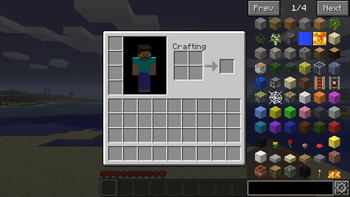
HowManyItems (HMI) is an inventory editor and recipe viewer mod for older versions of Minecraft.
- Left click on items for recipes.
- Right click on items for uses.
- Go to the previous recipe you searched with 'BACKSPACE'
- If your inventory contains all the items in a recipe you can click the '+' button to automatically fill the recipe in
- Feel free to configure the mod to your liking in the options: turn cheat mode on to spawn stuff in.
Modmakers can add their own tabs with addModTab(new Tab()) in mod_HowManyItems
INSTALL
- Install Modloader
- Delete META-INF from the minecraft.jar
- Insert this zip into the .minecraft/mods folder
- ???
- Success!
SUPPORTED MODS
- Industrial Craft 1 & 2 - Macerator, Extractor, Compressor
- Industrial Craft 2 - Canning Machine, Recycler, Matter Fabricator
- Equivalent Exchange v3.55 - Glowstone Aggregator, Obsidian Aggregator, Dark Matter Locus
- Better Than Wolves v2.94 - Millstone, Saw, Turntable, Kiln, Crucible, Cauldron, Anvil
- Aether Mod v1.02 - Enchanter, Freezer (Compatible with older/mp versions)
- Uranium Mod - Reactor
- Flan's Planes - Plane Workbench
- Buildcraft - Auto fill recipe support for Automatic Crafting Table
- New Frontier Craft - USE BETA PRERELEASE BUILDS OF HMI
CREDITS AND SOURCES
Available Versions
How to Install HowManyItems on Your Server
Order Server
Order a Minecraft Java server with at least 3 GB RAM (4 GB recommended).
Set modloader Loader
In the panel under "Egg", select the modloader loader and matching Minecraft version (b1.8.1).
Install Mod
Open the mod browser in the dashboard and search for "HowManyItems". Click "Install" – done! Alternatively, upload the .jar via SFTP to the /mods folder.
Compatibility
Mod Loaders
Minecraft Versions
b1.8.1, b1.7.3, b1.5_01
Server-side
✗ UnsupportedRecommended RAM
4 GB(min. 3 GB)Frequently Asked Questions
HowManyItems server crashes on startup – what to do?
Most common cause: wrong modloader version or insufficient RAM. Check the server log (latest.log) for "OutOfMemoryError" or "Mixin" errors. With Mado Hosting: ensure at least 3 GB RAM is allocated and the loader matches the mod version (b1.8.1). You can switch loaders with one click in the panel.
Is HowManyItems compatible with modloader?
HowManyItems officially supports modloader for Minecraft b1.8.1, b1.7.3, b1.5_01. The Mado dashboard automatically detects incompatible loader combinations.
Server lagging with HowManyItems – how to optimize performance?
Recommended RAM: 4 GB (per 8 players). Use /spark profiler to check if HowManyItems consumes the most tick time. Common fixes: reduce server view-distance to 8-10, install "performant" or "starlight" as supplementary mods on Forge. With Mado Hosting, your server runs on NVMe SSDs with dedicated CPU cores for minimal latency.
Similar Mods




![CobbleDollars [Cobblemon Addon]](https://cdn.modrinth.com/data/s7N7AsqL/684040a264fc1d7f9b856ec5d2da39767398c7ad.png)
Rent Modded Server
Install HowManyItems with just one click on your server.