
HPotions
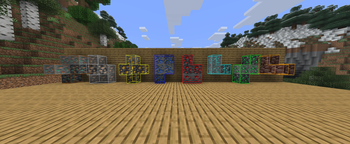
HPotions adds custom potions that lets you see specific ores, even through blocks!
Screenshots


About this Mod
👁️ HPotions
See ores through walls with magical vision potions! ⛏️✨
HPotions adds 8 magical eye potions that let you see specific ores through blocks with glowing outlines — perfect for efficient mining and ancient debris hunting in the Nether! 🔥
✨ NOW WORKS WITH SHADERS!
📥 Installation
⚠️ Required on BOTH client and server to function properly in multiplayer.
🧪 Ore Vision Potions
| Potion | Detects | Outline Color |
|---|---|---|
| 🟠 Copper Eye | Copper Ore | Orange |
| ⚫ Iron Eye | Iron Ore | Light Gray |
| 🟡 Gold Eye | Gold Ore | Golden Yellow |
| 🔵 Lapis Eye | Lapis Lazuli Ore | Blue |
| 🔴 Redstone Eye | Redstone Ore | Red |
| 💎 Diamond Eye | Diamond Ore | Cyan |
| 🟢 Emerald Eye | Emerald Ore | Green |
| 🔥 Ancient Debris Eye | Ancient Debris | Dark Red |
✨ Features
X-Ray Vision Through Walls
Colored glowing outlines make ores visible through solid blocks:


Balanced Duration System
- ⏱️ Normal Potion: 3:00 minutes
- 💥 Splash Potion: 1:30 minutes
- 💨 Lingering Potion: 0:45 seconds
Ore-Gated Crafting
🔒 You must find at least 1 piece of each ore naturally before you can craft its vision potion — keeping progression balanced!
Performance Optimized
⚡ Designed for minimal lag and maximum FPS, even in massive cave systems.
Shader Compatible
✨ Works perfectly with popular shader packs — no visual conflicts!
🔨 How to Craft
Step 1: Brew the base Mundane Eye potion
Combine Awkward Potion + Ender Pearl in a brewing stand

Step 2: Brew your ore-specific vision potion
Combine Mundane Eye + 1 Ore Ingot/Piece in a brewing stand

📖 View Full Crafting Guide & Recipes
🌍 Language Support
HPotions is fully localized in:
- 🇬🇧 English
- 🇩🇪 German (Deutsch)
- 🇮🇹 Italian (Italiano)
💡 Suggest New Ores!
Want support for modded ores or other vanilla blocks? 🌟
💬 Open an issue on GitHub and suggest your ideas!
We're actively taking community feedback for future updates. 🚀
⛏️ Transform your mining experience. Brew smarter, mine faster!
Available Versions
How to Install HPotions on Your Server
Order Server
Order a Minecraft Java server with at least 3 GB RAM (4 GB recommended).
Set fabric Loader
In the panel under "Egg", select the fabric loader and matching Minecraft version (1.21.11).
Install Mod
Open the mod browser in the dashboard and search for "HPotions". Click "Install" – done! Alternatively, upload the .jar via SFTP to the /mods folder.
Compatibility
Mod Loaders
Minecraft Versions
1.21.11
Server-side
✓ RequiredRecommended RAM
4 GB(min. 3 GB)Frequently Asked Questions
HPotions server crashes on startup – what to do?
Most common cause: wrong fabric version or insufficient RAM. Check the server log (latest.log) for "OutOfMemoryError" or "Mixin" errors. With Mado Hosting: ensure at least 3 GB RAM is allocated and the loader matches the mod version (1.21.11). You can switch loaders with one click in the panel.
Is HPotions compatible with fabric?
HPotions officially supports fabric for Minecraft 1.21.11. The Mado dashboard automatically detects incompatible loader combinations.
Server lagging with HPotions – how to optimize performance?
Recommended RAM: 4 GB (per 8 players). Use /spark profiler to check if HPotions consumes the most tick time. Common fixes: reduce server view-distance to 8-10, install "performant" or "starlight" as supplementary mods on Forge. With Mado Hosting, your server runs on NVMe SSDs with dedicated CPU cores for minimal latency.
Similar Mods




![[TaCZ] Timeless and Classics Zero](https://cdn.modrinth.com/data/SzzJttH8/fd27766d2bb8390d284696b1dbd358f87e081439_96.webp)

Rent Modded Server
Install HPotions with just one click on your server.