
HubExtended
CustomCosmetics is a client-side companion mod designed exclusively for the PokéHub Minecraft server.
Screenshots
About this Mod
CustomCosmetics is a client-side companion mod designed exclusively for the PokéHub Minecraft server. It enhances the cosmetic experience by providing a polished, interactive in-game interface that connects directly to the server's cosmetic system.
Features:
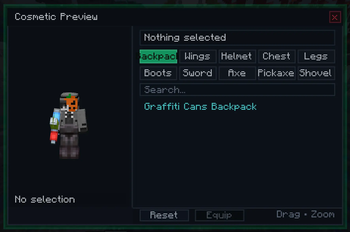
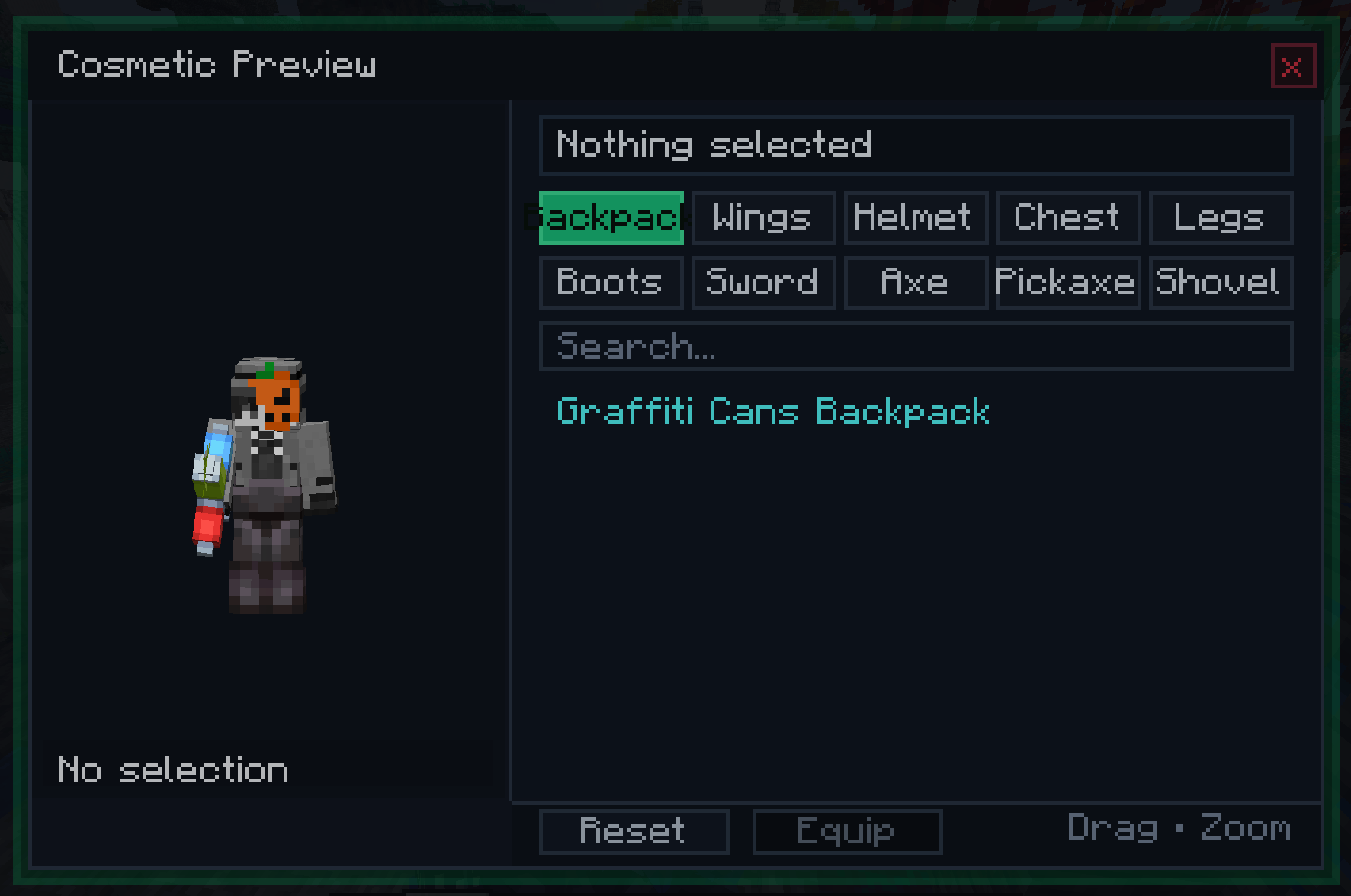
Custom Cosmetic Menu — Opens with a configurable keybind (default: C). Displays all available cosmetics organized into tabs: Backpack and Wings.
Live Player Preview — A real-time 3D render of your own character is displayed inside the menu. You can drag to rotate and scroll to zoom, letting you see exactly how a cosmetic looks on your skin before equipping it.
Server-Synced Cosmetic List — The list of available cosmetics is fetched directly from the PokéHub server when you log in, so it always reflects the current season's offerings without requiring a mod update.
Search & Scroll — A built-in search bar filters cosmetics by name in real time. A scrollable list with a visible scrollbar handles large cosmetic catalogs cleanly.
Backpack & Wings Rendering — Equipped cosmetics are rendered as a custom layer directly on your player model in the world, visible to other players who also have the mod installed.
Optional Client Installation — The mod is not required to join PokéHub. Players without it simply won't see cosmetics rendered on others or have access to the GUI. No crashes, no errors for vanilla or other-modded clients.
Packet-Based Sync — Cosmetic state (item, position offsets, rotation, scale) is sent from the server to each client individually, allowing per-cosmetic positioning adjustments configured server-side.
Without this mod, cosmetics on PokéHub are managed through server commands with no visual feedback. With CustomCosmetics installed, you get a dedicated menu that shows you every available cosmetic, lets you preview it on your character in real time, and equips it instantly — all without leaving the game or typing a single command.
Available Versions
How to Install HubExtended on Your Server
Order Server
Order a Minecraft Java server with at least 3 GB RAM (4 GB recommended).
Set fabric Loader
In the panel under "Egg", select the fabric loader and matching Minecraft version (1.21.1).
Install Mod
Open the mod browser in the dashboard and search for "HubExtended". Click "Install" – done! Alternatively, upload the .jar via SFTP to the /mods folder.
Compatibility
Mod Loaders
Minecraft Versions
1.21.1
Server-side
✗ UnsupportedRecommended RAM
4 GB(min. 3 GB)Frequently Asked Questions
HubExtended server crashes on startup – what to do?
Most common cause: wrong fabric version or insufficient RAM. Check the server log (latest.log) for "OutOfMemoryError" or "Mixin" errors. With Mado Hosting: ensure at least 3 GB RAM is allocated and the loader matches the mod version (1.21.1). You can switch loaders with one click in the panel.
Is HubExtended compatible with fabric?
HubExtended officially supports fabric for Minecraft 1.21.1. The Mado dashboard automatically detects incompatible loader combinations.
Server lagging with HubExtended – how to optimize performance?
Recommended RAM: 4 GB (per 8 players). Use /spark profiler to check if HubExtended consumes the most tick time. Common fixes: reduce server view-distance to 8-10, install "performant" or "starlight" as supplementary mods on Forge. With Mado Hosting, your server runs on NVMe SSDs with dedicated CPU cores for minimal latency.
Similar Mods




Rent Modded Server
Install HubExtended with just one click on your server.