
HUD manager AKA hudman
And a mod that allows you to set up custom hud using a JSON config file
Screenshots
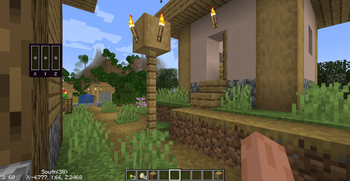
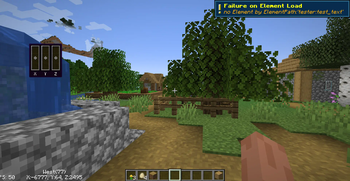
About this Mod
Hud Manager
On another custom HUD mod
But this time it's aimed towards the power user
At the moment this mod is very not user friendly i'm working on to change that
The future of the mod
Due to current life events I have taken a little bit of a break I've been working on some C projects of recent and I haven't been able to get around to this mod It is not dead but on hiatus
Important
Do not use mod version 1.7.0 to 1.8.0 They are broken use 1.8.1
📖 What's this mod?
a client side minecraft mod that I’ve created in my free time for mc1.21.4
the main feature of the mod is To allow the user to create custom HUD using a config file written in Json.
Fun fact: this was originally just made as a test mod to see if I can even write mods
✅ Features:
- A Detailed Json config file
- Many customizable built-in hud elements
- Expandability: this mod can be expanded upon by other mods
- Performant: Due to its minimal design it's really fast
- and for the dev's The API is quite easy More info on Github
- A new preset system That allows you to create pseudo elements using preexisting elements
📖 How do you get this thing working
you'll find the config file while in the config folder.
Here's an example config file:
{
    "ver":"v1.0",
    "elements": [ // The list of elements to be shown on your screen
        {
            "elementId": "hudman:velocity_vector", // The element you want on your screen
            "cords": {"x": 100, "y": 110}, // Where you want the element
            "width": 0, // This one doesn't work and might be removed
            "height": 0, // same with this one too
            "scale": 0.75, // Scales your element
            "pairGameHudElement": "", //Just leave this blank
            "enable": true, // If this is false then the mod will not render your element
            "strings": [ // Element Specific settings
                "doTooltip" // To render a tool tip background for this element
            ]
        }
    ],
    "debug": false, // Leave this off this is for the devs
    "errorNotification": false // To show a notification on screen if an element doesn't work
}
This will add this hud element to your game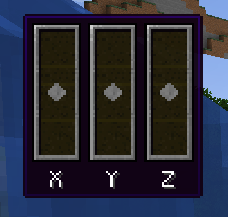
This element visualizes your velocity. it also has a very nice tooltip background
This was enabled by "doTooltip" The strings section is very versatile but it is very dependent on the element
Let's list off the elements
hudman:cords: Puts the cords on your screen is customizablehudman:text: This puts text on your screenhudman:compass: It just a little text compass showing what direction you're facinghudman:velocity_vector: The one shown abovehudman:fps: This one puts the FPS on your screen- And more to come
🔧 How to contribute
Info on how to contribute code can be found here
Please be warned that my spelling is terrible due to my dyslexia and I use text to speech a lot
Available Versions
How to Install HUD manager AKA hudman on Your Server
Order Server
Order a Minecraft Java server with at least 3 GB RAM (4 GB recommended).
Set fabric Loader
In the panel under "Egg", select the fabric loader and matching Minecraft version (1.21.4).
Install Mod
Open the mod browser in the dashboard and search for "HUD manager AKA hudman". Click "Install" – done! Alternatively, upload the .jar via SFTP to the /mods folder.
Compatibility
Mod Loaders
Minecraft Versions
1.21.4, 1.21.1, 1.20.1
Server-side
✗ UnsupportedRecommended RAM
4 GB(min. 3 GB)Frequently Asked Questions
HUD manager AKA hudman server crashes on startup – what to do?
Most common cause: wrong fabric version or insufficient RAM. Check the server log (latest.log) for "OutOfMemoryError" or "Mixin" errors. With Mado Hosting: ensure at least 3 GB RAM is allocated and the loader matches the mod version (1.21.4). You can switch loaders with one click in the panel.
Is HUD manager AKA hudman compatible with fabric?
HUD manager AKA hudman officially supports fabric for Minecraft 1.21.4, 1.21.1, 1.20.1. The Mado dashboard automatically detects incompatible loader combinations.
Server lagging with HUD manager AKA hudman – how to optimize performance?
Recommended RAM: 4 GB (per 8 players). Use /spark profiler to check if HUD manager AKA hudman consumes the most tick time. Common fixes: reduce server view-distance to 8-10, install "performant" or "starlight" as supplementary mods on Forge. With Mado Hosting, your server runs on NVMe SSDs with dedicated CPU cores for minimal latency.
Similar Mods



Rent Modded Server
Install HUD manager AKA hudman with just one click on your server.