Hyperlink
Currently add 5 hyper items and 1 hyper boss with no recipe for end game
About this Mod
All descriptions are written by DeepL translation

Resource pack with minor changes
Version 2.0 adds new recipes and a workbench with GUI animation!
All can be configured or disabled in config/hyperdaimc-common.toml
Complete damage nullification! 
「Muteki Star」
- This item is activated by placing it on a hotbar, in an armor slot (from command, etc.), or in an additional slot dedicated to it if the Curios mod is installed.
- Health does not decrease.
- Not selected by the command selector. (configurable)
- Gives resistance to robbery of items by some mods. (Ice and Fire, IntegratedDynamics, PneumaticCraft and Extra Botany)
Instant death attack! 
「Novelcalibur」
- Holding this item in your hand and clicking on it will kill all entities in the vicinity of your line of sight.
- Clicking while crouching kills only the one that overlaps your line of sight. (configurable)
- Enchantment ability works.
Absolute block protection! 
「Chroniclock」
- Holding this item in your hand and right-clicking on the start and end points will protect that area.
- Right-clicking while crouching allows selection of offset points on the face of the block. (configurable)
- Holding this item in your hand and clicking on the protected area will remove the protection.
- Stops non-owner block placement and destroying. (configurable)
- Depending on the configuration, stop interacting with the block as in adventure mode. (configurable, disabled by default)
Ultimate block destruction! 
「Pickdox」
- Holding this item in your hand and clicking on it destroys the block in front of you.
- Clicking while crouching destroys the blocks one by one. (configurable)
- Can destroy fluids. (configurable)
- Enchantment ability works.
Infinite resource supply! 
「V.R.X.」
- Holding this item in your hand and right-clicking on a block or entity opens the GUI.
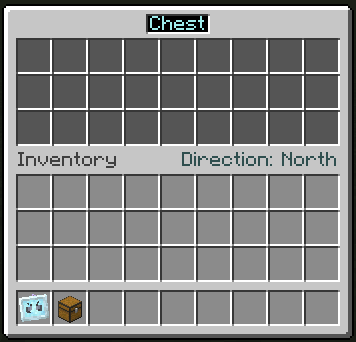
- Right-clicking on your player model in inventory will open a GUI for yourself.
- Closing the GUI will cause the configured items, fluids, energy, and even gases if Mekanism mod has been introduced, to be supplied to the Capability of the targeted block or entity from the specified direction.
- Change the supply direction on the current page to by clicking on the text to the right.
- Change pages by clicking on the text to the left.
- Clicking on an item overlaid on the upper slot allows it to be registered.
- If the item is a container of energy, fluid, or gas, it will be given priority for registration, but a middle-click will register the item itself.
- Registration can be done through JEI or REI, even if you do not have the actual item. (if it is an item, you can place it directly in your inventory)
- Clicking on the same item over and over with the same item increases the item being placed by the number of items you are holding. (or ten times that number if you hold down the shift key)
- Mouse scrolling can increase or decrease the number of items one by one. (in larger units if you hold down the shift key)
- Right-clicking can be used to set the number of items to half the number of items.
- Middle-clicking on a registered item allows you to copy the actual item as in creative mode. (if it is a fluid, then the bucket containing it)
- Left-clicking on a block or entity with V.R.X. to delete it.
Godly immortal boss! 
「Fumetsu Wither」
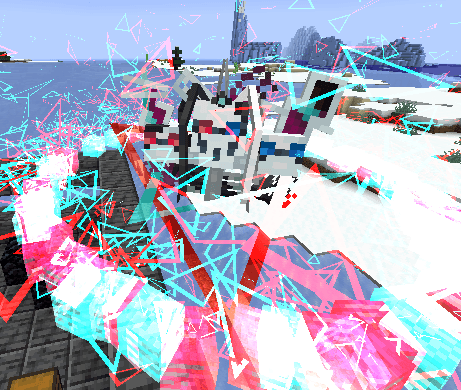
- When one of the players dies, logs in, logs out, etc., this entity logs out of this world and drops Bug Stars in its place.
- Attacks against this entity are nullified by「Muteki Star」.
- Attacks by this entity are by「Novelcalibur」.
- This entity can slip through walls.
- This entity does nothing at the time it is summoned and drifts in the air.
- Once this entity is harmed, it will start genociding the surrounding entities. (with priority given to the player)
Available Versions
How to Install Hyperlink on Your Server
Order Server
Order a Minecraft Java server with at least 3 GB RAM (4 GB recommended).
Set forge Loader
In the panel under "Egg", select the forge loader and matching Minecraft version (1.20.1).
Install Mod
Open the mod browser in the dashboard and search for "Hyperlink". Click "Install" – done! Alternatively, upload the .jar via SFTP to the /mods folder.
Compatibility
Mod Loaders
Minecraft Versions
1.20.1, 1.18.2
Server-side
✓ RequiredRecommended RAM
4 GB(min. 3 GB)Frequently Asked Questions
Hyperlink server crashes on startup – what to do?
Most common cause: wrong forge version or insufficient RAM. Check the server log (latest.log) for "OutOfMemoryError" or "Mixin" errors. With Mado Hosting: ensure at least 3 GB RAM is allocated and the loader matches the mod version (1.20.1). You can switch loaders with one click in the panel.
Is Hyperlink compatible with forge and neoforge?
Hyperlink officially supports forge, neoforge for Minecraft 1.20.1, 1.18.2. The Mado dashboard automatically detects incompatible loader combinations.
Server lagging with Hyperlink – how to optimize performance?
Recommended RAM: 4 GB (per 8 players). Use /spark profiler to check if Hyperlink consumes the most tick time. Common fixes: reduce server view-distance to 8-10, install "performant" or "starlight" as supplementary mods on Forge. With Mado Hosting, your server runs on NVMe SSDs with dedicated CPU cores for minimal latency.
Similar Mods





Rent Modded Server
Install Hyperlink with just one click on your server.