
IEMS
Introduces the colossal SE energy unit! 1 SE equals a mind-boggling 10^36 FE, all stored with perfect high precision.
Screenshots
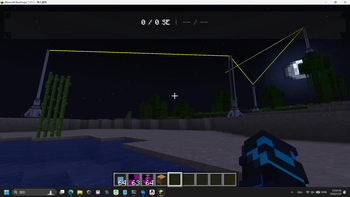
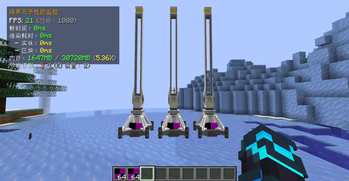
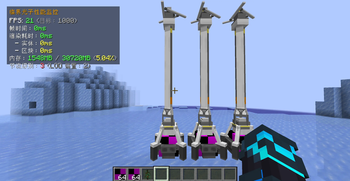
About this Mod
Integrated Energy Management System (IEMS) - Minecraft Mod Documentation
📖 Mod Introduction
Integrated Energy Management System (IEMS) is a high-precision energy management mod designed for large-scale modpacks. It provides a brand-new energy unit and management system, allowing you to build massive-scale power networks!
✨ Core Features
- 🔋 High-Precision Energy Storage - SE/GE units, supporting ultra-large numerical storage
- 🌐 Web Monitoring Interface - Real-time viewing of grid status via browser, supporting device management
- 🏗️ Flexible Grid Architecture - Repeaters/Broadcast Towers for building wireless energy networks
- ⚡ Core Uniqueness - Only one core per world, provided by other mods
🎮 Gameplay Guide
Beginner's Guide
Understanding Energy Units
This mod uses a new energy unit system:- FE - Traditional energy unit used by other mods
- GE - Medium-level unit in this mod
- SE - Advanced unit in this mod
Core Working Principle
Important: This mod does not provide core blocks! The core needs to be provided by other compatible mods.Basic Devices
First: Energy Storage
- Used to store excess energy
- Automatically charges when core has surplus
- Automatically discharges when core lacks power
Second: Energy Converter
- Right-click to switch conversion modes
- SE ↔ GE ↔ FE ↔ AE (if Applied Energistics is installed)
- Conversion rate: 1000 GE/s
Third: Energy Repeater
- Shift + Right-click to enter connection mode
- Right-click target to complete connection
- Maximum distance: 500 blocks
- Yellow laser indicates connection
- Signal source location: 11 blocks above the repeater itself
Fourth: Energy Broadcast Tower
- Short-range wireless transmission (50 blocks)
- Automatically scans and connects devices
- Signal source location: 7 blocks above the tower itself
- Note: Must be directly or indirectly connected to the core to work!
📦 Block Introduction
Standard Energy Storage
- Capacity: 100,000 SE
- Purpose: Early-game energy reserve
- Features: Automatic charging/discharging, no manual operation required
Universal Energy Storage
- Capacity: 10²⁰ GE
- Purpose: Large grid energy storage
- Features: Ultra-high capacity, supports massive grids
Energy Converter
- Function: Energy unit conversion
- Modes:
- SE → GE (1 SE = 10⁸ GE)
- GE → FE (1 GE = 9×10¹⁸ FE)
- Operation: Right-click to switch modes
Energy Repeater Transmitter
- Connection distance: 500 blocks
- Purpose: Long-distance energy transmission
- Signal source location: 11 blocks above the repeater
- Operation:
- Shift + Right-click to enter connection mode
- Aim at target and right-click
- Yellow laser indicates successful connection
Energy Broadcast Tower
- Transmission distance: 50 blocks
- Purpose: Short-range wireless transmission
- Signal source location: 7 blocks above the tower
- Features:
- Automatically connects devices within range
- Must be directly or indirectly connected to core to work
- Requirement: No ≥3 layers of complete blocks between device and signal source
Energy Marker Block
- Purpose: Multiblock structure positioning
- Features:
- Creative mode item
- Visible when holding a stick
- Operation: Placed and bound by other mods via API
🌐 Web Monitoring Interface
Access Method
Ensure the game world is loaded, then access the real-time grid status at "http://localhost:8080"!
Interface Functions
Device Management (v0.6.0+/v0.8.0-)
In the Web interface you can:
- View all connected device lists
- View device locations and power supply status
- Click switches to control device power supply
Tip: Turning off unimportant devices can save energy!
🔧 Advanced Gameplay
Broadcast Tower Layout Tips
- Height Advantage: Build broadcast towers at high places to expand coverage range
- Avoid Obstructions: Avoid opaque complete blocks between signal source location (7 blocks above tower) and devices
- Repeater Assistance: Use repeaters as relays for long-distance devices
- Multi-layer Coverage: Use multi-layer broadcast tower networks for large bases
Energy Management Strategies
- Peak-Valley Balance: Use storage discharge during peak electricity consumption
- Sufficient Reserves: Maintain at least 1 hour of production reserve energy
- Zoned Power Supply: Independent power lines for important devices
- Monitoring Alerts: Monitor through Web interface's external leak interface, automatic alerts when power is low
⚙️ Technical Details
Core Uniqueness
- Only one core per world
- Multi-mod conflict handling rules:
- Priority given to cores provided by DLZ Studio (better compatibility)
- If not available, select the first one according to loading order
- Detection of multiple cores will force crash (to prevent undefined behavior)
Line-of-Sight Check Rules
Broadcast tower transmission requires clear line of sight:
- Calculation formula: For each voxel on the connection line, check if it's a "complete block" (non-transparent, non-replaceable, collision box covers the entire voxel). If 3 or more consecutive voxels are complete blocks, the connection is invalid.
- Connection rules:
- Valid connections: Direct line-of-sight between device and the signal source point (7 blocks above the Broadcast Tower) with less than 3 consecutive complete blocks obstructing the path.
- Invalid connections: Line-of-sight blocked by 3 or more consecutive complete blocks, or device is outside the 50-block spherical range centered on the signal source point.
📋 Dependency Requirements
Required Dependencies
- Minecraft
- NeoForge or compatible mod loader
- Core-providing mod (e.g., from Plasma Studio or other compatible energy mods)
Optional Dependencies
- Applied Energistics 2 (for AE ↔ FE/GE/SE conversion support)
- Other energy generation/storage mods for core functionality
🎯 Frequently Asked Questions (FAQ)
Q: Why is there no core block?
A: This mod focuses on energy management, with the core provided by other large energy mods. This allows better integration into existing modpacks.
Q: How to know if the core is working?
A: Access the Web interface at "http://localhost:8080". If energy data is displayed, it proves the core is working normally.
Q: What to do if the broadcast tower isn't working?
A: Check the following:
- Whether it has direct or indirect connection to the core
- Whether there are obstructions between signal source location (7 blocks above tower) and devices
- Whether distance is within 50 blocks
- Check in Web interface whether devices are online
Q: Storage not charging/discharging?
A: This is normal! Storage works automatically:
- Automatically charges when core has energy surplus
- Automatically discharges when core lacks energy
- No manual operation required
Q: Web interface inaccessible?
A: Check:
- Whether game world is loaded
- Whether port 8080 is occupied
- Whether firewall is blocking
- Check game logs for errors
Q: How to remove device connections?
A:
- Find corresponding device in Web interface
- Click power switch to turn off
- Destroy device to automatically disconnect
Development Team
- DLZ Studio
⚖️ License
MIT License
This mod is open source, welcome contributions and secondary development!
🙏 Acknowledgments
- GeckoLib Team - For providing excellent 3D model rendering library
- NeoForge Team - For providing powerful mod loader
- Beishan_Besson - For providing some device models
This document was translated from Chinese by AI.
Available Versions
How to Install IEMS on Your Server
Order Server
Order a Minecraft Java server with at least 3 GB RAM (4 GB recommended).
Set neoforge Loader
In the panel under "Egg", select the neoforge loader and matching Minecraft version (1.21.1).
Install Mod
Open the mod browser in the dashboard and search for "IEMS". Click "Install" – done! Alternatively, upload the .jar via SFTP to the /mods folder.
Compatibility
Mod Loaders
Minecraft Versions
1.21.1
Server-side
✓ RequiredRecommended RAM
4 GB(min. 3 GB)Frequently Asked Questions
IEMS server crashes on startup – what to do?
Most common cause: wrong neoforge version or insufficient RAM. Check the server log (latest.log) for "OutOfMemoryError" or "Mixin" errors. With Mado Hosting: ensure at least 3 GB RAM is allocated and the loader matches the mod version (1.21.1). You can switch loaders with one click in the panel.
Is IEMS compatible with neoforge?
IEMS officially supports neoforge for Minecraft 1.21.1. The Mado dashboard automatically detects incompatible loader combinations.
Server lagging with IEMS – how to optimize performance?
Recommended RAM: 4 GB (per 8 players). Use /spark profiler to check if IEMS consumes the most tick time. Common fixes: reduce server view-distance to 8-10, install "performant" or "starlight" as supplementary mods on Forge. With Mado Hosting, your server runs on NVMe SSDs with dedicated CPU cores for minimal latency.
Rent Modded Server
Install IEMS with just one click on your server.