
Ignite HUD
An RPG style HUD for Minecraft!
Screenshots
About this Mod

Oh, hello there! Welcome to the Ignite HUD's Curse Forge page!
If you don't know what Ignite HUD is, well, it is quite obvious... It's a RPG style HUD for Minecraft.
Embark on your new world with a very appealing (and soon highly customizable) HUD, with plenty of features and even more to come!
Features
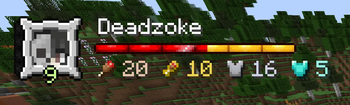
Player Widget so you know you?
- Player Skin
- Player Experience bar and level
- Player name
- Player health bar
- Player Food and Saturation
- Player Armor and Toughness
- Hardcode icon (when in hardcore mode)
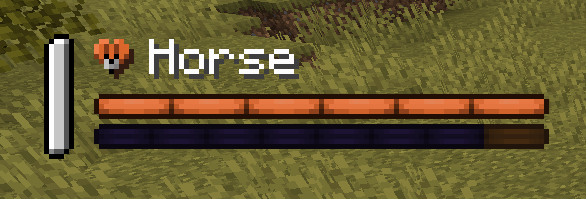
Mount Stats to take care of your pet:
- Mount name
- Mount health bar
- Mount jump bar (when mount can jump, like Horses)
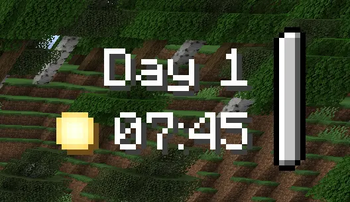
Clock Widget for time management:
- Day
- Time
- Icon with either Sun or Moon (moon shows when player can sleep)
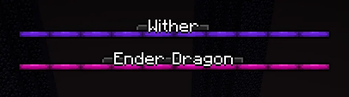
Boss Bar with name and colors
Player Breath Bar with a cute bubble
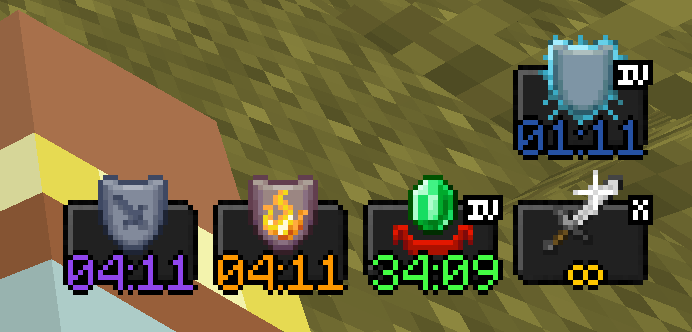
Potion Effects with effect duration, strength and even colour
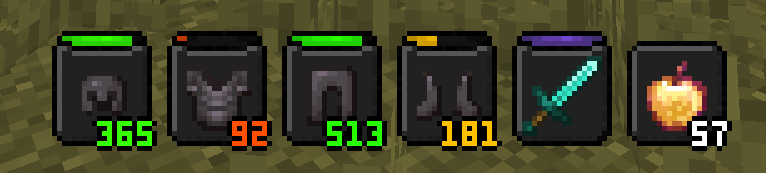
Equipped Items so you know the health of your gear:
- Durability display (for items with durability, like swords)
- Amount size (for items that are stackable)
Usage
ATTENTION, this mod is client side only. Don't use it on a server!
Known Bugs
- Apple skin overlay is still shown, and on top the items overlay.
If you want to report a bug, use the issues tab please! I appreciate your help!
FAQs
1. Can I use this mod in my modpack?
Why shouldn't you? Of course you can! As long as you give me credits for my very hard work. *cof*cof*
2. Can you add support for *modname*?
Nothing better than to ask me. I will take any requests!
3. Why my suggestion for mod *modname* didn't get accepted?
Well, if it wasn't accepted it was probably because the mod is not within an RPG game standard or it was because the mod is very low in popularity.
4. I'm not sure if the mod *modname* can be selected. What do I do?
Well, if you are not sure, you can send it to me (comment of private message) and I will check it for you!
5. The mod *modname* isn't that popular, but I think it's a very good adition to the game!
All the mods that can make my HUD better, I will take it! :)
Available Versions
How to Install Ignite HUD on Your Server
Order Server
Order a Minecraft Java server with at least 3 GB RAM (4 GB recommended).
Set neoforge Loader
In the panel under "Egg", select the neoforge loader and matching Minecraft version (1.21.5).
Install Mod
Open the mod browser in the dashboard and search for "Ignite HUD". Click "Install" – done! Alternatively, upload the .jar via SFTP to the /mods folder.
Compatibility
Mod Loaders
Minecraft Versions
1.21.5, 1.21.4, 1.21.3 (+1 more)
Server-side
✗ UnsupportedRecommended RAM
4 GB(min. 3 GB)Frequently Asked Questions
Ignite HUD server crashes on startup – what to do?
Most common cause: wrong neoforge version or insufficient RAM. Check the server log (latest.log) for "OutOfMemoryError" or "Mixin" errors. With Mado Hosting: ensure at least 3 GB RAM is allocated and the loader matches the mod version (1.21.5). You can switch loaders with one click in the panel.
Is Ignite HUD compatible with neoforge?
Ignite HUD officially supports neoforge for Minecraft 1.21.5, 1.21.4, 1.21.3. The Mado dashboard automatically detects incompatible loader combinations.
Server lagging with Ignite HUD – how to optimize performance?
Recommended RAM: 4 GB (per 8 players). Use /spark profiler to check if Ignite HUD consumes the most tick time. Common fixes: reduce server view-distance to 8-10, install "performant" or "starlight" as supplementary mods on Forge. With Mado Hosting, your server runs on NVMe SSDs with dedicated CPU cores for minimal latency.
Similar Mods




Rent Modded Server
Install Ignite HUD with just one click on your server.