
Melodix Music Player
A simple yet functional in-game music player that plays your custom music.
Screenshots
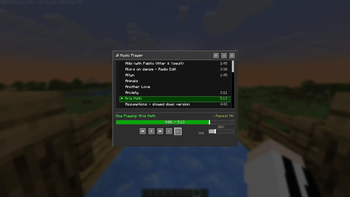
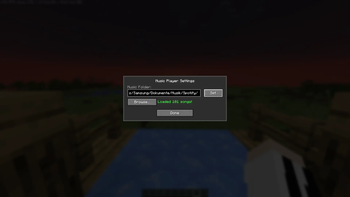
About this Mod
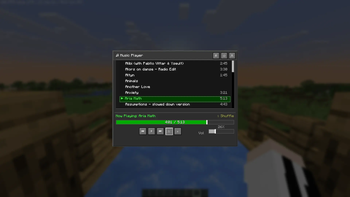
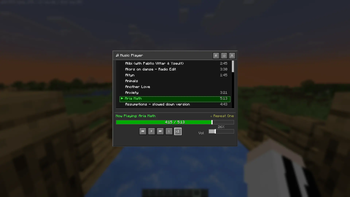
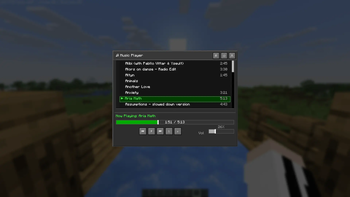
Melodix is a client-side Fabric mod that lets you enjoy your own local music files — or Minecraft's own soundtrack — while playing, with a full-featured in-game player.
✨ Features
- Minecraft-native GUI — Open the full player with
Mto browse your library, manage a queue, and tweak every setting without leaving the game. - Format Support — Compatible with
.mp3and.wavaudio files. - Vanilla Soundtrack Control — Browse and play Minecraft's built-in music tracks from the same interface. Optionally suppress Minecraft's automatic music so you're always in control.
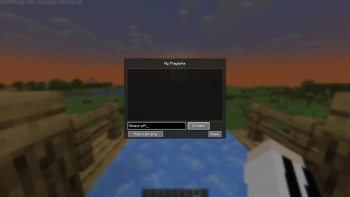
- Custom Playlists — Create, edit, and manage multiple playlists to suit any gameplay mood.
- Mini Player HUD — A compact, draggable overlay shows the current track on-screen at all times.
- Now Playing Display — Shows track info as a widget or above the hotbar, or turn it off entirely.
- Audio Visualizer — An optional frequency visualizer renders on-screen during playback.
- Album Art — Displays album art for Minecraft's official soundtrack releases, with a fallback image for custom tracks.
- Audio Effects — 5-band equalizer with preamp, reverb, crossfade between tracks, playback speed control, and fade-on-pause.
- Listening Statistics — See how long you've listened to each track from a dedicated stats screen.
- Liked Songs — Mark tracks as favorites for quick access.
- Playback Modes — Sequential, shuffle, and repeat.
- Volume Ducking — Music automatically lowers when you take damage, then restores itself.
- Window Focus Handling — Optionally pause music when Minecraft loses focus.
- Keyboard Shortcuts — Play/pause (
P), next (→), previous (←), volume up/down (↑/↓), and a custom quick-volume keybind — all rebindable in the vanilla Controls menu. - Themes — Switch between color themes from the settings screen.
🛠️ Installation
- Install Fabric Loader and Fabric API.
- Drop
melodix-<version>.jarinto your.minecraft/modsfolder. - Launch the game.
- Press
Min-game to open the player. - In the settings screen, set your music folder path to the folder containing your
.mp3or.wavfiles. - (Optional) To avoid overlap with Minecraft's automatic music, enable Suppress Vanilla Music in the mod's settings, or go to
ESC→Options...→Music & Sounds...and set theMusicslider to OFF.
📦 Dependencies
- Fabric API — Required
- Java 25 or newer — Required
📜 Third-Party Libraries
- JLayer by JavaZoom — Handles MP3 decoding and playback. Licensed under LGPL.
Available Versions
How to Install Melodix Music Player on Your Server
Order Server
Order a Minecraft Java server with at least 3 GB RAM (4 GB recommended).
Set fabric Loader
In the panel under "Egg", select the fabric loader and matching Minecraft version (26.1.2).
Install Mod
Open the mod browser in the dashboard and search for "Melodix Music Player". Click "Install" – done! Alternatively, upload the .jar via SFTP to the /mods folder.
Compatibility
Mod Loaders
Minecraft Versions
26.1.2, 26.1.1, 26.1 (+1 more)
Server-side
✗ UnsupportedRecommended RAM
4 GB(min. 3 GB)Frequently Asked Questions
Melodix Music Player server crashes on startup – what to do?
Most common cause: wrong fabric version or insufficient RAM. Check the server log (latest.log) for "OutOfMemoryError" or "Mixin" errors. With Mado Hosting: ensure at least 3 GB RAM is allocated and the loader matches the mod version (26.1.2). You can switch loaders with one click in the panel.
Is Melodix Music Player compatible with fabric?
Melodix Music Player officially supports fabric for Minecraft 26.1.2, 26.1.1, 26.1. The Mado dashboard automatically detects incompatible loader combinations.
Server lagging with Melodix Music Player – how to optimize performance?
Recommended RAM: 4 GB (per 8 players). Use /spark profiler to check if Melodix Music Player consumes the most tick time. Common fixes: reduce server view-distance to 8-10, install "performant" or "starlight" as supplementary mods on Forge. With Mado Hosting, your server runs on NVMe SSDs with dedicated CPU cores for minimal latency.
Similar Mods






Rent Modded Server
Install Melodix Music Player with just one click on your server.