
Imagine Your Craft
Imagine Your Craft (IYC) is a complete reimagining of the famous "Imagine Your Craft" mod originally released in 2012.
Screenshots
About this Mod
Imagine Your Craft (IYC)
A modern rebirth of the classic IYC 2012 mod
Developed by Stylobow
📖 About Imagine Your Craft
Imagine Your Craft (IYC) is a complete reimagining of the famous "Imagine Your Craft" mod originally released in 2012. Entirely rebuilt from scratch for modern Minecraft, this mod brings back the nostalgic soul of the classic experience while delivering exceptional performance, optimized code, and modernized designs.
Whether you want to mine classic legendary materials, decorate your base with advanced furniture, or customize your character, IYC bridges the gap between 2012 nostalgia and modern gameplay.
🌍 Language Support: The mod is fully available in both English and French.
✨ Key Features
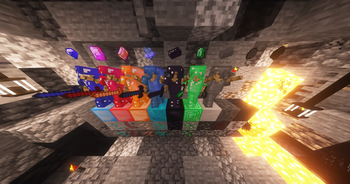
- Classic Ores & Materials: Rediscover iconic resources including Rubis, Saphir, Topaze, Adamantium, Lignite, Steel and Slate.
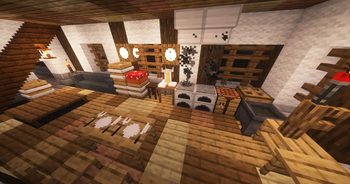
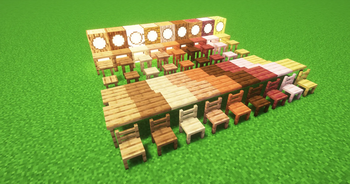
- Dynamic Decoration: Enhance your builds with colored iron blocks, multicolored redstone lamps, and unique furniture (Chairs, Tables, Stools) available in all vanilla wood types.
- Advanced HUD: A fully integrated, customizable HUD system to tailor your in-game interface.
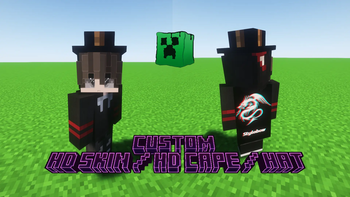
- Cosmetic Customization: Complete support for high-resolution HD Skins, custom Capes, and Hats to stand out on servers.
🚀 Installation Guide
Make sure you are using the correct mod loader version for a seamless experience:
- Download the latest version of the mod from the Versions tab.
- Install NeoForge for Minecraft 1.21.1 (Recommended version:
21.1.216). - Drop the downloaded
.jarfile into your.minecraft/modsfolder. - Launch the game and enjoy!
💬 Community, Feedback & Bug Reports
Your feedback is essential to keep improving the mod! If you encounter any bugs, visual glitches, or crashes:
- Discord: Contact Stylobow directly on Discord (the fastest way to get support or share your feedback!).
- GitHub Issues: Open a formal ticket on our issue tracker if you have a detailed log or crash report to provide.
When reporting a bug, please include your crash logs or screenshots to help resolve the issue as quickly as possible.
🛠️ Credits
- Original Mod (2012): Created by the original IYC Team.
- Remake & Code Modernization: Rebuilt by Stylobow.
- Powered by: NeoForge.
Thank you for playing Imagine Your Craft!
Available Versions
How to Install Imagine Your Craft on Your Server
Order Server
Order a Minecraft Java server with at least 3 GB RAM (4 GB recommended).
Set neoforge Loader
In the panel under "Egg", select the neoforge loader and matching Minecraft version (1.21.1).
Install Mod
Open the mod browser in the dashboard and search for "Imagine Your Craft". Click "Install" – done! Alternatively, upload the .jar via SFTP to the /mods folder.
Compatibility
Mod Loaders
Minecraft Versions
1.21.1
Server-side
✓ RequiredRecommended RAM
4 GB(min. 3 GB)Frequently Asked Questions
Imagine Your Craft server crashes on startup – what to do?
Most common cause: wrong neoforge version or insufficient RAM. Check the server log (latest.log) for "OutOfMemoryError" or "Mixin" errors. With Mado Hosting: ensure at least 3 GB RAM is allocated and the loader matches the mod version (1.21.1). You can switch loaders with one click in the panel.
Is Imagine Your Craft compatible with neoforge?
Imagine Your Craft officially supports neoforge for Minecraft 1.21.1. The Mado dashboard automatically detects incompatible loader combinations.
Server lagging with Imagine Your Craft – how to optimize performance?
Recommended RAM: 4 GB (per 8 players). Use /spark profiler to check if Imagine Your Craft consumes the most tick time. Common fixes: reduce server view-distance to 8-10, install "performant" or "starlight" as supplementary mods on Forge. With Mado Hosting, your server runs on NVMe SSDs with dedicated CPU cores for minimal latency.
Similar Mods




Rent Modded Server
Install Imagine Your Craft with just one click on your server.