
Immersive Navigation
Adds multiple navigation tools to avoid F3 screen.
Screenshots
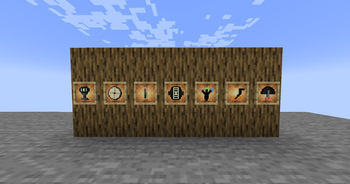
![[Crafting] Solar Cell](https://cdn.modrinth.com/data/zt6MdULH/images/b8a62f86217bbad7d0c48cd703c925a5a29c1d3c_350.webp)
![[Crafting] Battery](https://cdn.modrinth.com/data/zt6MdULH/images/53bb24c43ec1c0a0eb08b3bce04fb9c1b0040cf7_350.webp)
![[Crafting] Depth Meter](https://cdn.modrinth.com/data/zt6MdULH/images/b26979a47a54fe145d15ef526ddbe535567c8331_350.webp)
![[Crafting] Cartesian Locator](https://cdn.modrinth.com/data/zt6MdULH/images/bfdacbd17f6274670e067731ab32664085083cc3_350.webp)
![[Crafting] Omni Gauge](https://cdn.modrinth.com/data/zt6MdULH/images/ead0367ba98e3a3b2725e472124852add83c7f5e_350.webp)
About this Mod

Immersive Navigation
Immersive Navigation is a utility and quality-of-life mod for Minecraft that enhances exploration and immersion by providing a variety of tools to help navigate and understand the world, without relying on debug screens (F3). These tools simulate semi-realistic navigation and surveying experiences while maintaining gameplay immersion.
Features
Depth Meter: Displays the player's current Y-level (height).
Cartesian Tool: Shows the player's X and Z coordinates or chunk information.
Digital Clock: Shows the time in modern language. (12-Hour)
Metal Detector: Detects nearby ores.
Moist Sensor: Determines if the player is standing in a slime chunk **(My Favorite)**.
Hollow Scanner: Identifies open areas (2-block tall) beneath the player.
Terrain Analyzer: Detects if valuable materials exist under the player, summarizes the richness.
** Omni-Gauge**: All-in-one tool with switchable modes for multiple functionalities like time display, coordinate checking, and terrain analysis.
Crafting
Battery: Crafted using lapis lazuli and iron ingots.
Solar Panel: Renewable energy component crafted using glass, iron ingots, and sunlight sensor.
Not-so-near Plans
Config for ore detection, compatibility with other mods.
How to Use
All tools: Right-click to for functionality.
Omni-Gauge: Shift + Right-click to change mode.
Installation
If not from modrinth client:
Download and install Fabric and Fabric API.
Place the mod .jar file into your mods folder located in .minecraft.
License
This work is licensed under a Creative Commons Attribution 4.0 International License.
You are free to:
- Share — copy and redistribute the material in any medium or format
- Adapt — remix, transform, and build upon the material for any purpose, even commercially.
Under the following terms:
- Attribution — You must give appropriate credit, provide a link to the license, and indicate if changes were made. You may do so in any reasonable manner, but not in any way that suggests the licensor endorses you or your use.
Available Versions
How to Install Immersive Navigation on Your Server
Order Server
Order a Minecraft Java server with at least 3 GB RAM (4 GB recommended).
Set fabric Loader
In the panel under "Egg", select the fabric loader and matching Minecraft version (1.20.1).
Install Mod
Open the mod browser in the dashboard and search for "Immersive Navigation". Click "Install" – done! Alternatively, upload the .jar via SFTP to the /mods folder.
Compatibility
Mod Loaders
Minecraft Versions
1.20.1
Server-side
✓ RequiredRecommended RAM
4 GB(min. 3 GB)Frequently Asked Questions
Immersive Navigation server crashes on startup – what to do?
Most common cause: wrong fabric version or insufficient RAM. Check the server log (latest.log) for "OutOfMemoryError" or "Mixin" errors. With Mado Hosting: ensure at least 3 GB RAM is allocated and the loader matches the mod version (1.20.1). You can switch loaders with one click in the panel.
Is Immersive Navigation compatible with fabric?
Immersive Navigation officially supports fabric for Minecraft 1.20.1. The Mado dashboard automatically detects incompatible loader combinations.
Server lagging with Immersive Navigation – how to optimize performance?
Recommended RAM: 4 GB (per 8 players). Use /spark profiler to check if Immersive Navigation consumes the most tick time. Common fixes: reduce server view-distance to 8-10, install "performant" or "starlight" as supplementary mods on Forge. With Mado Hosting, your server runs on NVMe SSDs with dedicated CPU cores for minimal latency.
Similar Mods




Rent Modded Server
Install Immersive Navigation with just one click on your server.