
Immersive Tool & Armor Degradation
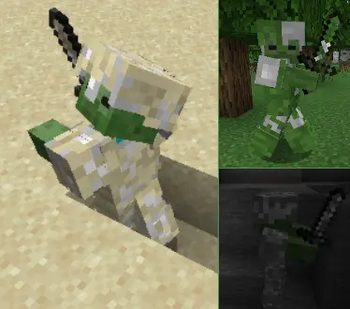
Adds all kinds of dynamic, realistic dirt, gore, and rust overlays to all your tools and armor.
Screenshots



About this Mod
Immersive Tool Aging
Dynamic dirt, blood, rust, and combat grime – fully procedural, fully gameplay-integrated, and compatible with almost every item out of the box.

Key Features
Procedural Dirt & Damage (Mod-Friendly, Zero Setup)
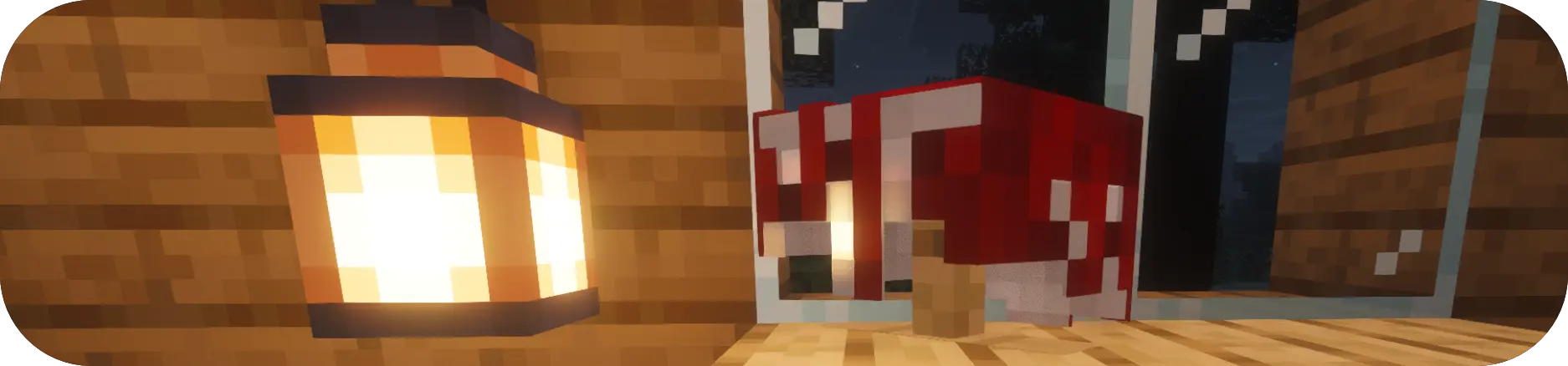
- No resource packs required: overlays are generated at runtime using noise and pixel hashing.
- Works on tools, weapons, armor, and shields (including banner patterns).
- Over 15 tracked substances: dirt, sand, snow, ash, blood, slime, ink, rust, burns, and more.
- Supports emissive fluids like Glow Ink, Warden blood, and Enderman blood.
Blood Has Consequences
Visual blood directly influences gameplay and mob behavior:
- The Scent of Blood: At night, heavily bloodied players may (very rarely!) attract wolf packs.
- Animals or Villager run; if you are covered in blood.
- Monsters could smell you from further away.
- Warden Repulsion: Most hostile mobs avoid players covered in Warden blood.
- Wither Aura: High Wither blood creates a damaging debuff aura.
- End Glitches: End blood on held items can randomly teleport the player.
- Harmful Substances Attacking with dirty weapons may apply minor effects on hit targets.
Combat Splatter, Decals & Footprints
- Hits splatter mob-specific fluids on gear and terrain.
- Blood puddles form; step in them to dirty your boots leave temporary bloody footprints.
- Squids release ink that inflicts Blindness or Glowing.
Environment-Aware Dirt
- Dropped items absorb fluids and pick up environmental dirt from blocks they touch.
- Loot on spawned mobs comes with biome-appropriate aging.
- Slot-specific stains: boots develop gradients from grass; helmets and chestplates show patchy scuffs.

Rust, Burns & Maintenance
- Metallic gear rusts when exposed to water or rain, increasing durability loss.
- Water removes dirt, but Rust and Burns require a Grindstone.
- Dirty food applies themed debuffs (e.g., Mining Fatigue from sand, teleportation from End blood).

Cleaning & Inventory Logic
- Clean items by rain, swimming, Water Cauldrons, or splash water bottles.
- Splash bottles also dissolve ground decals.
- Inventory contagion keeps items stackable: merging stacks applies the highest dirt level.
Performance & Compatibility
- Texture overlays are cached for minimal overhead.
- A central performance handler culls old decals and footprints under server load.
- Sodium detection prevents conflicts: overlays disable automatically if Sodium runs without Indium.
Design Philosophy
Immersive Tool Aging aims for immersion, mechanical relevance, and low friction.
- Universal procedural generation: Works with any item without configs or external assets.
- Performance-first: Caching and adaptive culling protect FPS/TPS.
- Anti-tedium inventory: Smart stacking avoids clutter and lots of stacks of 1 item that can't stack.
- Form follows function: Visual wear reflects actual mechanics (rust = faster durability loss). But in a organic way and without to much impact.
- Diegetic interaction: Cleaning and repair happen through world actions, not menus.
- Context-aware and lore-driven: Mob fluids and environmental materials behave uniquely. There are a lot of suprises and interactions that just make sense. (If you've got more ideas join my Discord!!)
- Soft-failure integration: Features blend into vanilla logic and disable gracefully if needed.
Planned Direction
Expected future focuses include:
- Configuration options
- Additional environmental substances and unique mob fluids.
- More mob behavior tied to biological contaminants, maybe villagers give bad trades if you are dirty.
- Blood dripping from your armor or tools if you've freshly gotten them dirty.
- Wetness and wet steps, imagine leaving water on your carpet after you've came home during a storm. Along with water puddles that are shader compatible.
- More item compatability. Doesnt support modded items that have their own 3d models too well if at all.
- Doesnt support vanilla items like: Tridend, Skulls or Playerheads (Bloody skulls would be so cool)
- Explosion decals
- Some more unique features for unique monster blood.
- Player's skins could get dirty
- Dirty blocks?
About the Project
Immersive Tool Aging is created by an individual developer.
This is my first released mod, built to push immersion as far as possible while maintaining performance and a vanilla(ish) feel.

Available Versions
How to Install Immersive Tool & Armor Degradation on Your Server
Order Server
Order a Minecraft Java server with at least 3 GB RAM (4 GB recommended).
Set fabric Loader
In the panel under "Egg", select the fabric loader and matching Minecraft version (1.21.1).
Install Mod
Open the mod browser in the dashboard and search for "Immersive Tool & Armor Degradation". Click "Install" – done! Alternatively, upload the .jar via SFTP to the /mods folder.
Compatibility
Mod Loaders
Minecraft Versions
1.21.1, 1.20.1
Server-side
✓ RequiredRecommended RAM
4 GB(min. 3 GB)Frequently Asked Questions
Immersive Tool & Armor Degradation server crashes on startup – what to do?
Most common cause: wrong fabric version or insufficient RAM. Check the server log (latest.log) for "OutOfMemoryError" or "Mixin" errors. With Mado Hosting: ensure at least 3 GB RAM is allocated and the loader matches the mod version (1.21.1). You can switch loaders with one click in the panel.
Is Immersive Tool & Armor Degradation compatible with fabric?
Immersive Tool & Armor Degradation officially supports fabric for Minecraft 1.21.1, 1.20.1. The Mado dashboard automatically detects incompatible loader combinations.
Server lagging with Immersive Tool & Armor Degradation – how to optimize performance?
Recommended RAM: 4 GB (per 8 players). Use /spark profiler to check if Immersive Tool & Armor Degradation consumes the most tick time. Common fixes: reduce server view-distance to 8-10, install "performant" or "starlight" as supplementary mods on Forge. With Mado Hosting, your server runs on NVMe SSDs with dedicated CPU cores for minimal latency.
Similar Mods




Rent Modded Server
Install Immersive Tool & Armor Degradation with just one click on your server.