
Impact Frames
Adds flashing impact frames that plays on mace/spear hits, shield breaks, ... Or just any hits at all! Fully client-sided, configurable and customizable. BIG EPILEPSY WARNING!
Screenshots
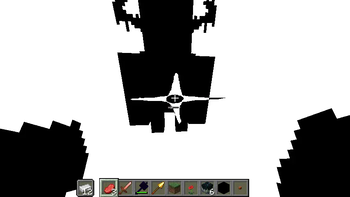
About this Mod
If you are a content creator using this mod, make sure to put an epilepsy warning in the video title or on screen!
1.21.1 port coming soon! Follow the project to be notified when it drops. 


Overview
- Adds fully configurable impact frames to Minecraft.
- You can customize how long they last, the delay between them, their sprites, their colors, what can trigger them,… right in the options.
- All settings can be found inside the
Accessibilitytab, under theImpact Framessubtab, edited via ModMenu, or accessed with an in-game hotkey.
- This mod is still in active development and will be constantly receiving updates and ports! Join the discord server to be kept up to date on new releases.
- The newest releases come bundled with a few community-made resource packs. Credits goes to
jouci,draconivr2.0,aurahmanaandyounotgoth(4give) on discord for their wonderful creations. - You can make your own custom impact frames with this template.
Available settings
Keybinds
Toggle
- Toggle impact frames. Default: I
Menu
- Brings up the config menu for Impact Frames. Default: M
General
Duration (ms)
- How long the impact frames sequence last (in milliseconds), split evenly between all frames. Set to 0 to disable.
Delay (s)
- How long the game will wait after an impact frame before the next one can be triggered (in seconds).
Frame count
- How many frames is in a sequence (1-5). Default: 2
Cinematic mode
- Whether to render the GUI during impact frames (equivalent to F1).
No freeze mode
- Whether impact frames freeze the view.
Stretch texture
- Whether the impact frame texture is scaled and centered to preserve aspect ratio, or stretched across the entire screen.
Pitch
- The pitch of the sound. Also affects the length of the sound. Set to 0 to disable.
Chance
- The chance of the frame happening per hit.
Chance decay
- How much the chance decreases per impact frame trigger.
- If this setting is enabled, impact frames can trigger consecutively regardless of the delay. Instead, the chance will reset after the delay.
Hit conditions
All hits
- Impact frames will trigger on any hits.
Full hit
- Impact frames will trigger on a fully charged hit (strong attack).
Critical hit
- Impact frames will trigger on a critical hit.
Totem pop
- Impact frames will trigger on totem pops.
Kill
- Impact frames will trigger on kills.
Mace smash
- Impact frames will trigger on a mace smash.
Spear charge
- Impact frames will trigger on a spear charge hit.
Shield break
- Impact frames will trigger upon breaking someone's shield with an axe.
Eligible items
All items
- All items can trigger impact frames.
Special weapons
- Maces and spears can trigger impact frames.
Normal weapons
- Swords, axes and tridents can trigger impact frames.
Tools
- All tools can trigger impact frames.
Target entities
All entities
- Hitting all entities can trigger impact frames.
Neutral mobs
- Hitting all neutral mobs can trigger impact frames.
Hostile mobs
- Hitting all hostile mobs can trigger impact frames.
Humanoid mobs
- Hitting all humanoid can trigger impact frames.
Players
- Hitting players can trigger impact frames.
How to change impact frame texture
Make a resource pack that overrides the files
impact-frames/textures/effect/frame_<0-4>.pngJoin the discord server to get access to a template, along with community-created impact frames..
Final notes
- Join the discord server to be notified of updates, report bugs, or suggest new features.
Available Versions
How to Install Impact Frames on Your Server
Order Server
Order a Minecraft Java server with at least 3 GB RAM (4 GB recommended).
Set fabric Loader
In the panel under "Egg", select the fabric loader and matching Minecraft version (26.1.2).
Install Mod
Open the mod browser in the dashboard and search for "Impact Frames". Click "Install" – done! Alternatively, upload the .jar via SFTP to the /mods folder.
Compatibility
Mod Loaders
Minecraft Versions
26.1.2, 26.1.1, 26.1 (+1 more)
Server-side
✗ UnsupportedRecommended RAM
4 GB(min. 3 GB)Frequently Asked Questions
Impact Frames server crashes on startup – what to do?
Most common cause: wrong fabric version or insufficient RAM. Check the server log (latest.log) for "OutOfMemoryError" or "Mixin" errors. With Mado Hosting: ensure at least 3 GB RAM is allocated and the loader matches the mod version (26.1.2). You can switch loaders with one click in the panel.
Is Impact Frames compatible with fabric?
Impact Frames officially supports fabric for Minecraft 26.1.2, 26.1.1, 26.1. The Mado dashboard automatically detects incompatible loader combinations.
Server lagging with Impact Frames – how to optimize performance?
Recommended RAM: 4 GB (per 8 players). Use /spark profiler to check if Impact Frames consumes the most tick time. Common fixes: reduce server view-distance to 8-10, install "performant" or "starlight" as supplementary mods on Forge. With Mado Hosting, your server runs on NVMe SSDs with dedicated CPU cores for minimal latency.
Similar Mods





Rent Modded Server
Install Impact Frames with just one click on your server.