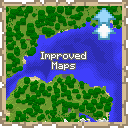
Improved Maps
Server-side mod implementing Atlases and other map features
Screenshots

About this Mod
Improved Maps 
This mod is only for Fabric Servers(or Single-Player) and requires Fabric API. Works with Vanilla clients thanks to Polymer!
Current Features
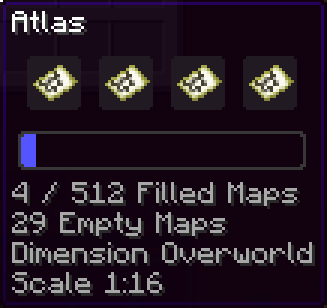
- Atlas - A combination between a bundle and a map.
- Fill it with empty maps and it will automatically create new maps as you explore off the edge of your current map.
- Automatically switch to the relevant map when returning to previous areas.
- Make a copy of the entire Atlas. Great for map walls!
- Fits up to 512 filled maps, and any number of empty maps
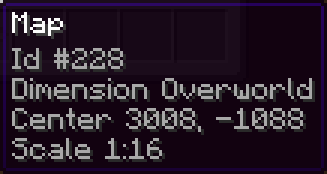
- Map Information Tooltips - See the map scale and center coordinates right from the tooltip
How to use Atlases
- Craft one by combining a filled map and a book in a crafting bench
- An Atlas is specific to a dimension
- All maps in an Atlas must have the same scale
- Atlases behave like bundles, but can only take filled and empty maps
- Copy an Atlas by combining an Atlas and a book, either in a crafting bench or a cartography table
- You must have enough empty maps in the Atlas to copy it, otherwise it won't craft
- You'll get 2 identical Atlases, each containing half the remaining empty maps
- You can take maps out like you would take items out of a bundle. To take out the empty maps you can either place the Atlas in a cartography table, or take out all the filled maps then right-click the empty Atlas in your inventory
(Optional) Client-side features
- Installing the mod client-side will show custom icons for the Atlas item and fix some UI issues
- Icons can also be used by providing the Polymer resource pack to your vanilla clients
- Find out how to setup Polymer AutoHost here: https://polymer.pb4.eu/latest/user/resource-pack-hosting/
- Run
/polymer generate-packafter installing the mod to generate the resource pack
Known Issues
- Cartography table result slot doesn't work well. You can click the empty slot and get the correct result, it just won't preview
- Installing the mod client-side will fix this
- Bundle tooltip on Atlas will show full once it hits 64 maps. You can still keep adding maps
- Installing the mod client-side will fix this
Shout-outs
- Pillowsledder for creating the excellent icons!
- Map Atlases by Pepperoni-Jabroni for the original idea and map switching logic.
- Diversity: Better Bundle by FaeWulf for implementation of larger bundle sizes
Available Versions
How to Install Improved Maps on Your Server
Order Server
Order a Minecraft Java server with at least 3 GB RAM (4 GB recommended).
Set fabric Loader
In the panel under "Egg", select the fabric loader and matching Minecraft version (26.1.2).
Install Mod
Open the mod browser in the dashboard and search for "Improved Maps". Click "Install" – done! Alternatively, upload the .jar via SFTP to the /mods folder.
Compatibility
Mod Loaders
Minecraft Versions
26.1.2, 1.21.11, 1.21.10 (+5 more)
Server-side
✓ RequiredRecommended RAM
4 GB(min. 3 GB)Frequently Asked Questions
Improved Maps server crashes on startup – what to do?
Most common cause: wrong fabric version or insufficient RAM. Check the server log (latest.log) for "OutOfMemoryError" or "Mixin" errors. With Mado Hosting: ensure at least 3 GB RAM is allocated and the loader matches the mod version (26.1.2). You can switch loaders with one click in the panel.
Is Improved Maps compatible with fabric?
Improved Maps officially supports fabric for Minecraft 26.1.2, 1.21.11, 1.21.10. The Mado dashboard automatically detects incompatible loader combinations.
Server lagging with Improved Maps – how to optimize performance?
Recommended RAM: 4 GB (per 8 players). Use /spark profiler to check if Improved Maps consumes the most tick time. Common fixes: reduce server view-distance to 8-10, install "performant" or "starlight" as supplementary mods on Forge. With Mado Hosting, your server runs on NVMe SSDs with dedicated CPU cores for minimal latency.
Similar Mods




Rent Modded Server
Install Improved Maps with just one click on your server.