Infinicrafts
Gain the ability to craft all* uncraftable items or blocks in Minecraft! *most
Screenshots
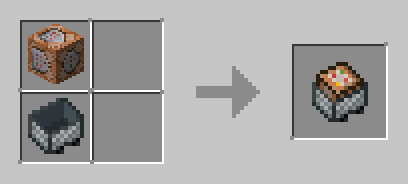
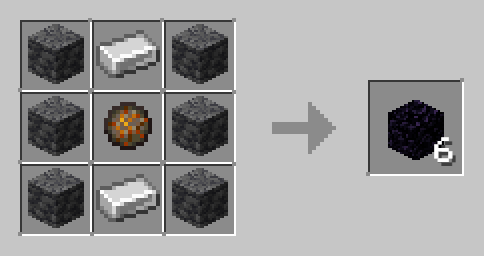
About this Mod






IMPORTANT NOTE!
In order for the datapack to work, you must install the Infinicrafts Resources resourcepack! This resourcepack is attached in each version, and you must install both files from the versions list! If you simply click on Download on this page/the home page of the datapack, it will only install the datapack without the required textures!
A datapack that adds crafting recipes for a bunch of blocks and items that were previously uncraftable! Blocks like the command block, bedrock, and items like the totem of undying!
Craft away to your hearts intent! DM my discord @error_dev if you would like to see any items added! This datapack will definitely be updated.
For a full list of features, please refer to the wiki (linked on sidebar).
Added Features (SPOILERS)
This datapack adds a lot of features. Mainly recipes. Let's go over some of them.- The datapack adds two custom functions. Using [/function infinicrafts:give_duplicating_template] will give you a Duplicating Template and [/function infinicrafts:test] will test the datapack systems.
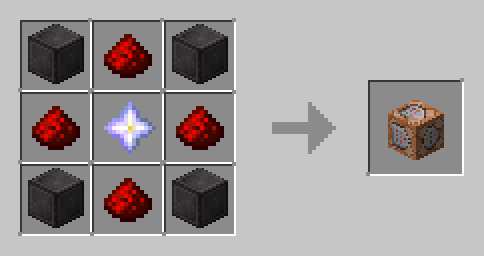
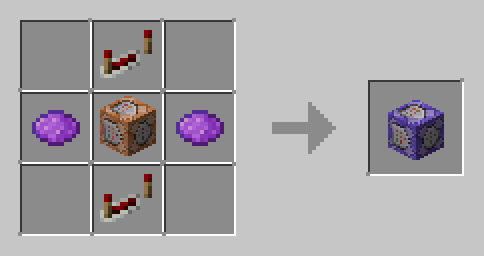
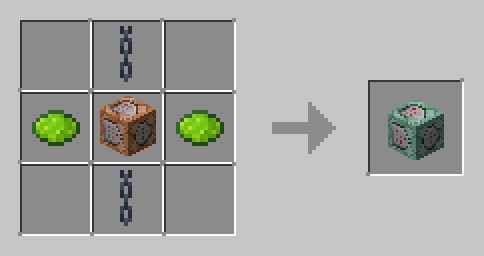
- It adds a bunch of recipes for previously uncraftable items. Blocks like barriers can now be crafted! For a full list of added recipes, view the Gallery tab.
- It adds 5 new tags. The #infinicrafts:uncraftable tag is for all the blocks or items that were previously uncraftable but now can be crafted. The #infinicrafts:deepslate tag includes only cobbled deepslate and deepslate, and no variants. The #infinicrafts:glass tag includes all types of glass except glass panes. This inludes glass, tinted glass, and all colored glass. The #infinicrafts:signs tag includes all signs and hanging signs.
MORE INFINI-PROJECTS
CREDITS
All assets and code in this datapack are all made by me.
LICENSE
Infinicrafts © 2025 by Error Dev is licensed under CC BY-SA 4.0
Available Versions
How to Install Infinicrafts on Your Server
Order Server
Order a Minecraft Java server with at least 3 GB RAM (4 GB recommended).
Set datapack Loader
In the panel under "Egg", select the datapack loader and matching Minecraft version (1.21.10).
Install Mod
Open the mod browser in the dashboard and search for "Infinicrafts". Click "Install" – done! Alternatively, upload the .jar via SFTP to the /mods folder.
Compatibility
Mod Loaders
Minecraft Versions
1.21.10, 1.21.9, 1.21.8 (+4 more)
Server-side
✓ RequiredRecommended RAM
4 GB(min. 3 GB)Frequently Asked Questions
Infinicrafts server crashes on startup – what to do?
Most common cause: wrong datapack version or insufficient RAM. Check the server log (latest.log) for "OutOfMemoryError" or "Mixin" errors. With Mado Hosting: ensure at least 3 GB RAM is allocated and the loader matches the mod version (1.21.10). You can switch loaders with one click in the panel.
Is Infinicrafts compatible with datapack and fabric and forge and neoforge and quilt?
Infinicrafts officially supports datapack, fabric, forge, neoforge, quilt for Minecraft 1.21.10, 1.21.9, 1.21.8. Note: Forge and Fabric mods are NOT cross-compatible – pick one loader and stick with it. The Mado dashboard automatically detects incompatible loader combinations.
Server lagging with Infinicrafts – how to optimize performance?
Recommended RAM: 4 GB (per 8 players). Use /spark profiler to check if Infinicrafts consumes the most tick time. Common fixes: reduce server view-distance to 8-10, install "performant" or "starlight" as supplementary mods on Forge. With Mado Hosting, your server runs on NVMe SSDs with dedicated CPU cores for minimal latency.
Similar Mods





Rent Modded Server
Install Infinicrafts with just one click on your server.
Details
- License
- Creative Commons Attribution Share Alike 4.0 International
- Server-side
- Required