
Infinite Food
Adds an item that acts like infinite food!
About this Mod
Overview:
This Minecraft mod introduces a single, powerful item designed to solve all hunger-related issues in the game. Once acquired, this item provides players with an endless supply of food, eliminating the need for farming, hunting, or gathering resources for sustenance.
Key Features:
Infinite Food Item: A special item that, when used, instantly restores the player's hunger bar to full capacity.
Easy Accessibility: The item can be crafted using a combination of rare and common materials or found in specific in-game locations.
Balanced Gameplay: The mod ensures that acquiring the infinite food item is challenging enough to maintain game balance, making it a rewarding achievement rather than an overpowered tool.
Compatibility: Works seamlessly with other mods and can be used in both single-player and multiplayer modes.
Benefits:
Convenience: Players no longer need to worry about running out of food during long adventures or intense battles.
Time-Saving: Reduces the time spent on food-related activities, allowing players to focus on exploration, building, and other gameplay elements.
Survival Aid: Particularly useful in survival mode, where managing food can be a constant concern.
Crafting Recipe:
1x Golden Apple
2x Diamonds
3x Wheat
1x Nether Star
2x Cooked Beef
Conclusion:
This mod is perfect for players looking for a more streamlined and less resource-intensive survival experience in Minecraft. By providing an infinite food item, it enhances convenience without significantly disrupting game balance.
Crafting Recipie:
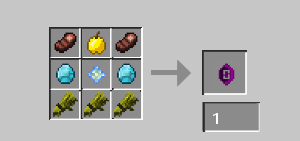
To report an issue, please visit the Mod Support Form.
Available Versions
How to Install Infinite Food on Your Server
Order Server
Order a Minecraft Java server with at least 3 GB RAM (4 GB recommended).
Set forge Loader
In the panel under "Egg", select the forge loader and matching Minecraft version (1.20.1).
Install Mod
Open the mod browser in the dashboard and search for "Infinite Food". Click "Install" – done! Alternatively, upload the .jar via SFTP to the /mods folder.
Compatibility
Mod Loaders
Minecraft Versions
1.20.1
Server-side
✓ RequiredRecommended RAM
4 GB(min. 3 GB)Frequently Asked Questions
Infinite Food server crashes on startup – what to do?
Most common cause: wrong forge version or insufficient RAM. Check the server log (latest.log) for "OutOfMemoryError" or "Mixin" errors. With Mado Hosting: ensure at least 3 GB RAM is allocated and the loader matches the mod version (1.20.1). You can switch loaders with one click in the panel.
Is Infinite Food compatible with forge?
Infinite Food officially supports forge for Minecraft 1.20.1. The Mado dashboard automatically detects incompatible loader combinations.
Server lagging with Infinite Food – how to optimize performance?
Recommended RAM: 4 GB (per 8 players). Use /spark profiler to check if Infinite Food consumes the most tick time. Common fixes: reduce server view-distance to 8-10, install "performant" or "starlight" as supplementary mods on Forge. With Mado Hosting, your server runs on NVMe SSDs with dedicated CPU cores for minimal latency.
Similar Mods





Rent Modded Server
Install Infinite Food with just one click on your server.