
Infinite Storage Bundle
Make your bundles be your new storage solution!
Screenshots
About this Mod
Infinity Bundle Mod/Datapack





Overview
The Infinity Bundle Mod/Datapack is a revolutionary Minecraft storage solution that allows players to store bundles inside bundles, offering an infinite approach to item storage. Say goodbye to cluttered chests and hello to seamless, compact storage, all packed into a single item.
Features
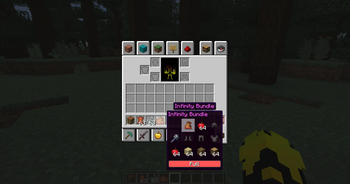
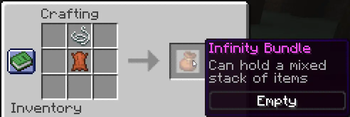
- Infinity Storage: Craft the Infinity Bundle using 1 Leather and 1 String. This unique bundle allows you to store bundles within other bundles, providing a virtually limitless storage solution.
- Note: storing an excessive number of items may cause significant lag.
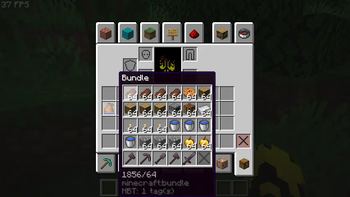
- Unlimited Capacity: Store an infinite number of items in a single bundle, enabling effortless organization.
- Retrieve Stored Items:
- In Inventory: Right-click the bundle to retrieve the most recent item stored.
- Pre-1.21.2: Right-click the bundle from the hotbar to eject all stored items at once.
- 1.21.2 and Beyond: Right-click the bundle from the hotbar to retrieve only the most recent item stored.
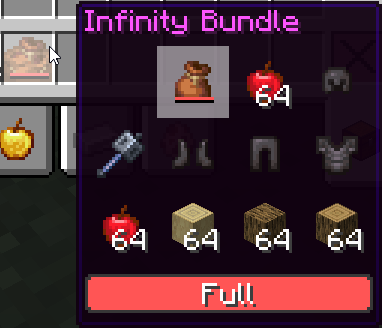
- Scroll Functionality (1.21.2+): Use the mouse wheel to scroll through the contents of the bundle and select a specific item from up to 10 displayed items.
- Effortless Usage: Simply throw the Infinity Bundle on the ground and toss in any items you wish to store.
- Compact Design: Minimize clutter and streamline inventory management by nesting multiple bundles within a single Infinity Bundle.
- Seamless Integration: Compatible with both single-player and multiplayer environments, this mod/datapack integrates smoothly into your Minecraft world without disrupting gameplay.
Installation
For Mod Installation
- Download the Mod: CurseForge | Modrinth
- Install with Your Preferred Mod Loader:
- Forge/NeoForge: Drag the mod file into the
modsfolder located in your.minecraftdirectory. - Fabric/Quilt: Ensure you have the Fabric API installed alongside the corresponding mod loader. Place the mod file into the
modsfolder.
- Forge/NeoForge: Drag the mod file into the
For Datapack Installation
- Download the Datapack: CurseForge | Modrinth
- Locate Your Minecraft Saves Folder:
- Windows:
%appdata%\.minecraft\saves - Mac:
~/Library/Application Support/minecraft/saves - Linux:
~/.minecraft/saves
- Windows:
- Add the Datapack:
- Open the folder of the world you want to add the datapack to.
- Drag and drop the downloaded
.zipfile into thedatapacksfolder.
- Load the Datapack:
- Start Minecraft and enter your world.
- Use the
/reloadcommand if necessary. - Enjoy infinite storage with the Infinity Bundle!
Compatibility
- Minecraft Version: Compatible with Minecraft version 1.17+.
- Mod Loaders: Supports Forge, NeoForge, Fabric (with Fabric API), and Quilt (with Fabric API).
- Multiplayer Support: Fully compatible with multiplayer servers.
Usage
- Storing Items: Throw your Infinity Bundle on the ground and throw items or other bundles into it for storage.
- Retrieving Items: Right-click the bundle inside your inventory to retrieve items. For versions 1.21.2 and later, use the scroll wheel to cycle through up to 10 items in the bundle.
- Stacking Bundles: Take advantage of the ability to store bundles within other bundles to manage massive inventories in a compact space.
Feedback and Support
If you encounter any issues or have suggestions for improvements, please contact us via Discord.
License
This mod/datapack is licensed under All Rights Reserved. You are free to use it for personal enjoyment and incorporate it into modpacks. Modifications for personal use are allowed. Redistribution and reuploading are strictly prohibited. Sharing is permitted only through official links.
Credits
- Creator: sashiro
Links
- Download the Mod/Datapack: CurseForge MOD | CurseForge DATAPACK | Modrinth
- Join our Community: Discord
- Support the Creator: PayPal
Thank you for using the Infinity Bundle Mod/Datapack! Enjoy a cleaner, more organized Minecraft experience.
Available Versions
How to Install Infinite Storage Bundle on Your Server
Order Server
Order a Minecraft Java server with at least 3 GB RAM (4 GB recommended).
Set datapack Loader
In the panel under "Egg", select the datapack loader and matching Minecraft version (1.21.11).
Install Mod
Open the mod browser in the dashboard and search for "Infinite Storage Bundle". Click "Install" – done! Alternatively, upload the .jar via SFTP to the /mods folder.
Compatibility
Mod Loaders
Minecraft Versions
1.21.11, 1.21.10, 1.21.9 (+30 more)
Server-side
✓ RequiredRecommended RAM
4 GB(min. 3 GB)Frequently Asked Questions
Infinite Storage Bundle server crashes on startup – what to do?
Most common cause: wrong datapack version or insufficient RAM. Check the server log (latest.log) for "OutOfMemoryError" or "Mixin" errors. With Mado Hosting: ensure at least 3 GB RAM is allocated and the loader matches the mod version (1.21.11). You can switch loaders with one click in the panel.
Is Infinite Storage Bundle compatible with datapack and fabric and forge and neoforge and quilt?
Infinite Storage Bundle officially supports datapack, fabric, forge, neoforge, quilt for Minecraft 1.21.11, 1.21.10, 1.21.9. Note: Forge and Fabric mods are NOT cross-compatible – pick one loader and stick with it. The Mado dashboard automatically detects incompatible loader combinations.
Server lagging with Infinite Storage Bundle – how to optimize performance?
Recommended RAM: 4 GB (per 8 players). Use /spark profiler to check if Infinite Storage Bundle consumes the most tick time. Common fixes: reduce server view-distance to 8-10, install "performant" or "starlight" as supplementary mods on Forge. With Mado Hosting, your server runs on NVMe SSDs with dedicated CPU cores for minimal latency.
Similar Mods




![[TaCZ] Timeless and Classics Zero](https://cdn.modrinth.com/data/SzzJttH8/fd27766d2bb8390d284696b1dbd358f87e081439_96.webp)

Rent Modded Server
Install Infinite Storage Bundle with just one click on your server.