
Infinite Upgrades
Hunt mobs and use their souls to upgrade your items to +1, +2, +3, etc. The classic MMORPG grindfest! 👌
Screenshots


About this Mod



What is InfiniteUpgrades?
InfiniteUpgrades brings the classic MMO-style +1, +2, +3… enhancement loop to Minecraft.
Each success boosts your item level while the next attempt gets harder. Collect souls in a Soul Cage and infuse gear at an Angel or Demon statue—each path upgrades differently.
Angel vs Demon (How upgrades apply)
Angel Infusion — Balanced growth
Applies the per-level step to all eligible stats on success. Great for steady, even progression (damage, speed, armor, etc.).Demon Infusion — Min–max power
Applies a (usually larger) step to one random eligible stat on success. Perfect for pushing a single attribute to the extreme.
Reputation System (affects success chances)
Your actions build a Reputation between Angel and Demon.
- Angel-leaning reputation slightly boosts Angel attempts and penalizes Demon.
- Demon-leaning reputation boosts Demon and penalizes Angel.
- The bonus/penalty is configurable and clamped, so it never gets out of hand. You can pivot sides—but expect a penalty until your reputation shifts.
Statues
| Angel statue | Demon statue |
|---|---|
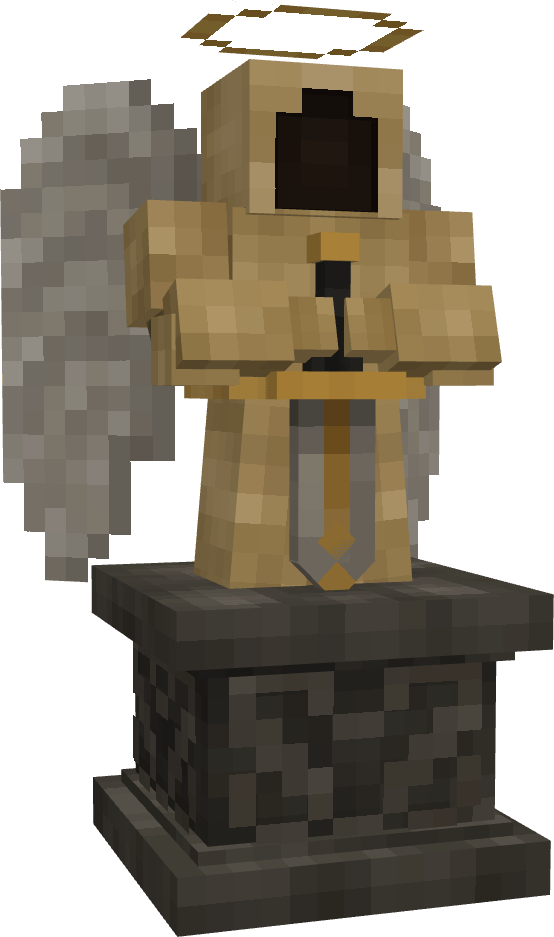 |
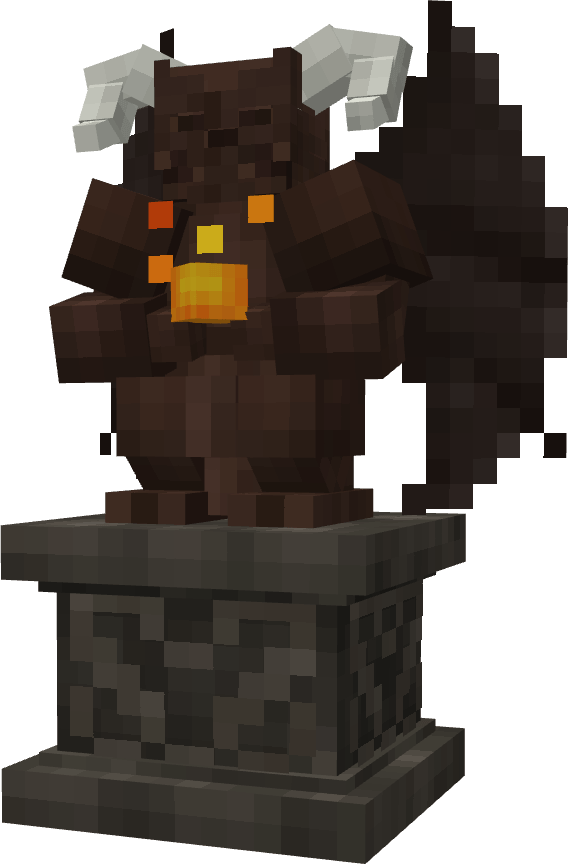 |
Core Gameplay Loop
- Craft a Soul Cage and carry it to gather souls from defeated mobs.
- Place an Angel or Demon statue to access the infusion UI.
- Infuse your gear: item (left), Soul Cage (right), then review success chance, soul cost, and what will upgrade.
Success permanently improves stats and increments the item’s +level.
Failure adjusts your Reputation and sets up your next decision—double down or switch sides.
What Can Improve?
Vanilla combat attributes are supported out of the box (attack damage, attack speed, armor, armor toughness, knockback resistance).
Tools also benefit via a special Block Speed bonus so pickaxes/shovels/axes get meaningful progression too.
Modded attributes are supported but need to be added manually by server admin in the config.
Fully Configurable
Everything lives in world/serverconfig/infiniteupgrades-server.toml:
- Max level cap
- Chance curve (flat decrement or exponential; per-level overrides)
- Per-attribute rules (percent vs additive, direction, weights, rounding)
- Angel/Demon multipliers (per-step ritual scaling)
- Souls cost formula (base, exp base, scale, or exact overrides)
- Final multipliers per stat (e.g., halve/double specific stat effects)
- Reputation range, bonus-per-point, and clamp
How to Play (Quick Start)
- Make a Soul Cage → collect souls while fighting.
- Open a statue → insert item + Soul Cage.
- Check the right panel → success chance, cost, and affected stats.
- Choose → Angel for consistent all-stat growth, Demon for focused spikes.
Multiplayer & Modpacks
- Everything is fully server-authoritative: client-sided cheats won't matter.
- Pack-friendly configuration to match any progression curve.
FAQ
What can I configure?
Everything. 👍
Is there a hard level cap?
Default cap is generous (20) and fully configurable.
What if my item has no combat attributes?
Tools still progress via Block Speed i.e. how quickly you break blocks. And, pack makers can add custom rules for anything.
Does failure destroy items?
No, failures shift Reputation (which influences future chances) and reverts back the latest upgrade.
Tips
- Angel = consistency, Demon = min–max burst.
- Lean your Reputation toward your chosen side to pad your odds.
- Pack authors: a reputation clamp around 10–20% often feels fair.
Balancing feedback is welcome—share configs and scenarios in the issues/discussions so we can tune further.
Available Versions
How to Install Infinite Upgrades on Your Server
Order Server
Order a Minecraft Java server with at least 3 GB RAM (4 GB recommended).
Set forge Loader
In the panel under "Egg", select the forge loader and matching Minecraft version (1.21.1).
Install Mod
Open the mod browser in the dashboard and search for "Infinite Upgrades". Click "Install" – done! Alternatively, upload the .jar via SFTP to the /mods folder.
Compatibility
Mod Loaders
Minecraft Versions
1.21.1, 1.20.1
Server-side
✓ RequiredRecommended RAM
4 GB(min. 3 GB)Frequently Asked Questions
Infinite Upgrades server crashes on startup – what to do?
Most common cause: wrong forge version or insufficient RAM. Check the server log (latest.log) for "OutOfMemoryError" or "Mixin" errors. With Mado Hosting: ensure at least 3 GB RAM is allocated and the loader matches the mod version (1.21.1). You can switch loaders with one click in the panel.
Is Infinite Upgrades compatible with forge and neoforge?
Infinite Upgrades officially supports forge, neoforge for Minecraft 1.21.1, 1.20.1. The Mado dashboard automatically detects incompatible loader combinations.
Server lagging with Infinite Upgrades – how to optimize performance?
Recommended RAM: 4 GB (per 8 players). Use /spark profiler to check if Infinite Upgrades consumes the most tick time. Common fixes: reduce server view-distance to 8-10, install "performant" or "starlight" as supplementary mods on Forge. With Mado Hosting, your server runs on NVMe SSDs with dedicated CPU cores for minimal latency.
Similar Mods




Rent Modded Server
Install Infinite Upgrades with just one click on your server.