
Infiniarmory
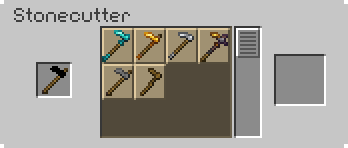
Transform any tool or armor into a different one of the same type! Turn your wooden hoe into a netherite one as soon as you start!
Screenshots
About this Mod




A datapack/mod that allows you to change the material of any tool or armor via a stonecutter.
For a full list of features, please refer to the wiki (linked on sidebar).
This datapack/mod adds a lot of features. Mainly recipes. Let's go over some of them:
Added Features (SPOILERS)
It adds 25 new functions to the game. You can access these with
/function infinitools:give_tools/(function),/function infinitools:give_armor/(function), or/function infinitools:all. These give you all of the tools and/or armor based on the type or material. Use Minecraft's built-in command selector to view all, or see the wiki.It allows you to transform any tool into another with the same type but different (or same) material. For example, if you put a stone shovel into a stonecutter, you can turn it into a netherite shovel! Now supports bows & crossbows!
It allows you to transform any armor into another with the same type but different (or same) material. For example, if you put an iron chestplate into a stonecutter, you can turn it into a netherite chestplate!
As a little easter egg, all hoes that are obtained this way through a stonecutter have Loyalty! The enchantment does nothing since it's not on a trident, but still, it's pretty fun. Now who said you can't have loyal hoes?!
MORE INFINI-PROJECTS

CREDITS
All assets and code in this datapack are all made by me.
LICENSE
Infiniarmory © 2025 by Error Dev is licensed under CC BY-SA 4.0
Available Versions
How to Install Infiniarmory on Your Server
Order Server
Order a Minecraft Java server with at least 3 GB RAM (4 GB recommended).
Set datapack Loader
In the panel under "Egg", select the datapack loader and matching Minecraft version (1.21.10).
Install Mod
Open the mod browser in the dashboard and search for "Infiniarmory". Click "Install" – done! Alternatively, upload the .jar via SFTP to the /mods folder.
Compatibility
Mod Loaders
Minecraft Versions
1.21.10, 1.21.9, 1.21.8 (+4 more)
Server-side
✓ RequiredRecommended RAM
4 GB(min. 3 GB)Frequently Asked Questions
Infiniarmory server crashes on startup – what to do?
Most common cause: wrong datapack version or insufficient RAM. Check the server log (latest.log) for "OutOfMemoryError" or "Mixin" errors. With Mado Hosting: ensure at least 3 GB RAM is allocated and the loader matches the mod version (1.21.10). You can switch loaders with one click in the panel.
Is Infiniarmory compatible with datapack and fabric and forge and neoforge and quilt?
Infiniarmory officially supports datapack, fabric, forge, neoforge, quilt for Minecraft 1.21.10, 1.21.9, 1.21.8. Note: Forge and Fabric mods are NOT cross-compatible – pick one loader and stick with it. The Mado dashboard automatically detects incompatible loader combinations.
Server lagging with Infiniarmory – how to optimize performance?
Recommended RAM: 4 GB (per 8 players). Use /spark profiler to check if Infiniarmory consumes the most tick time. Common fixes: reduce server view-distance to 8-10, install "performant" or "starlight" as supplementary mods on Forge. With Mado Hosting, your server runs on NVMe SSDs with dedicated CPU cores for minimal latency.
Similar Mods





Rent Modded Server
Install Infiniarmory with just one click on your server.
Details
- License
- Creative Commons Attribution Share Alike 4.0 International
- Server-side
- Required