
Inflated Gear
Inflated Gear adds balloon-inspired weapons, tools, and armor. Blast damage into knockback, pop trees into leaf confetti, till fields with gusts, and watch ores float free. Light, magical gear for playful but powerful adventures.
Screenshots
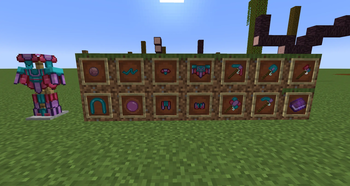
About this Mod
🎈 Inflated Gear
Step into the skies with the legendary relics of the Balloon Knights — a whimsical order who turned every battle into a carnival of clouds and every farm into a field of wind-swept wonder.
Inflated Gear brings you magical, balloon-themed armor and tools that bend the rules of Minecraft:
- Take a hit? You’re blasted back instead of hurt.
- Swing a hammer? Foes go flying skyward.
- Farm the land? Till fields in gusts of wind and whisper crops into sudden bloom.
- Chop a tree? Leaves scatter and pop like confetti.
Light, fragile, yet powerful — these tools don’t just change how you play, they change how the world feels. ✨
✨ Features
🛡️ Balloon Armor Set
- Converts all incoming damage (from entites) into proportional knockback instead of health loss.
⚔️ Tools
Skyward Slammer (Hammer)
- Right-clicking on the ground launches enemies upward.
Helium Harvester (Pickaxe)
- Ores mined float in place until collected.
Puff Digger (Shovel)
- Right-click ability removes gravity-affected blocks (sand, gravel, concrete powder, etc.).
- Config file allows adding/removing which blocks are affected.
Zephyr Hoe
- Gust Till: Right-click tills a configurable radius (default 3×3) and hydrates soil.
- Breezy Growth: Sneak + right-click → nearby crops receive random growth ticks.
- Configurable cooldowns, radius, durability cost, moisture, particles.
Popper Chopper (Axe)
- Gust Defoliate: Sneak + right-click → instantly clears connected leaves (vein-miner style).
- Respects Silk Touch & Fortune.
- Configurable radius, leaf cap, durability cost, cooldown, and natural-leaves-only toggle.
Anyone is free to use this Mod in a public modpack w/o asking permission (Must be hosted on curseforge or modrinth).
Logo Art by: BH | Katrina
Available Versions
How to Install Inflated Gear on Your Server
Order Server
Order a Minecraft Java server with at least 3 GB RAM (4 GB recommended).
Set neoforge Loader
In the panel under "Egg", select the neoforge loader and matching Minecraft version (1.21.10).
Install Mod
Open the mod browser in the dashboard and search for "Inflated Gear". Click "Install" – done! Alternatively, upload the .jar via SFTP to the /mods folder.
Compatibility
Mod Loaders
Minecraft Versions
1.21.10, 1.21.9, 1.21.8 (+7 more)
Server-side
✓ RequiredRecommended RAM
4 GB(min. 3 GB)Frequently Asked Questions
Inflated Gear server crashes on startup – what to do?
Most common cause: wrong neoforge version or insufficient RAM. Check the server log (latest.log) for "OutOfMemoryError" or "Mixin" errors. With Mado Hosting: ensure at least 3 GB RAM is allocated and the loader matches the mod version (1.21.10). You can switch loaders with one click in the panel.
Is Inflated Gear compatible with neoforge?
Inflated Gear officially supports neoforge for Minecraft 1.21.10, 1.21.9, 1.21.8. The Mado dashboard automatically detects incompatible loader combinations.
Server lagging with Inflated Gear – how to optimize performance?
Recommended RAM: 4 GB (per 8 players). Use /spark profiler to check if Inflated Gear consumes the most tick time. Common fixes: reduce server view-distance to 8-10, install "performant" or "starlight" as supplementary mods on Forge. With Mado Hosting, your server runs on NVMe SSDs with dedicated CPU cores for minimal latency.
Similar Mods




![[TaCZ] Timeless and Classics Zero](https://cdn.modrinth.com/data/SzzJttH8/fd27766d2bb8390d284696b1dbd358f87e081439_96.webp)

Rent Modded Server
Install Inflated Gear with just one click on your server.