Info in slot
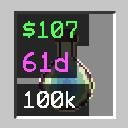
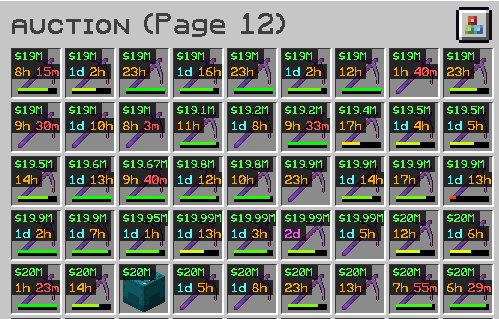
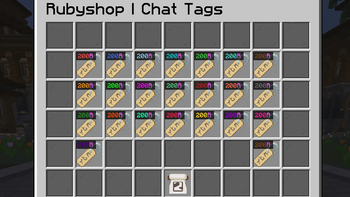
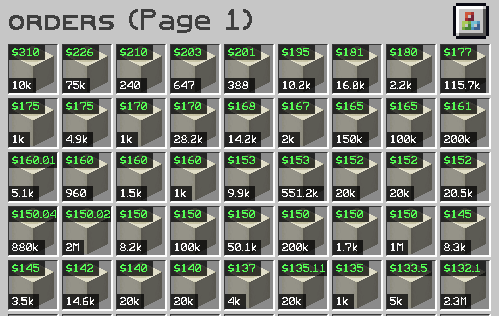
A Mod displaying expire timer, order/auction price & order delivered count in Item slot! Made for DonutSMP, very configurable.
Screenshots
About this Mod
Mod was inspired by Map in Slot
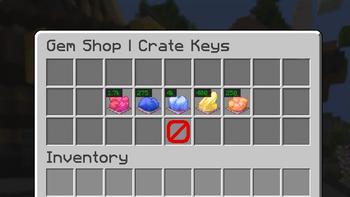
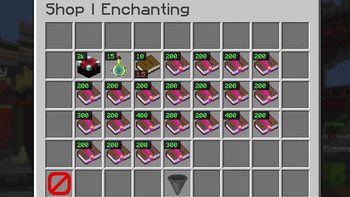
This mod extracts information from the Tooltip sent by the DonutSMP server without the need to hover mouse over it, then uses that information to display a list of stats onto the inventory hotbar Slot
List of Stats that are displayed
- Self Destruct or Expire Timer
- Auction or Order Item Price
- Order Delivered Count (for personal orders)
- Order Count available to be Delivered (for other player orders)
information is obtain by taking the order request count and subtracting it by the already delivered count for example 25/100 Delievered would Display as 75
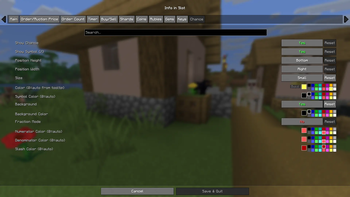
Configuration Options:
Ability to change
- Color
- Bold Font
- Text Size (Small, Medium, (Large for Timer only))
- Toggle Background (dark gray square behind text)
- Position (Top, Middle, Bottom)
for all 4 Categories
Timer Display
Auciton Price
Order Price
Order Display
also includes Color Seperator option for Expiration Timer
2+Days, Day, Hours, Minutes
Magenta, Aqua, Gold, Red
all can be changed either thru (Mod Menu) or thru Commands for those who arent using Mod Menu
or just want to quickly type it out
/slotinfo
Control Keybinds
- Toggle Mod on & Off (unbound)
- Cycle Timer Size (unbound)
when keybind pressed cycles Expire Timer character size beween Small, Medium, Large - Toggle Hours only (h)
converts times like 2d 20h to 68h
Available Versions
How to Install Info in slot on Your Server
Order Server
Order a Minecraft Java server with at least 3 GB RAM (4 GB recommended).
Set fabric Loader
In the panel under "Egg", select the fabric loader and matching Minecraft version (26.1.2).
Install Mod
Open the mod browser in the dashboard and search for "Info in slot". Click "Install" – done! Alternatively, upload the .jar via SFTP to the /mods folder.
Compatibility
Mod Loaders
Minecraft Versions
26.1.2, 26.1.1, 26.1 (+2 more)
Server-side
✗ UnsupportedRecommended RAM
4 GB(min. 3 GB)Frequently Asked Questions
Info in slot server crashes on startup – what to do?
Most common cause: wrong fabric version or insufficient RAM. Check the server log (latest.log) for "OutOfMemoryError" or "Mixin" errors. With Mado Hosting: ensure at least 3 GB RAM is allocated and the loader matches the mod version (26.1.2). You can switch loaders with one click in the panel.
Is Info in slot compatible with fabric?
Info in slot officially supports fabric for Minecraft 26.1.2, 26.1.1, 26.1. The Mado dashboard automatically detects incompatible loader combinations.
Server lagging with Info in slot – how to optimize performance?
Recommended RAM: 4 GB (per 8 players). Use /spark profiler to check if Info in slot consumes the most tick time. Common fixes: reduce server view-distance to 8-10, install "performant" or "starlight" as supplementary mods on Forge. With Mado Hosting, your server runs on NVMe SSDs with dedicated CPU cores for minimal latency.
Similar Mods




![CobbleDollars [Cobblemon Addon]](https://cdn.modrinth.com/data/s7N7AsqL/684040a264fc1d7f9b856ec5d2da39767398c7ad.png)
Rent Modded Server
Install Info in slot with just one click on your server.