
Infuse
Simple recreation of the Infuse plugin, as a datapack
About this Mod
A simple recreation of the plugin used in the Infuse SMP, for Fabric 1.20.4
Usage
- Killing someone grants you a random positive effect from the list below
- Dying to someone grants you a random negative effect
- Dying to someone while you have a positive effect will remove one randomly
- Killing someone while you have a negative effect will remove one randomly
- You can craft a good potion (see recipe below), drinking it is the same as killing someone
- You can drain your positive effects into potions for safe keeping/trading
Effects
- Good:
- Speed
- Hero of the Village
- Health Boost
- Conduit's Power
- Haste
- Fire Resistance
- Strength
- Bad:
- Slowness
- Slow Falling
- Jump Boost
- Mining Fatigue
- Hunger
- Glowing
- Weakness
Recipe
The recipe may show up as a command block instead of a potion in the crafting table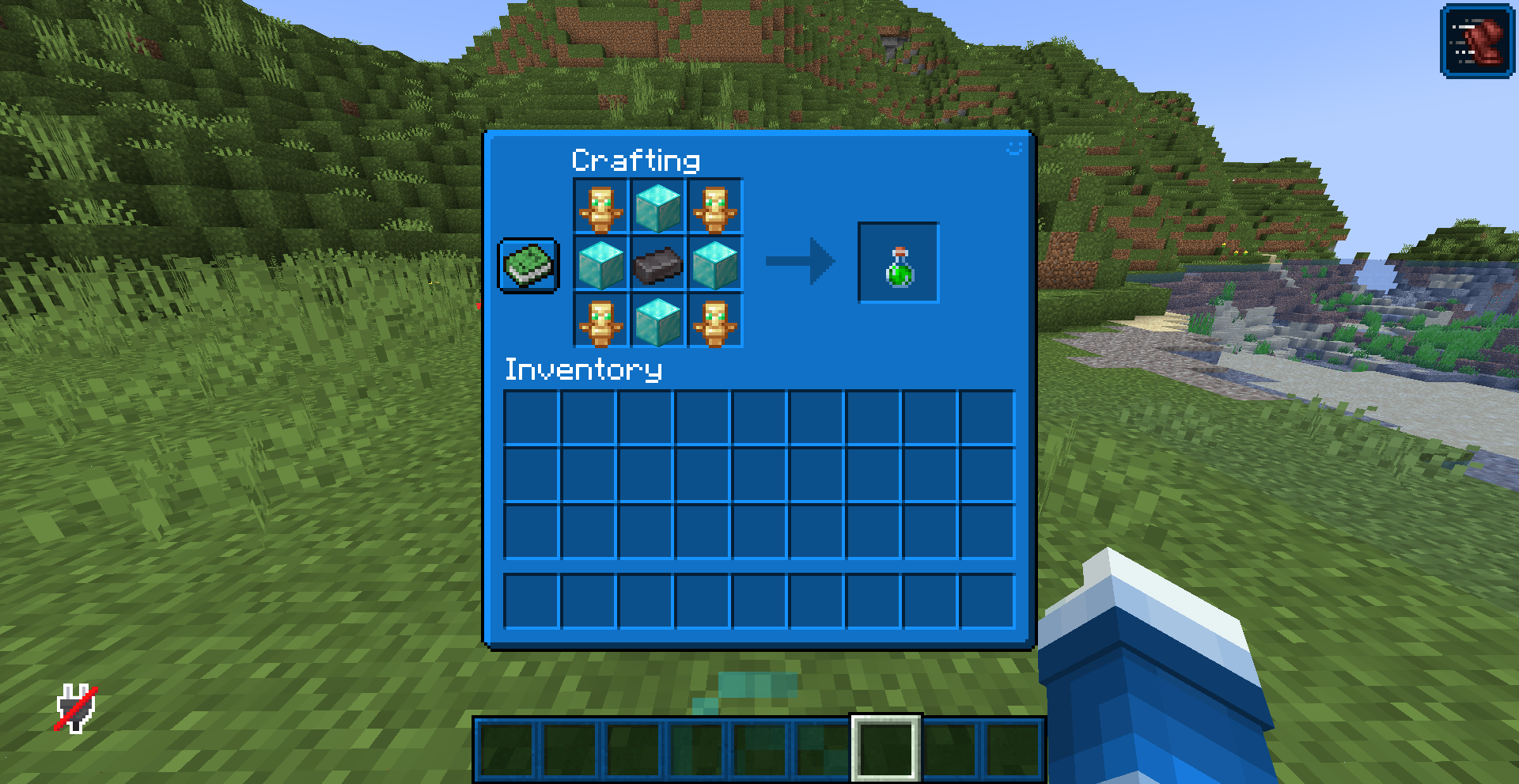
Commands
Draining Effects
/trigger DrainPotion- Only shows up when you are able to drain effects/function #cootshk:infuse/drain- requires OP/drain- Requires the fabric version
Resetting Effects
/trigger ResetInfuse- Requires Creative Mode/function #cootshk:infuse/reset_effects- Requires OP/resetinfuse- Requires OP and the fabric version
Giving an individual effect
/scoreboard players set (player) (effect) 1- Requires OP
Replace (player) with the player to give the effect to
Replace effect with the internal name of the effect (see below)
Removing an individual effect
/scoreboard players set (player) (effect) 0- Requires OP
Replace (player) with the player to give the effect to
Replace effect with the internal name of the effect (see below)
Internal Effect Names
| Effect | Internal Name |
|---|---|
| Speed | Speed |
| Hero of the Village | Hero |
| Health Boost | Health |
| Conduit's Power | Conduit |
| Haste | Haste |
| Fire Resistence | Fire |
| Strength | Strength |
| Slowness | Slowness |
| Slow Falling | Falling |
| Jump Boost | Jump |
| Mining Fatigue | Mining |
| Hunger | Hunger |
| Glowing | Glowing |
| Weakness | Weakness |
Available Versions
How to Install Infuse on Your Server
Order Server
Order a Minecraft Java server with at least 3 GB RAM (4 GB recommended).
Set datapack Loader
In the panel under "Egg", select the datapack loader and matching Minecraft version (1.20.4).
Install Mod
Open the mod browser in the dashboard and search for "Infuse". Click "Install" – done! Alternatively, upload the .jar via SFTP to the /mods folder.
Compatibility
Mod Loaders
Minecraft Versions
1.20.4
Server-side
✓ RequiredRecommended RAM
4 GB(min. 3 GB)Frequently Asked Questions
Infuse server crashes on startup – what to do?
Most common cause: wrong datapack version or insufficient RAM. Check the server log (latest.log) for "OutOfMemoryError" or "Mixin" errors. With Mado Hosting: ensure at least 3 GB RAM is allocated and the loader matches the mod version (1.20.4). You can switch loaders with one click in the panel.
Is Infuse compatible with datapack and fabric?
Infuse officially supports datapack, fabric for Minecraft 1.20.4. The Mado dashboard automatically detects incompatible loader combinations.
Server lagging with Infuse – how to optimize performance?
Recommended RAM: 4 GB (per 8 players). Use /spark profiler to check if Infuse consumes the most tick time. Common fixes: reduce server view-distance to 8-10, install "performant" or "starlight" as supplementary mods on Forge. With Mado Hosting, your server runs on NVMe SSDs with dedicated CPU cores for minimal latency.
Similar Mods



![[TaCZ] Timeless and Classics Zero](https://cdn.modrinth.com/data/SzzJttH8/fd27766d2bb8390d284696b1dbd358f87e081439_96.webp)


Rent Modded Server
Install Infuse with just one click on your server.