
Ingame Executor - made by zerrissenheit
A scripting console for Minecraft – run Python, Java, Lua, C++ and AI-generated code live inside the game without ever leaving it
Screenshots
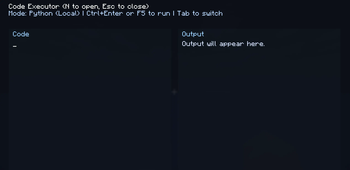
About this Mod
This mod adds a live scripting console directly into Minecraft – made by zerrissenheit.
Built for developers and experimenters who want to run and test code without leaving the game.
Controls:
N to open | Esc to close | Tab to switch runtime | F5 or Ctrl+Enter to run code
Ctrl+O to open AI settings | Ctrl+K to generate code with AI | Ctrl+L to load saved AI script
Features:
- Python local execution
- Java execution through external JShell
- Java Ingame mode running inside the Minecraft JVM
- Lua Ingame mode with full scripting support
- C++ execution via local toolchain
- AI assistant via Ollama – type a prompt, press Ctrl+K and get code generated instantly
- Ready bindings in Ingame modes: mc, player, level
- Live output panel for print output, errors, and execution status
Runtime requirements:
- Python (Local): requires Python in PATH
- Java (JShell): requires a JDK with JShell in PATH
- Java/Lua (Ingame): no external runtime needed
- AI (Ollama): requires a running Ollama instance (default: http://localhost:11434)
⚠️ Important Notice:
This scripting console is intended for development and experimentation only.
Any misuse for harmful actions, unauthorized access, or manipulation of
third-party servers is strictly prohibited. Use at your own risk. The author
accepts no liability for damage, data loss, account bans, or legal consequences.
Available Versions
How to Install Ingame Executor - made by zerrissenheit on Your Server
Order Server
Order a Minecraft Java server with at least 3 GB RAM (4 GB recommended).
Set fabric Loader
In the panel under "Egg", select the fabric loader and matching Minecraft version (26.1.2).
Install Mod
Open the mod browser in the dashboard and search for "Ingame Executor - made by zerrissenheit". Click "Install" – done! Alternatively, upload the .jar via SFTP to the /mods folder.
Compatibility
Mod Loaders
Minecraft Versions
26.1.2
Server-side
✗ UnsupportedRecommended RAM
4 GB(min. 3 GB)Frequently Asked Questions
Ingame Executor - made by zerrissenheit server crashes on startup – what to do?
Most common cause: wrong fabric version or insufficient RAM. Check the server log (latest.log) for "OutOfMemoryError" or "Mixin" errors. With Mado Hosting: ensure at least 3 GB RAM is allocated and the loader matches the mod version (26.1.2). You can switch loaders with one click in the panel.
Is Ingame Executor - made by zerrissenheit compatible with fabric?
Ingame Executor - made by zerrissenheit officially supports fabric for Minecraft 26.1.2. The Mado dashboard automatically detects incompatible loader combinations.
Server lagging with Ingame Executor - made by zerrissenheit – how to optimize performance?
Recommended RAM: 4 GB (per 8 players). Use /spark profiler to check if Ingame Executor - made by zerrissenheit consumes the most tick time. Common fixes: reduce server view-distance to 8-10, install "performant" or "starlight" as supplementary mods on Forge. With Mado Hosting, your server runs on NVMe SSDs with dedicated CPU cores for minimal latency.
Similar Mods






Rent Modded Server
Install Ingame Executor - made by zerrissenheit with just one click on your server.