
InPost (create add-on)
Transport items instantly between large distances with the new InPost block!
Screenshots
About this Mod
IMPORTANT: Please do not try transporting storage items (backpacks/create's packages etc.). It does NOT work yet! I'm sorry to any of you who lost items this way.
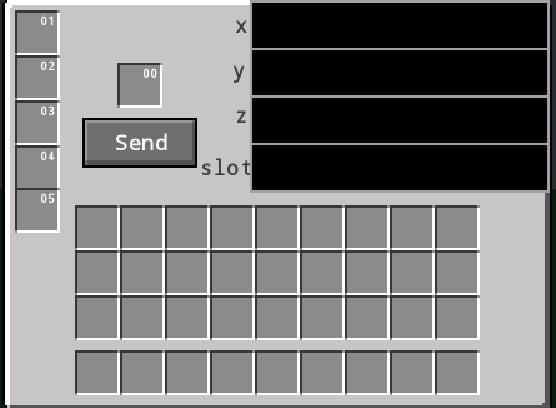
This mod adds InPost to the game, so you can send items to your friends or transport items instantly to wherever you want as long as there is an InPost block there and it's in the same dimension. It can be crafted by surrounding a chest with gold ingots to make an InPost creator and shift right click with it on a create packager. The 5 slots on the left are the items sent to you. The slot in the middle is where you input the item you want to send. In the top 3 textfields input the coordinates (x y z) and the bottom textfield is for the slot you would like to send the item to. If the slot is filled or there isn't an InPost block at the coordinates the item will remain in your block. The mod create version 6.0.0 or higher is required to make the block, but if create is then removed this mod will still work. Since 1.2.0 you can also automate sending with the use of InPost Calibrators, items crafted like a chain, but diagonally and with gold instead. By right-clicking they can be set to any value up to 128000 including negatives. After powering the block with redstone it will read data from the calibrators (which need to be placed in the bottom right slots, which are x, y, z and slot from top to bottom) and send the items just as if you pressed the send button!
Available Versions
How to Install InPost (create add-on) on Your Server
Order Server
Order a Minecraft Java server with at least 4 GB RAM (6 GB recommended).
Set forge Loader
In the panel under "Egg", select the forge loader and matching Minecraft version (1.21.1).
Install Mod
Open the mod browser in the dashboard and search for "InPost (create add-on)". Click "Install" – done! Alternatively, upload the .jar via SFTP to the /mods folder.
Compatibility
Mod Loaders
Minecraft Versions
1.21.1, 1.20.4, 1.20.1
Server-side
✓ RequiredRecommended RAM
6 GB(min. 4 GB)Frequently Asked Questions
InPost (create add-on) server crashes on startup – what to do?
Most common cause: wrong forge version or insufficient RAM. Check the server log (latest.log) for "OutOfMemoryError" or "Mixin" errors. With Mado Hosting: ensure at least 4 GB RAM is allocated and the loader matches the mod version (1.21.1). You can switch loaders with one click in the panel.
Is InPost (create add-on) compatible with forge and neoforge?
InPost (create add-on) officially supports forge, neoforge for Minecraft 1.21.1, 1.20.4, 1.20.1. The Mado dashboard automatically detects incompatible loader combinations.
Server lagging with InPost (create add-on) – how to optimize performance?
Recommended RAM: 6 GB (per 5 players). Use /spark profiler to check if InPost (create add-on) consumes the most tick time. Common fixes: reduce server view-distance to 8-10, install "performant" or "starlight" as supplementary mods on Forge. With Mado Hosting, your server runs on NVMe SSDs with dedicated CPU cores for minimal latency.
Similar Mods



![CobbleDollars [Cobblemon Addon]](https://cdn.modrinth.com/data/s7N7AsqL/684040a264fc1d7f9b856ec5d2da39767398c7ad.png)

Rent Modded Server
Install InPost (create add-on) with just one click on your server.