
IG: Durability Multiplier
Complete control over item durability in Minecraft 26.1+. Multiply durability by any factor or make items completely unbreakable — all through GameRules. Works automatically with modded items via vanilla tags. Part of the Instant Gratification Collection.
About this Mod





⚒️ Durability Multiplier
No Backports: This mod targets Minecraft 26.1+. Older versions are unsupported.
Stop babysitting your tools. Focus on the adventure.
Durability Multiplier gives you complete control over item longevity. Whether you want double durability or complete invincibility (God Mode), it's just a GameRule away.
Part of the Instant Gratification Collection — mods that respect the player's time.
✨ Features
🔧 Multiplier System
Make items last 2x, 10x, or even 2,147,483,647x longer.
- Global Multiplier: One rule to affect all damageable items.
- 12+ Granular Categories: Separate multipliers for Swords, Spears, Tridents, Maces, Bows, Crossbows, Tools, Armor, Elytra, and Shields.
- Overflow Protection: Uses
longmath internally to prevent integer overflow — items cap at max durability instead of breaking instantly.
🛡️ God Mode (Infinity)
Toggle complete invincibility for item categories.
- Per-Category Control: Make only your armor unbreakable, or make everything invincible.
- Hierarchy: Category-specific settings override Global settings. Infinity always takes precedence.
📦 Dynamic Modded Item Support
Automatically scans items on startup to dynamically register multipliers and infinity rules for custom modded items that don't fit into standard categories.
- Dynamic Config GUI: Customize modded items directly from the in-game configuration screen.
💬 Tooltip Display
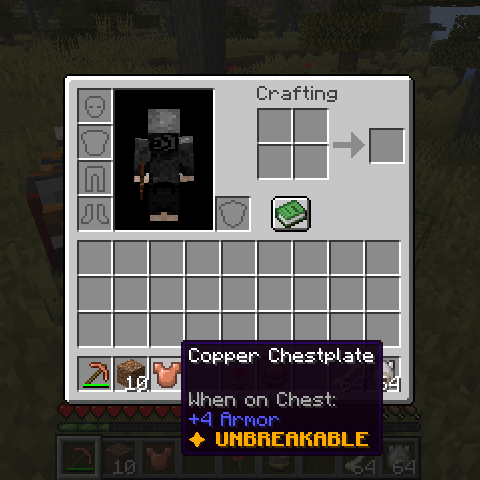
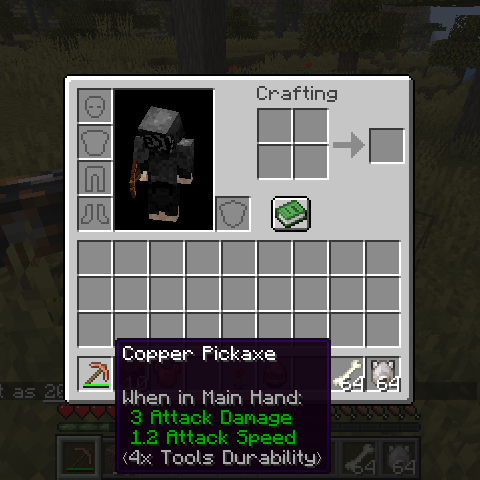
Hover over any item to see its durability status directly in its tooltip:
|
|
⟨Nx Category/Item Durability⟩— showing the active multiplier, dynamically rendering localized modded item names (e.g.,⟨4x Blood Katana Durability⟩).✦ UNBREAKABLE— gold bold text when God Mode is active.- Fully togglable via GameRule.
⚙️ Configuration (Native Game Rules & Config GUI)
Configure everything in-game using the Edit Game Rules screen, via standard commands, or through the optional configuration GUI (requires ModMenu + Cloth Config).
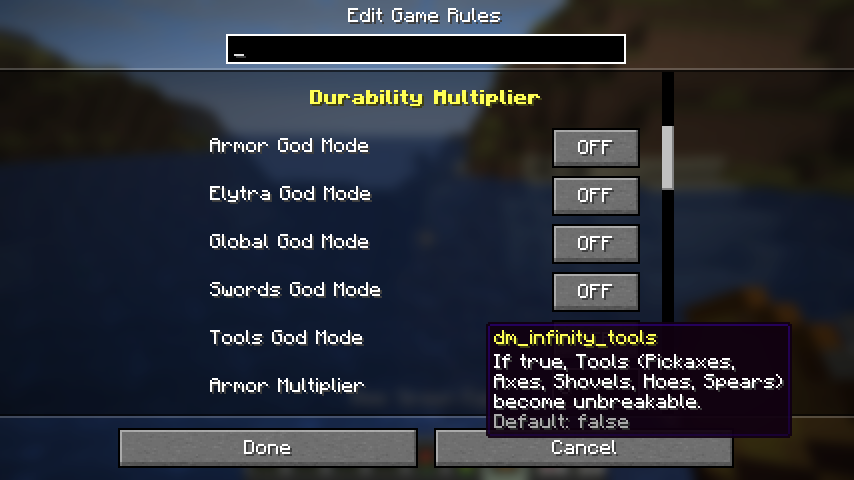
/gamerule ig:dm_multiplier_global 4      → 4x durability for everything
/gamerule ig:dm_infinity_swords true     → Swords never break
/gamerule ig:dm_multiplier_armor 10      → 10x armor durability
/gamerule ig:dm_infinity_global true     → Everything is unbreakable
/gamerule ig:dm_show_tooltip false       → Hide tooltip indicator
/gamerule ig:multiplier_mymod_cool_item 5 → 5x durability for a specific modded item
☕ Support
If you enjoy the Instant Gratification collection, consider fueling the next update!



[!NOTE]
Indonesian Users: SocioBuzz and Saweria support local payment methods (Gopay, OVO, Dana, etc.) if you want to support me without using PayPal/Ko-fi!
📜 Credits
| Role | Author |
|---|---|
| Creator | Rifaditya (Dasik) |
| Collection | Instant Gratification |
| License | GPLv3 |
[!IMPORTANT]
Modpack Permissions: You are free to include this mod in modpacks, provided the modpack is hosted on the same platform (e.g. Modrinth).Cross-platform distribution is not permitted. If you download this mod from Modrinth, your modpack must also be published on Modrinth.
Made with ❤️ for the Minecraft community
Part of the Instant Gratification Collection
Available Versions
How to Install IG: Durability Multiplier on Your Server
Order Server
Order a Minecraft Java server with at least 3 GB RAM (4 GB recommended).
Set fabric Loader
In the panel under "Egg", select the fabric loader and matching Minecraft version (26.2).
Install Mod
Open the mod browser in the dashboard and search for "IG: Durability Multiplier". Click "Install" – done! Alternatively, upload the .jar via SFTP to the /mods folder.
Compatibility
Mod Loaders
Minecraft Versions
26.2, 26.2-rc-2, 26.2-rc-1 (+26 more)
Server-side
✓ RequiredRecommended RAM
4 GB(min. 3 GB)Frequently Asked Questions
IG: Durability Multiplier server crashes on startup – what to do?
Most common cause: wrong fabric version or insufficient RAM. Check the server log (latest.log) for "OutOfMemoryError" or "Mixin" errors. With Mado Hosting: ensure at least 3 GB RAM is allocated and the loader matches the mod version (26.2). You can switch loaders with one click in the panel.
Is IG: Durability Multiplier compatible with fabric?
IG: Durability Multiplier officially supports fabric for Minecraft 26.2, 26.2-rc-2, 26.2-rc-1. The Mado dashboard automatically detects incompatible loader combinations.
Server lagging with IG: Durability Multiplier – how to optimize performance?
Recommended RAM: 4 GB (per 8 players). Use /spark profiler to check if IG: Durability Multiplier consumes the most tick time. Common fixes: reduce server view-distance to 8-10, install "performant" or "starlight" as supplementary mods on Forge. With Mado Hosting, your server runs on NVMe SSDs with dedicated CPU cores for minimal latency.
Similar Mods



![[TaCZ] Timeless and Classics Zero](https://cdn.modrinth.com/data/SzzJttH8/fd27766d2bb8390d284696b1dbd358f87e081439_96.webp)


Rent Modded Server
Install IG: Durability Multiplier with just one click on your server.