
InstantMarker
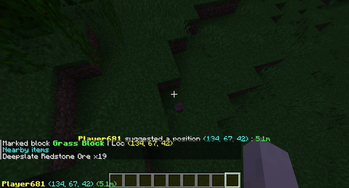
A Minecraft Fabric Mod that can mark the position you are pointing to and broadcast to all other players.
Screenshots
About this Mod
InstantMarker




Description
A Minecraft Fabric Mod that can mark the position you are pointing to and broadcast to all other players.
Usage
Install the mod, join a server or your single player world and press Z (you can change to other keys in Key Binding settings).
Configuration
You can modify global configurations in mod menu.
Also, we provided a command system that you can change configurations temporarily in game.
Commands
All in one root command: /im
Clear markers
To clear all markers you have created or received, type in the following command.
/im clear
Mute/Unmute
To mute a player's marking operation, you need to type this command, and he/she will be added into ignore list. It's only ignored by your client, but others can still see his/her markers.
/im mute <playerName>
To unmute a player, type this command, and he/she would be removed from ignore list.
/im unmute <playerName>
Sound settings
To enable/disable sound notification when someone (include yourself) marks a position, type the following command
/im sound
Local mode
To share or disable sharing your markers to others, use the following command
/im local
Share detailed information
To share more information around the marker, there are many things you can do
/im share <items|biome>
items: Share items around the marker (10×10×6 blocks) to others.biome: Share the biome the marker at to others.
Dependencies
oωo
Version requirement: >=0.8.2
Provides configuration management
(Optional) Mod Menu
Version requirement: >=4.0.5
Provides a global configurations panel
License
This project is licensed under MIT License. You can view it in LICENSE in root directory.
Available Versions
How to Install InstantMarker on Your Server
Order Server
Order a Minecraft Java server with at least 3 GB RAM (4 GB recommended).
Set fabric Loader
In the panel under "Egg", select the fabric loader and matching Minecraft version (1.21.4).
Install Mod
Open the mod browser in the dashboard and search for "InstantMarker". Click "Install" – done! Alternatively, upload the .jar via SFTP to the /mods folder.
Compatibility
Mod Loaders
Minecraft Versions
1.21.4, 1.21.1, 1.21 (+4 more)
Server-side
✓ RequiredRecommended RAM
4 GB(min. 3 GB)Frequently Asked Questions
InstantMarker server crashes on startup – what to do?
Most common cause: wrong fabric version or insufficient RAM. Check the server log (latest.log) for "OutOfMemoryError" or "Mixin" errors. With Mado Hosting: ensure at least 3 GB RAM is allocated and the loader matches the mod version (1.21.4). You can switch loaders with one click in the panel.
Is InstantMarker compatible with fabric?
InstantMarker officially supports fabric for Minecraft 1.21.4, 1.21.1, 1.21. The Mado dashboard automatically detects incompatible loader combinations.
Server lagging with InstantMarker – how to optimize performance?
Recommended RAM: 4 GB (per 8 players). Use /spark profiler to check if InstantMarker consumes the most tick time. Common fixes: reduce server view-distance to 8-10, install "performant" or "starlight" as supplementary mods on Forge. With Mado Hosting, your server runs on NVMe SSDs with dedicated CPU cores for minimal latency.
Similar Mods






Rent Modded Server
Install InstantMarker with just one click on your server.