
Integral
Verify that your players didn't edit the modpack you gave them
Screenshots
About this Mod
Integral
Verify that your players didn't edit the modpack you gave them
Features
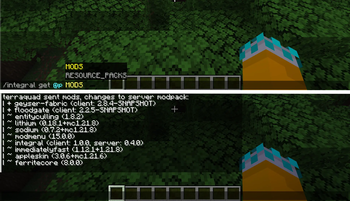
- Operators can request mod and resource packs lists from players
- These lists are also sent automatically on join and resource reload
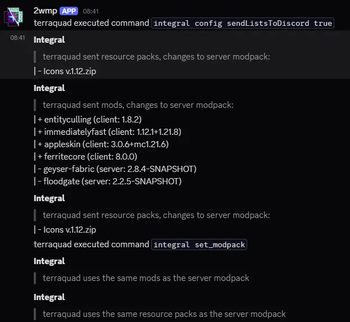
- The server will log the lists to the console and optionally to Discord
- It will also log whenever the mod isn't installed client-side and can tell
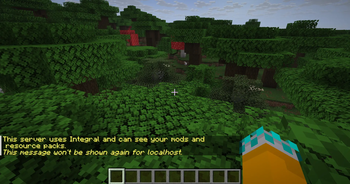
Java and Bedrock/Geyser players apart - Players will be notified when servers send list requests for the first time
Drawbacks
This mod doesn't protect your server on its own; it's possible for hackers to
spoof their lists, which is why you should still use other anticheat measures.
Unlike other anticheat mods, Integral will never kick/ban players, that decision
is left to admins.
Recommendation: Install a mod which increases the chat line limit
(e.g. More Chat History), since /integral get results may send more than
100 lines.
Commands
All commands start with /integral and require operator status (= permission level 4)
| Subcommand | Description |
|---|---|
set_modpack |
Sends the mod and resource packs lists of the executing player to the server. See compareLists below. |
get <PLAYER> <TYPE> [OVERLAPS=false] [SUMMARY=false] |
Requests a mod or resource pack list from the specified player and sends it to the executing player once received. [OVERLAPS] determines the inclusion of entries existing in both the server and client list; [SUMMARY] causes the command to return a summary instead of a report |
reload |
Reloads the server-side configuration (both integral.json and integral_modpack.json) |
config <KEY> [VALUE] |
Retrieves/changes the config value at KEY. |
Config options
| Option | Default | Description |
|---|---|---|
enableModInSingleplayer |
false |
Whether Integral should enable/disable itself when it detects that the client is in singleplayer. |
compareLists |
true |
When this is enabled and /integral set_modpack has been run at least once, Integral will show which mods were added/removed from the client modpack. |
includeOverlaps |
true |
When compareLists is true, this option will cause Integral to show mods existing on both sides. This includes version differences. |
requestModsOnJoin |
true |
Whether a mod list should be requested from players with Integral when they join the server. |
requestResourcePacksOnJoin |
true |
Same as requestModsOnJoin but for resource packs. |
requestResourcePacksOnReload |
true |
Players could spoof their resource pack list by enabling resource packs after joining. This option combats this by requesting the resource pack list when the player reloads their resource packs. |
reportPlayersWithoutMod |
true |
Logs players who don't have Integral installed, since they can't respond to list requests. Players who are connected through Geyser aren't affected by this option. |
reportGeyserPlayers |
true |
Include Geyser players in reportPlayersWithoutMod; they get a special log message. |
sendListsToDiscord |
false |
When Discord Integration is installed, lists are logged to the command log channel (if configured). |
summarizeToOperators |
false |
When a list request is collected, Integral will send a summary of the results to all operators. |
summarizeEverywhere |
false |
Like summarizeToOperators, but replacing every occasion where list contents would be logged with a summary. |
Available Versions
How to Install Integral on Your Server
Order Server
Order a Minecraft Java server with at least 3 GB RAM (4 GB recommended).
Set fabric Loader
In the panel under "Egg", select the fabric loader and matching Minecraft version (1.21.10).
Install Mod
Open the mod browser in the dashboard and search for "Integral". Click "Install" – done! Alternatively, upload the .jar via SFTP to the /mods folder.
Compatibility
Mod Loaders
Minecraft Versions
1.21.10, 1.21.9, 1.21.8
Server-side
✓ RequiredRecommended RAM
4 GB(min. 3 GB)Frequently Asked Questions
Integral server crashes on startup – what to do?
Most common cause: wrong fabric version or insufficient RAM. Check the server log (latest.log) for "OutOfMemoryError" or "Mixin" errors. With Mado Hosting: ensure at least 3 GB RAM is allocated and the loader matches the mod version (1.21.10). You can switch loaders with one click in the panel.
Is Integral compatible with fabric?
Integral officially supports fabric for Minecraft 1.21.10, 1.21.9, 1.21.8. The Mado dashboard automatically detects incompatible loader combinations.
Server lagging with Integral – how to optimize performance?
Recommended RAM: 4 GB (per 8 players). Use /spark profiler to check if Integral consumes the most tick time. Common fixes: reduce server view-distance to 8-10, install "performant" or "starlight" as supplementary mods on Forge. With Mado Hosting, your server runs on NVMe SSDs with dedicated CPU cores for minimal latency.
Similar Mods






Rent Modded Server
Install Integral with just one click on your server.