
Intense Horror
A night of fright is happening... Horrors will roam the night's surface!
Screenshots
About this Mod
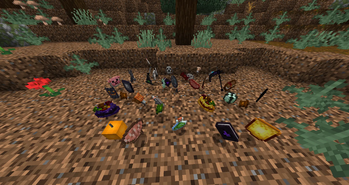
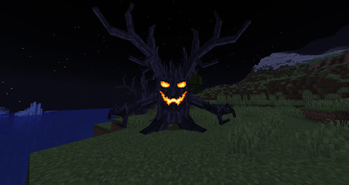
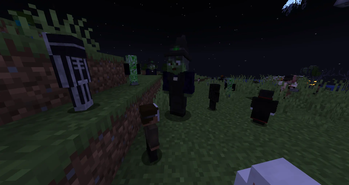
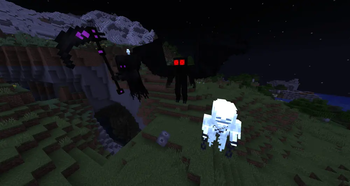
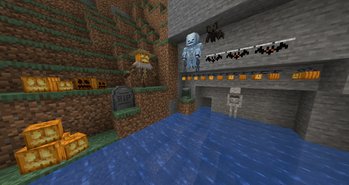
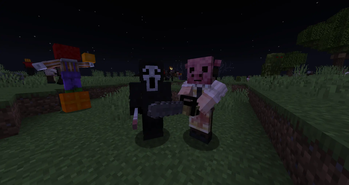
Dive into the ultimate horror experience with the Intense Horror Mod! This mod introduces the "Night of Fright," a nighttime event that can randomly occur, unleashing hordes of terrifying creatures. Face iconic monsters from classic horror films like Jason Voorhees or Michael Myers, as well as fearsome beings like the Mourning Wood from Terraria. Inspired by Terraria's "Solar Eclipse" event, this mod offers exciting Easter eggs, familiar elements for fans, and new decorations for your home. With new weapons and items at your disposal, are you ready to confront your fears and survive the night?
Updates continue on Curseforge
- A mod made by Zcoper
- Mod created with MCreator!
- Requires Geckolib
● Visit my Discord Server!
https://discord.gg/akP56NtmVQ
● Important FaQ
Spoiler
► [OLD] What is my console spaming?
► [OLD] What is my console spaming?
Most mobs use special spawning conditions, which means that these mobs can only appear under certain conditions. If the spawning conditions work, this spam is created in the console.
► [OLD] Why can't I summon a mob?
Spawning Conditions determine which conditions must be met in order to spawn certain mobs. Some mobs only spawn above Y level 60. Some below. Most mobs can only spawn in the overworld than in other dimensions.
► Why are features missing in different versions?
It is recommended to play the newest versions of higher minecraft versions.
Not all features of MCreator available or the same in different versions.
For example: Version 1.19.2 doesn't have the feature of shield, better structure generation or custom villagers, but Version 1.20.1 does have them.
► Why are Mobs not spawning?
Intense Horror's mobs only spawn during the night during a specific event called "Night of Fright."
► How to disable Music?
Music can be switched off using the gamerule "allowNightOfFrightMusic" if it is set to false.
► How to disable Night of Fright?
Night of Fright can be switched off using the gamerule "allowNightOfFright" if it is set to false.
But keep in mind that the monsters will spawn during the night, if the gamerule is set to false.
You can also stop the Night of Fright by using a Solar Tablet on the Lunatic Altar.
► Do Moon Phases affect the triggerrate of a Night of Fright?
Yes! All 8 different moon phases have an impact on the chances that a Night of Fright can happen.
Moon Phase 1 (Full Moon)
1% chance of happening if the trigger entity spawned at the day (100 / 1).
Moon Phase 2 and 8
10% chance of happening if the trigger entity spawned at the day (100 / 1).
Moon Phase 3 and 7
20% chance of happening if the trigger entity spawned at the day (100 / 1).
Moon Phase 4 and 6
40% chance of happening if the trigger entity spawned at the day (100 / 1).
Moon Phase 5 (New Moon)
65% chance of happening if the trigger entity spawned at the day (100 / 1).
► Why is my Game crashing when shooting with a ranged weapon?
The game can crash if you shoot too quickly with a ranged weapon or if a mob is hit by multiple projectiles too quickly.
► How to turn on/off the event?
The Night of Fright is naturally triggered by a Trigger Entity during the day. When night falls, the event starts and when it becomes day, the event ends and all monsters disappear. However, the Night of Fright is rarely triggered, but can also be influenced by the number of other mods.
Alternatively, you can trigger the event using a Lunar Tablet at a Lunatic Altar during the day. To stop the event you can use a solar tablet on a Lunatic Altar during the night.
► How do I get some Items?
During the Night of Fright, entities can drop new items when you kill them. These can be candy bags, decorative blocks, lunar tablets or, for example, new weapons....
A new villager called "Collector" can also sell new items for Emeralds. This Villager requires a chest as a profession block.
- Config File not inculed.
- You are all allowed to use this mod in your modpacks!
- Do not port my mods without permission!
Available Versions
How to Install Intense Horror on Your Server
Order Server
Order a Minecraft Java server with at least 3 GB RAM (4 GB recommended).
Set forge Loader
In the panel under "Egg", select the forge loader and matching Minecraft version (1.20.1).
Install Mod
Open the mod browser in the dashboard and search for "Intense Horror". Click "Install" – done! Alternatively, upload the .jar via SFTP to the /mods folder.
Compatibility
Mod Loaders
Minecraft Versions
1.20.1, 1.19.4, 1.19.2
Server-side
✓ RequiredRecommended RAM
4 GB(min. 3 GB)Frequently Asked Questions
Intense Horror server crashes on startup – what to do?
Most common cause: wrong forge version or insufficient RAM. Check the server log (latest.log) for "OutOfMemoryError" or "Mixin" errors. With Mado Hosting: ensure at least 3 GB RAM is allocated and the loader matches the mod version (1.20.1). You can switch loaders with one click in the panel.
Is Intense Horror compatible with forge?
Intense Horror officially supports forge for Minecraft 1.20.1, 1.19.4, 1.19.2. The Mado dashboard automatically detects incompatible loader combinations.
Server lagging with Intense Horror – how to optimize performance?
Recommended RAM: 4 GB (per 8 players). Use /spark profiler to check if Intense Horror consumes the most tick time. Common fixes: reduce server view-distance to 8-10, install "performant" or "starlight" as supplementary mods on Forge. With Mado Hosting, your server runs on NVMe SSDs with dedicated CPU cores for minimal latency.
Similar Mods




Rent Modded Server
Install Intense Horror with just one click on your server.