
IntervalCommands
Schedules chat messages and commands at custom intervals.
Screenshots
About this Mod
English
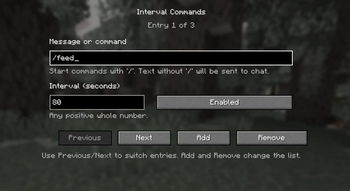
This mod allows you to automatically send chat messages and commands at custom intervals.
You can add any number of entries, set a separate interval for each one, and manage everything through a simple in-game config screen.
Features
- Automatic sending of chat messages and commands
- Unlimited number of entries
- Separate interval for each entry
- Simple in-game configuration
- English and Russian localization
How it works
- Text starting with
/is sent as a command - Text without
/is sent as a normal chat message
Notes
- Works in singleplayer and on multiplayer servers
- Press
Kto open the config screen
Русский
Этот мод позволяет автоматически отправлять сообщения и команды в чат через заданные интервалы времени.
Вы можете добавить любое количество записей, задать отдельный интервал для каждой из них и управлять всем через простое меню настройки прямо в игре.
Возможности
- Автоматическая отправка сообщений и команд в чат
- Неограниченное количество записей
- Отдельный интервал для каждой записи
- Простая настройка прямо в игре
- Поддержка английского и русского языков
Как это работает
- Текст, начинающийся с
/, отправляется как команда - Текст без
/отправляется как обычное сообщение в чат
Примечания
- Работает в одиночной игре и на серверах
- Клавиша
Kоткрывает меню настройки
Available Versions
How to Install IntervalCommands on Your Server
Order Server
Order a Minecraft Java server with at least 3 GB RAM (4 GB recommended).
Set fabric Loader
In the panel under "Egg", select the fabric loader and matching Minecraft version (1.21.8).
Install Mod
Open the mod browser in the dashboard and search for "IntervalCommands". Click "Install" – done! Alternatively, upload the .jar via SFTP to the /mods folder.
Compatibility
Mod Loaders
Minecraft Versions
1.21.8, 1.21.7, 1.21.6 (+6 more)
Server-side
✗ UnsupportedRecommended RAM
4 GB(min. 3 GB)Frequently Asked Questions
IntervalCommands server crashes on startup – what to do?
Most common cause: wrong fabric version or insufficient RAM. Check the server log (latest.log) for "OutOfMemoryError" or "Mixin" errors. With Mado Hosting: ensure at least 3 GB RAM is allocated and the loader matches the mod version (1.21.8). You can switch loaders with one click in the panel.
Is IntervalCommands compatible with fabric?
IntervalCommands officially supports fabric for Minecraft 1.21.8, 1.21.7, 1.21.6. The Mado dashboard automatically detects incompatible loader combinations.
Server lagging with IntervalCommands – how to optimize performance?
Recommended RAM: 4 GB (per 8 players). Use /spark profiler to check if IntervalCommands consumes the most tick time. Common fixes: reduce server view-distance to 8-10, install "performant" or "starlight" as supplementary mods on Forge. With Mado Hosting, your server runs on NVMe SSDs with dedicated CPU cores for minimal latency.
Similar Mods






Rent Modded Server
Install IntervalCommands with just one click on your server.