
InTheMinecraftGalaxy
A custom mod designed for the InTheMinecraftGalaxy server, bringing exciting new mechanics and items to enhance your Minecraft experience.
Screenshots

About this Mod
InTheMinecraftGalaxy
A custom mod designed for the InTheMinecraftGalaxy server, bringing exciting new mechanics and items to enhance your Minecraft experience.
Features
This mod adds Lifesteal features and custom items to the game.
LifeSteal
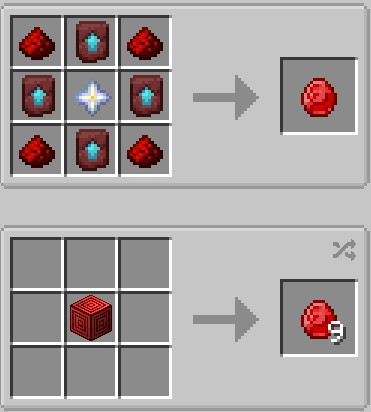
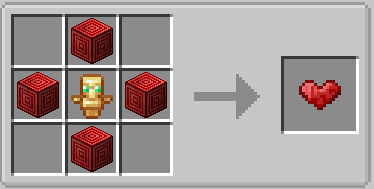
- If you kill another player, you get an extra heart and the killed player loses 1.
- You can craft hearts, although not easy.
- using /giveHeart you can send a heart to whoever you want.
- Inspired by Lifesteal mod by Mian
Unique Items
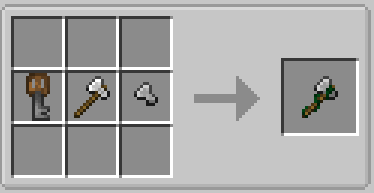
- Timber Axe
- Mines all connecting logs at once.
- Compatible enchants: Unbreaking and Efficiency
- Snow Sword
- If an entity gets attacked with this sword, a slowness effect is applied.
- Compatible enchants: Unbreaking and Sharpness
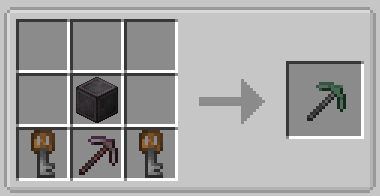
- Vein Mining Pickaxe
- Allows players to mine entire veins of ore at once.
- Compatible enchants: Unbreaking and Efficiency
- Unique key
- Needed to craft any of the items described above.
- Found in Minecraft trial chambers.
For a closer look at these items, check out the gallery: See Here
Other
This is my first ever mod, so if there are bugs, please report them here: Report Issues
Available Versions
How to Install InTheMinecraftGalaxy on Your Server
Order Server
Order a Minecraft Java server with at least 3 GB RAM (4 GB recommended).
Set fabric Loader
In the panel under "Egg", select the fabric loader and matching Minecraft version (1.21.3).
Install Mod
Open the mod browser in the dashboard and search for "InTheMinecraftGalaxy". Click "Install" – done! Alternatively, upload the .jar via SFTP to the /mods folder.
Compatibility
Mod Loaders
Minecraft Versions
1.21.3, 1.21.2, 1.21.1
Server-side
✓ RequiredRecommended RAM
4 GB(min. 3 GB)Frequently Asked Questions
InTheMinecraftGalaxy server crashes on startup – what to do?
Most common cause: wrong fabric version or insufficient RAM. Check the server log (latest.log) for "OutOfMemoryError" or "Mixin" errors. With Mado Hosting: ensure at least 3 GB RAM is allocated and the loader matches the mod version (1.21.3). You can switch loaders with one click in the panel.
Is InTheMinecraftGalaxy compatible with fabric?
InTheMinecraftGalaxy officially supports fabric for Minecraft 1.21.3, 1.21.2, 1.21.1. The Mado dashboard automatically detects incompatible loader combinations.
Server lagging with InTheMinecraftGalaxy – how to optimize performance?
Recommended RAM: 4 GB (per 8 players). Use /spark profiler to check if InTheMinecraftGalaxy consumes the most tick time. Common fixes: reduce server view-distance to 8-10, install "performant" or "starlight" as supplementary mods on Forge. With Mado Hosting, your server runs on NVMe SSDs with dedicated CPU cores for minimal latency.
Similar Mods



![[TaCZ] Timeless and Classics Zero](https://cdn.modrinth.com/data/SzzJttH8/fd27766d2bb8390d284696b1dbd358f87e081439_96.webp)


Rent Modded Server
Install InTheMinecraftGalaxy with just one click on your server.