
Inventory Manager: Smart Storage
A simple and powerful Minecraft inventory and chest management mod.
Screenshots

About this Mod
Inventory Manager
Inventory Manager is a Minecraft mod designed to make chest, inventory, and storage management much simpler, faster, and more enjoyable.
The mod adds a complete in-game interface to help you organize your chests, transfer items, sort your inventory, and manage your storage systems more easily. It is especially useful in survival worlds when you start having many chests, many resources, and want to save time instead of sorting everything manually.
Main Features
Rename and register chests
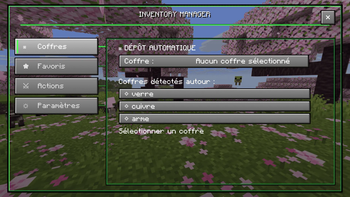
Automatically detect registered chests around the player
Display an item directly on a chest in the world
Choose the display side of the item on the chest
Automatic deposit system
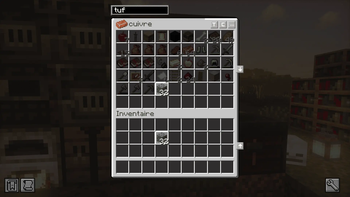
Search bar inside chests
Transfer buttons between the chest and the inventory
Automatic inventory sorting
Automatic chest sorting
Favorites system to keep important items organized
Simple, clean interface integrated into the Minecraft style
Automatic Deposit
The automatic deposit system allows you to link specific items to a specific chest. Once configured, the mod can automatically deposit selected items into the correct chest, making it much easier to store resources without having to move everything manually.
Item Display on Chests
Inventory Manager also allows you to display an item directly on a chest in the world. This is useful for quickly identifying what a chest contains without needing to open it. You can also choose the item’s display position on the chest, such as front, back, left, right, or positions adapted for double chests.
Favorites
The favorites system allows you to keep important items in specific slots, such as tools, weapons, or useful items. This helps keep your inventory clean and organized while playing.
Why Use Inventory Manager?
Inventory Manager is made for players who want to spend less time sorting chests and more time playing. Whether you are building a survival base, a storage room, or playing a modded adventure, this mod makes item management much more comfortable.
Requirements
Minecraft 26.1.2
Fabric Loader
Fabric API
Version
First public release of the mod.
Available Versions
How to Install Inventory Manager: Smart Storage on Your Server
Order Server
Order a Minecraft Java server with at least 3 GB RAM (4 GB recommended).
Set fabric Loader
In the panel under "Egg", select the fabric loader and matching Minecraft version (26.1.2).
Install Mod
Open the mod browser in the dashboard and search for "Inventory Manager: Smart Storage". Click "Install" – done! Alternatively, upload the .jar via SFTP to the /mods folder.
Compatibility
Mod Loaders
Minecraft Versions
26.1.2
Server-side
✓ RequiredRecommended RAM
4 GB(min. 3 GB)Frequently Asked Questions
Inventory Manager: Smart Storage server crashes on startup – what to do?
Most common cause: wrong fabric version or insufficient RAM. Check the server log (latest.log) for "OutOfMemoryError" or "Mixin" errors. With Mado Hosting: ensure at least 3 GB RAM is allocated and the loader matches the mod version (26.1.2). You can switch loaders with one click in the panel.
Is Inventory Manager: Smart Storage compatible with fabric?
Inventory Manager: Smart Storage officially supports fabric for Minecraft 26.1.2. The Mado dashboard automatically detects incompatible loader combinations.
Server lagging with Inventory Manager: Smart Storage – how to optimize performance?
Recommended RAM: 4 GB (per 8 players). Use /spark profiler to check if Inventory Manager: Smart Storage consumes the most tick time. Common fixes: reduce server view-distance to 8-10, install "performant" or "starlight" as supplementary mods on Forge. With Mado Hosting, your server runs on NVMe SSDs with dedicated CPU cores for minimal latency.
Similar Mods






Rent Modded Server
Install Inventory Manager: Smart Storage with just one click on your server.