
ISB - Inventory Sorter Button
One-Click Inventory Sort Button.
Screenshots
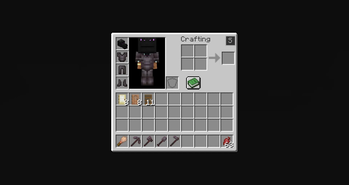
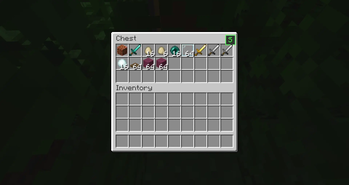
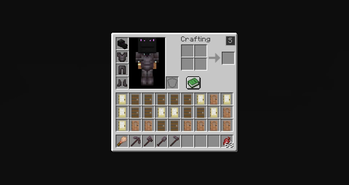
About this Mod
The mod adds a small button inside the inventory screen that allows players to quickly sort items in a simple and predictable way.
The goal of the mod is very straightforward: make it easier to organize inventories without changing how the game works.
🔹 What the Mod Does
When you open your inventory or a chest, a small button appears in the top-right corner of the GUI.
When this button is clicked, the mod:
• Reads the item stacks in the inventory
• Sorts them alphabetically based on their item registry name
• Reorders the slots according to that order
The items themselves are not modified. The mod only changes where the stacks are placed inside the inventory.
📦 Supported Screens
The sorting button works in:
✔ Player inventory
✔ Chest GUI
The sorting logic only affects the inventory slots visible in the container.
⚙️ Behavior
The sorting system follows a few simple rules:
🔹 Alphabetical order
Items are sorted using their registry names.
🔹 Stacks stay intact
Item stacks are never split or merged by the mod.
🔹 Slots are only reordered
The mod does not modify NBT data, durability, enchantments, or any other item information.
🔹 Client-side only
The mod runs entirely on the client and does not add any server-side functionality.
🖥 Interface
The mod adds a small button to the inventory GUI.
It is placed in the top-right area of the inventory screen so it is accessible but does not interfere with the rest of the interface.
Clicking the button immediately triggers the sorting process.
Available Versions
How to Install ISB - Inventory Sorter Button on Your Server
Order Server
Order a Minecraft Java server with at least 3 GB RAM (4 GB recommended).
Set fabric Loader
In the panel under "Egg", select the fabric loader and matching Minecraft version (1.21.11).
Install Mod
Open the mod browser in the dashboard and search for "ISB - Inventory Sorter Button". Click "Install" – done! Alternatively, upload the .jar via SFTP to the /mods folder.
Compatibility
Mod Loaders
Minecraft Versions
1.21.11, 1.21.10, 1.21.9 (+26 more)
Server-side
✗ UnsupportedRecommended RAM
4 GB(min. 3 GB)Frequently Asked Questions
ISB - Inventory Sorter Button server crashes on startup – what to do?
Most common cause: wrong fabric version or insufficient RAM. Check the server log (latest.log) for "OutOfMemoryError" or "Mixin" errors. With Mado Hosting: ensure at least 3 GB RAM is allocated and the loader matches the mod version (1.21.11). You can switch loaders with one click in the panel.
Is ISB - Inventory Sorter Button compatible with fabric and forge and neoforge?
ISB - Inventory Sorter Button officially supports fabric, forge, neoforge for Minecraft 1.21.11, 1.21.10, 1.21.9. Note: Forge and Fabric mods are NOT cross-compatible – pick one loader and stick with it. The Mado dashboard automatically detects incompatible loader combinations.
Server lagging with ISB - Inventory Sorter Button – how to optimize performance?
Recommended RAM: 4 GB (per 8 players). Use /spark profiler to check if ISB - Inventory Sorter Button consumes the most tick time. Common fixes: reduce server view-distance to 8-10, install "performant" or "starlight" as supplementary mods on Forge. With Mado Hosting, your server runs on NVMe SSDs with dedicated CPU cores for minimal latency.
Rent Modded Server
Install ISB - Inventory Sorter Button with just one click on your server.