
InventoryCleaner
A mod that automatically throws away junk items usefull for pvp and normal use
Screenshots

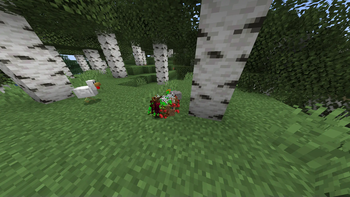


About this Mod
☕ Support My Work
If you would like to support me and my projects, feel free to buy me a coffee!


Gui for versions above 1.1.3
- First u will need to set a keybind in the settings for the gui then open it
- Note that the gui was added in 1.1.3 versions below still use command system
How to set up
- Open Minecraft and navigate to Settings > Controls > Key Bindings or open the gui and toggle it from there.
- Search for InventoryCleaner and set a keybind to toggle the mod on and off.
- Use the assigned keybind to toggle the mod on it will only throw if the mod is on
Inventory Cleaner
Inventory Cleaner is a useful mod that automates the task of throwing away junk and useless items from your inventory. It provides a convenient solution for keeping your inventory clean and organized.
- You can turn the mod on and off by going in options/controls/keybinds.
Features
Toggleable Cleaning: Enable or disable the InventoryCleaner to clean your inventory.
Inventory open Will automatically open the inventory when throwing items better for multiplayer servers. version above 1.1.3
Add Items to Throw List: Use commands to add items to the list of items that will be thrown when the InventoryCleaner is active.
Remove Items from Throw List Remove items from the throw list using commands.
Commands
- /ic additem
- (for adding an item to throw list) for items with spaces like Iron sword
you should use _ (iron_sword). - /ic delitem
- (for deleting items from throw list)
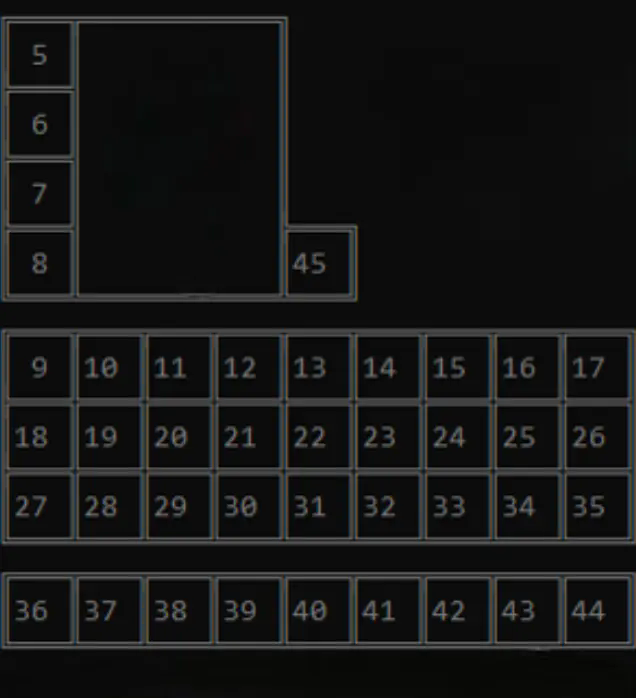
- /ic lockslot
(to lock a slot so it wont throw the item from that slot) - /ic unlockslot
(to unlock the locked slot) - /ic list (lists all items in the throw list and all locked slots)
- /ic config save
(saves the current throw list and locked slots as a configuration with the given name) - /ic config load
(loads a saved configuration with the given name) - /ic delay seconds < (the delay betwen items to throw)
- /ic mode WHITELIST: it wont throw the items in the list.
- /ic mode BLACKLSIT: it will throw the items in the list.
Configuration
- The mod uses a configuration file (inventorycleaner.properties) to store the list of items to throw which can be found in the config folder.
Contributing
Feel free to open issues or pull requests for bug fixes or improvements.
Here are the slot ids
Available Versions
How to Install InventoryCleaner on Your Server
Order Server
Order a Minecraft Java server with at least 3 GB RAM (4 GB recommended).
Set fabric Loader
In the panel under "Egg", select the fabric loader and matching Minecraft version (26.1.2).
Install Mod
Open the mod browser in the dashboard and search for "InventoryCleaner". Click "Install" – done! Alternatively, upload the .jar via SFTP to the /mods folder.
Compatibility
Mod Loaders
Minecraft Versions
26.1.2, 26.1.1, 26.1 (+17 more)
Server-side
✗ UnsupportedRecommended RAM
4 GB(min. 3 GB)Frequently Asked Questions
InventoryCleaner server crashes on startup – what to do?
Most common cause: wrong fabric version or insufficient RAM. Check the server log (latest.log) for "OutOfMemoryError" or "Mixin" errors. With Mado Hosting: ensure at least 3 GB RAM is allocated and the loader matches the mod version (26.1.2). You can switch loaders with one click in the panel.
Is InventoryCleaner compatible with fabric and quilt?
InventoryCleaner officially supports fabric, quilt for Minecraft 26.1.2, 26.1.1, 26.1. The Mado dashboard automatically detects incompatible loader combinations.
Server lagging with InventoryCleaner – how to optimize performance?
Recommended RAM: 4 GB (per 8 players). Use /spark profiler to check if InventoryCleaner consumes the most tick time. Common fixes: reduce server view-distance to 8-10, install "performant" or "starlight" as supplementary mods on Forge. With Mado Hosting, your server runs on NVMe SSDs with dedicated CPU cores for minimal latency.
Similar Mods




Rent Modded Server
Install InventoryCleaner with just one click on your server.