
InvSort
Quickly sort Minecraft inventories and containers into a clean, predictable order.
Screenshots
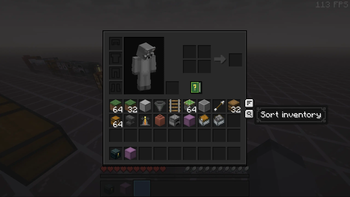
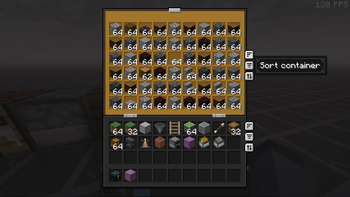
About this Mod
InvSort is a lightweight Fabric client mod that adds fast, practical inventory
sorting to Minecraft. It cleans up messy inventories and containers without
making you manually drag every stack around.
It focuses on predictable survival-friendly sorting: restacking partial piles,
compacting empty gaps, and ordering items in a way that keeps common storage
readable. Use it on its own, or alongside InvSearch and InvCatalogue as part of
the wider inventory management suite.
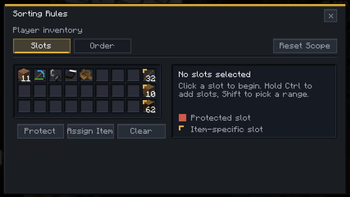
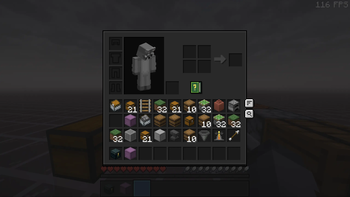
Open supported inventories and containers to use the Sort button. Right-click
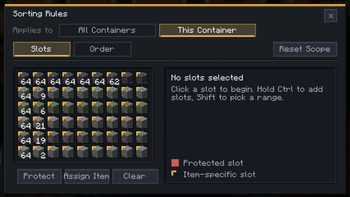
that button to open the rules screen, where you can protect slots, assign exact
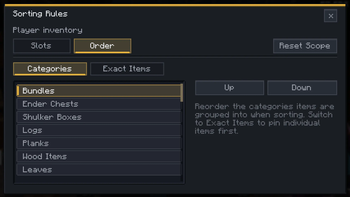
items to specific slots, and control the order that categories or exact items
should follow.
The rules screen has separate Slots and Order views. Use Slots when you want
parts of an inventory or chest to stay untouched, or when one slot should only
receive a particular item. Use Order when you want logs, planks, tools, stone,
food, or exact items to appear in your preferred sequence.
Features
- Sort button for supported inventory and container screens
- Right-click rules screen for custom inventory and container layouts
- Protected slots that sorting will not move items into or out of
- Item-specific slots for keeping resources, tools, or building blocks in fixed
places - Custom category and exact-item sort ordering
- Per-screen, per-container, and global rule scopes
- Restacks partial piles before laying items out cleanly
- Compacts empty gaps so storage is easier to scan
- Practical default ordering by stack size, item category, and item id
- Hotbar-friendly player inventory behavior
- Skips slot-sensitive screens such as hoppers, furnaces, and brewing stands
- Works client-side in singleplayer, LAN, Realms, and multiplayer where
client-side utility mods are allowed
Good for
- Cleaning up messy chests, barrels, and shulker boxes
- Keeping survival storage readable
- Resetting dump chests after a mining or building session
- Keeping hotbar supplies, building palettes, and tool slots where you expect
them - Players who want predictable sorting without server-side changes
- Using alongside InvSearch and InvCatalogue for broader inventory management
Install note
InvSort does not require a server install. Install Fabric Loader, Fabric API,
and the InvSort jar for your Minecraft version.
It does not add blocks, items, or server mechanics. Server rules still apply,
so only use it where client-side utility mods are allowed.
Available Versions
How to Install InvSort on Your Server
Order Server
Order a Minecraft Java server with at least 3 GB RAM (4 GB recommended).
Set fabric Loader
In the panel under "Egg", select the fabric loader and matching Minecraft version (26.3-snapshot-1).
Install Mod
Open the mod browser in the dashboard and search for "InvSort". Click "Install" – done! Alternatively, upload the .jar via SFTP to the /mods folder.
Compatibility
Mod Loaders
Minecraft Versions
26.3-snapshot-1, 26.2, 26.2-pre-3 (+22 more)
Server-side
✗ UnsupportedRecommended RAM
4 GB(min. 3 GB)Frequently Asked Questions
InvSort server crashes on startup – what to do?
Most common cause: wrong fabric version or insufficient RAM. Check the server log (latest.log) for "OutOfMemoryError" or "Mixin" errors. With Mado Hosting: ensure at least 3 GB RAM is allocated and the loader matches the mod version (26.3-snapshot-1). You can switch loaders with one click in the panel.
Is InvSort compatible with fabric?
InvSort officially supports fabric for Minecraft 26.3-snapshot-1, 26.2, 26.2-pre-3. The Mado dashboard automatically detects incompatible loader combinations.
Server lagging with InvSort – how to optimize performance?
Recommended RAM: 4 GB (per 8 players). Use /spark profiler to check if InvSort consumes the most tick time. Common fixes: reduce server view-distance to 8-10, install "performant" or "starlight" as supplementary mods on Forge. With Mado Hosting, your server runs on NVMe SSDs with dedicated CPU cores for minimal latency.
Similar Mods






Rent Modded Server
Install InvSort with just one click on your server.