
IPWhitelist
This mod is made for server admins to stop bot raiding or other people join without permission. What this mod does is binds an IP to a Player and nobody can join with that name but the real player.
Screenshots
About this Mod
IPWL IP-Based Whitelist for Minecraft (Fabric)
Minecraft: 1.21.1-26.2 | Loader: Fabric | Java: 25 | License: GPL
A server-side mod that adds a second security layer on top of Mojang authentication. Every player is bound to one or more approved IP addresses, even if someone has a valid account, they cannot join unless they are connecting from a pre-approved IP. Connections are blocked before authentication even completes, so rejected players consume minimal server resources.
Installation
- Drop the
.jarinto your server'smods/folder. - Start the server. The mod creates
config/ipwl.jsonautomatically. - Add yourself as an IPWL admin (see below) and start managing players.
No OP required. IPWL uses its own admin list — OP status is completely separate.
Admin Setup
IPWL has its own permission system. Only players listed as IPWL admins can run any /ipwl, /lockdown, /seen, or /connections command. The server console always has full access.
/ipwl admin add <player>     — Grant IPWL access (saved to config immediately)
/ipwl admin remove <player>  — Revoke access instantly, refreshes their command tree
/ipwl admin list             — Show all current IPWL admins
When an admin is removed they lose tab-complete and command execution immediately without needing to rejoin.
Whitelist Commands
/ipwl add <player>           — Allow player from any IP
/ipwl add <player> <ip>      — Allow player from a specific IP
/ipwl addip <player> <ip>    — Add a second allowed IP to an existing player
/ipwl removeip <player> <ip> — Remove one specific IP from a player
/ipwl remove <player>        — Remove player entirely and kick them if online
/ipwl list                   — Show all whitelisted players and their IPs
/ipwl reload                 — Reload config and whitelist from disk
IP formats supported:
- Exact:
192.168.1.5 - Wildcard suffix:
192.168.1.*(matches any IP starting with that prefix) - CIDR notation:
192.168.1.0/24(works for both IPv4 and IPv6) - Any IP:
*(player can join from anywhere)
Temporary Access
/ipwl tempadd <player> <ip> <duration>
Grants access for a limited time without modifying the permanent whitelist. Duration examples: 30m, 2h, 1d, 3600s. When the time expires, all online admins are notified automatically.
IP Bans
/ipwl banip <ip>       — Permanently ban an IP (blocks all accounts from it)
/ipwl unbanip <ip>     — Lift a permanent ban
/ipwl banip list       — Show all permanently banned IPs
Permanent bans are saved to config/ipwl.json and survive server restarts.
Security Tools
/lockdown on     — Block all new connections immediately (admins still allowed)
/lockdown off    — Resume normal operation
/seen <player>   — Show last known IP and timestamp for a player
/connections     — List all currently active connections
/security status — Show live security stats (blocked, allowed, temp bans, etc.)
Unknown Player Alerts
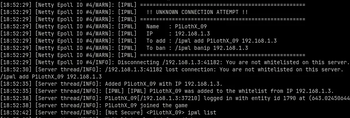
When someone tries to join and is not on the whitelist, every online admin receives a chat message with two clickable buttons:
- [Accept] — runs
/ipwl add <player> <ip>instantly - [Ban IP] — runs
/ipwl banip <ip>instantly
At the same time, the server console prints a clearly visible block:
[IPWL] ====================================================
[IPWL]   !! UNKNOWN CONNECTION ATTEMPT !!
[IPWL] ====================================================
[IPWL]   Name   : Steve
[IPWL]   IP     : 192.168.1.100
[IPWL]   To add : /ipwl add Steve 192.168.1.100
[IPWL]   To ban : /ipwl banip 192.168.1.100
[IPWL] ====================================================
All admin actions (accept, ban, remove) are broadcast to every online admin so no one acts on stale information.
Bruteforce & Rate Limiting
The mod automatically detects and blocks abusive connection patterns:
| Pattern | Action |
|---|---|
| Same IP tries 3+ different usernames within 60 seconds | 1-hour ban (bot / credential stuffing) |
| Same IP hammers the server too fast (rate limit threshold) | 5-minute ban (configurable) |
| Permanent ban in config | Blocked forever |
Both ban types are enforced before authentication completes.
Logging
/ipwl logs verbose   — Log all attempts, retries, and debug info
/ipwl logs silent    — Log only kicks and critical security events (default)
The console always shows unknown-player alerts and bruteforce detections regardless of log level.
Configuration
Located at config/ipwl.json. Created automatically on first run.
| Field | Default | Description |
|---|---|---|
maxConnectionsPerIp |
2 |
Max simultaneous sessions from one IP |
rateLimitWindowMs |
1000 |
Minimum ms between connections from same IP |
maxFailuresBeforeTempBan |
5 |
Rate limit failures before 5-min temp ban |
tempBanDurationMs |
300000 |
Single-name temp ban duration (ms) |
enableRateLimit |
true |
Toggle rate limiting |
enableDuplicateCheck |
true |
Block duplicate logins for the same username |
enableJoinAlerts |
true |
Send admin alerts for unknown players |
alertCooldownMs |
30000 |
Minimum ms between alerts for the same IP |
verboseLogging |
false |
Mirrors /ipwl logs verbose |
allowWildcardIps |
true |
Allow * as a wildcard IP entry |
allowSubnetPatterns |
true |
Allow 192.168.1.* style patterns |
admins |
[] |
List of IPWL admin usernames |
bannedIps |
[] |
Permanently banned IPs |
Data Files
| File | Contents |
|---|---|
config/ipwl.json |
All settings, admin list, permanent IP bans |
config/ipwl_whitelist.json |
Player → IP mappings |
config/ipwl-stats.json |
Persistent connection statistics (survives restarts) |
config/ipwl-seen.json |
Last-seen data for /seen command |
config/ipwl-lang.json |
Optional message overrides (no rebuild needed) |
To customise any in-game message, create config/ipwl-lang.json on the server and add only the keys you want to change. This file takes priority over the built-in strings.
How It Works (Brief)
Every login attempt is intercepted at ServerboundHelloPacket — the very first packet a client sends — before Mojang authentication starts. The checks run in this order:
- Lockdown mode → block non-admins
- Permanent IP ban → block
- Temp ban (rate limit or bruteforce escalation) → block
- Bruteforce detection (3+ names from same IP in 60s) → 1-hour ban
- Rate limit (too fast) → block, escalate to temp ban after threshold
- Duplicate login check → block
- Whitelist IP check → block + fire admin alert if not listed
- Max connections per IP → block
- Allow secondary async re-verification runs post-join as a safety net
Available Versions
How to Install IPWhitelist on Your Server
Order Server
Order a Minecraft Java server with at least 3 GB RAM (4 GB recommended).
Set fabric Loader
In the panel under "Egg", select the fabric loader and matching Minecraft version (26.2).
Install Mod
Open the mod browser in the dashboard and search for "IPWhitelist". Click "Install" – done! Alternatively, upload the .jar via SFTP to the /mods folder.
Compatibility
Mod Loaders
Minecraft Versions
26.2, 26.1.1, 26.1 (+11 more)
Server-side
✓ RequiredRecommended RAM
4 GB(min. 3 GB)Frequently Asked Questions
IPWhitelist server crashes on startup – what to do?
Most common cause: wrong fabric version or insufficient RAM. Check the server log (latest.log) for "OutOfMemoryError" or "Mixin" errors. With Mado Hosting: ensure at least 3 GB RAM is allocated and the loader matches the mod version (26.2). You can switch loaders with one click in the panel.
Is IPWhitelist compatible with fabric?
IPWhitelist officially supports fabric for Minecraft 26.2, 26.1.1, 26.1. The Mado dashboard automatically detects incompatible loader combinations.
Server lagging with IPWhitelist – how to optimize performance?
Recommended RAM: 4 GB (per 8 players). Use /spark profiler to check if IPWhitelist consumes the most tick time. Common fixes: reduce server view-distance to 8-10, install "performant" or "starlight" as supplementary mods on Forge. With Mado Hosting, your server runs on NVMe SSDs with dedicated CPU cores for minimal latency.
Similar Mods






Rent Modded Server
Install IPWhitelist with just one click on your server.