
Iron Signs
Create signs in all colors of Minecraft.
Screenshots
About this Mod
Iron Signs (Fabric and NeoForge)
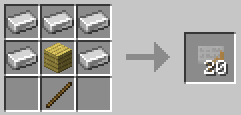
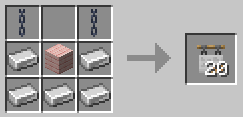
Iron Signs themselves are not much better than Vanilla wooden signs. They are inexpensive, and stack up to 64, but they are just dull gray, slightly rusted pieces of iron plates.

Their crafting recipes are similar to the Vanilla wooden signs:


But Iron Signs can be painted to all the colors of Minecraft:

Or even more efficiently, at the time of their creation:

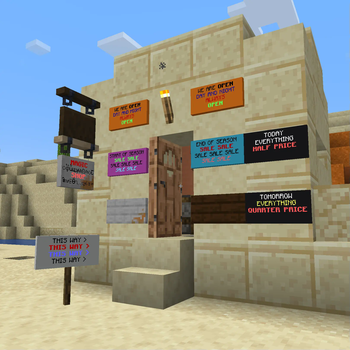
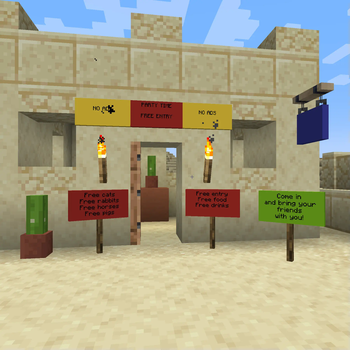
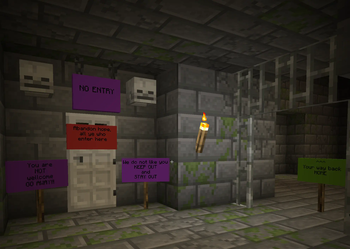
The vibrant, high contrast, painted signs then can be used to convey information to your friends:

Or to your enemies:

Or to your customers:

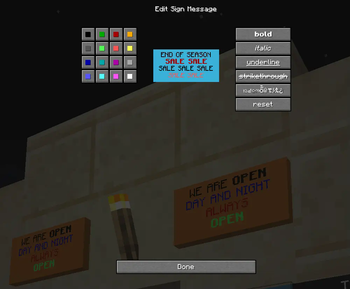
Since 1.0.2 with sign text coloring and formatting:

Requires (Fabric)
- Fabric API
- Cloth Config API
- Optional, but recommended Mod Menu
License
Standard MIT license. Feel free to learn from it and incorporate it in your own projects.
Some parts of the code are based on the source code of Text Utilities, which is LGPL-3 licensed.
Source code
Available on GitLab or on GitHub.
For developers
The mod has not been tested extensively in large modpacks and on large servers. Feedback is welcome.
Email: Pintér Gábor [email protected]
Future plans
- Pointer Signs
Thanks
Thanks to Kaupenjoe for his excellent Modding By Kaupenjoe: Minecraft Modding 1.20.X for Fabric course.
Thanks to Chaws for making available the source code of Text Utilities.
See also
My other mods on Modrinth and on CurseForge.
Available Versions
How to Install Iron Signs on Your Server
Order Server
Order a Minecraft Java server with at least 3 GB RAM (4 GB recommended).
Set fabric Loader
In the panel under "Egg", select the fabric loader and matching Minecraft version (26.1.1).
Install Mod
Open the mod browser in the dashboard and search for "Iron Signs". Click "Install" – done! Alternatively, upload the .jar via SFTP to the /mods folder.
Compatibility
Mod Loaders
Minecraft Versions
26.1.1, 26.1, 1.21.11 (+16 more)
Server-side
✓ RequiredRecommended RAM
4 GB(min. 3 GB)Frequently Asked Questions
Iron Signs server crashes on startup – what to do?
Most common cause: wrong fabric version or insufficient RAM. Check the server log (latest.log) for "OutOfMemoryError" or "Mixin" errors. With Mado Hosting: ensure at least 3 GB RAM is allocated and the loader matches the mod version (26.1.1). You can switch loaders with one click in the panel.
Is Iron Signs compatible with fabric and neoforge?
Iron Signs officially supports fabric, neoforge for Minecraft 26.1.1, 26.1, 1.21.11. The Mado dashboard automatically detects incompatible loader combinations.
Server lagging with Iron Signs – how to optimize performance?
Recommended RAM: 4 GB (per 8 players). Use /spark profiler to check if Iron Signs consumes the most tick time. Common fixes: reduce server view-distance to 8-10, install "performant" or "starlight" as supplementary mods on Forge. With Mado Hosting, your server runs on NVMe SSDs with dedicated CPU cores for minimal latency.
Similar Mods




Rent Modded Server
Install Iron Signs with just one click on your server.