
Item Compare
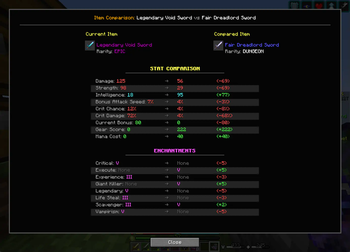
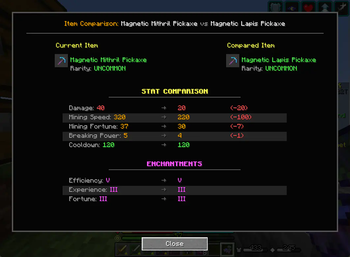
A comparison tool that lets you compare item stats and enchantments side-by-side with visual +/- indicators, including support for Hypixel Skyblock. Simply hover over items and press M to instantly see which gear upgrades are actually better.
Screenshots
About this Mod
Item Compare - Universal Gear Comparison for Minecraft
Ever find yourself squinting at two different items, trying to figure out which one is actually better? Wish you could just see a clear comparison of their stats and enchantments? Now you can!
Item Compare brings the intuitive item comparison mechanics from Diablo, Path of Exile, and other ARPGs directly into your Minecraft experience! With smart auto-detection that works with ANY stat pattern. Perfect for RPG servers, modpacks, and vanilla gameplay!
✅ Universal Compatibility: Works seamlessly with Hypixel (Skyblock, Bedwars, SkyWars), Wynncraft, modded servers, and any Minecraft setup - no configuration needed!
✨ Features
- 🎮 Clean Interface: Side-by-side gear comparison with visual +/- indicators (just like Diablo!)
- 🤖 Smart Auto-Detection: Automatically finds and compares ANY stat pattern - Mining Speed, Breaking Power, Damage, Defense, you name it!
- 📜 Enchantment Comparison: Compare enchantment levels with Roman numerals (I, II, III, etc.)
- 🎯 Visual Indicators: Green for improvements, red for downgrades - see the differences at a glance
- 🔮 Future-Proof: Generic parsing system automatically supports new stats as they're added
- ⚡ Zero Configuration: Works perfectly out of the box with any items and servers
- 🏰 Popular Server Support: Optimized for Hypixel Skyblock, Wynncraft, and other RPG servers with full stat pattern support
- 📦 Modpack Friendly: Compatible with any modded Minecraft setup - works alongside other inventory mods
🕹️ How to Use
- Hover over any item in your inventory and press
M - Hover over a second item and press
Magain - Boom! The comparison screen appears instantly
- Press
ESCto close
📊 What Gets Compared
Stats (Auto-Detected!)
- Combat: Damage, Defense, Strength, Crit Chance, Crit Damage, Health, Ferocity
- Mining: Mining Speed, Mining Fortune, Breaking Power
- Utility: Speed, Mana, Intelligence, Magic Find, Pet Luck
- And literally ANY other stat pattern!
Enchantments
- All enchantment levels with proper Roman numeral display
- Missing enchantments clearly marked as "None"
- Level differences shown with +/- indicators
🚀 Why You'll Love It
- ⏱️ Save Time: Make instant, informed decisions about your gear upgrades
- 📈 Optimize Builds: Easily see which items boost your playstyle the most - perfect for PvP, mining, or dungeon builds
- 🎯 No More Guesswork: Clear visual indicators show exactly what you gain or lose (ARPG veterans will feel right at home!)
- 🔧 Always Up-to-Date: Auto-detection means it works with future updates and new content
- 🌐 Server Versatility: Whether you're on Hypixel, Wynncraft, or your favorite modded server - it just works!
- 🎮 Familiar Feel: If you've played Diablo, Path of Exile, or any loot-based RPG, you'll instantly know how to use this
Installation is simple: Just drop the mod into your Fabric mods folder and start comparing! Compatible with all popular modpacks and inventory management mods.
☕ Support Development
Love this mod? Consider supporting development with a coffee! ☕
Available Versions
How to Install Item Compare on Your Server
Order Server
Order a Minecraft Java server with at least 3 GB RAM (4 GB recommended).
Set fabric Loader
In the panel under "Egg", select the fabric loader and matching Minecraft version (1.21.8).
Install Mod
Open the mod browser in the dashboard and search for "Item Compare". Click "Install" – done! Alternatively, upload the .jar via SFTP to the /mods folder.
Compatibility
Mod Loaders
Minecraft Versions
1.21.8, 1.21.7, 1.21.6 (+1 more)
Server-side
~ OptionalRecommended RAM
4 GB(min. 3 GB)Frequently Asked Questions
Item Compare server crashes on startup – what to do?
Most common cause: wrong fabric version or insufficient RAM. Check the server log (latest.log) for "OutOfMemoryError" or "Mixin" errors. With Mado Hosting: ensure at least 3 GB RAM is allocated and the loader matches the mod version (1.21.8). You can switch loaders with one click in the panel.
Is Item Compare compatible with fabric?
Item Compare officially supports fabric for Minecraft 1.21.8, 1.21.7, 1.21.6. The Mado dashboard automatically detects incompatible loader combinations.
Server lagging with Item Compare – how to optimize performance?
Recommended RAM: 4 GB (per 8 players). Use /spark profiler to check if Item Compare consumes the most tick time. Common fixes: reduce server view-distance to 8-10, install "performant" or "starlight" as supplementary mods on Forge. With Mado Hosting, your server runs on NVMe SSDs with dedicated CPU cores for minimal latency.
Similar Mods




![[TaCZ] Timeless and Classics Zero](https://cdn.modrinth.com/data/SzzJttH8/fd27766d2bb8390d284696b1dbd358f87e081439_96.webp)

Rent Modded Server
Install Item Compare with just one click on your server.