
Item Filter
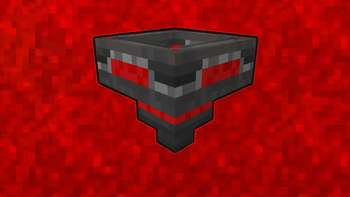
A configurable Fabric item filter block that works like a hopper with filter slots and toggleable filter mode.
Screenshots
About this Mod
Item Filter
Item Filter is a Minecraft Fabric mod that adds a configurable item filter block.
It works like a hopper, but with filter slots and a toggleable filter mode. You can choose which items are allowed to pass through, or disable the filter mode and use it like a normal hopper.
Showcase
Features
| Feature | Description |
|---|---|
| 🧰 Item Filter Block | Adds a custom hopper-like block focused on item filtering. |
| 🔍 Configurable Filter | Lets you choose which items are allowed to pass through. |
| 🔘 Toggleable Mode | Switch between filtered mode and normal hopper behavior. |
| ⬇️ Pulls From Above | Can pull items from inventories placed above, like chests, barrels, furnaces, smokers, and more. |
| 📦 Double Chest Support | Correctly pulls items from large chests and trapped large chests. |
| 🧲 Dropped Item Pickup | Can pick up dropped items from above, like a vanilla hopper. |
| ↪️ Directional Output | Outputs items in the direction the block is facing, like a vanilla hopper. |
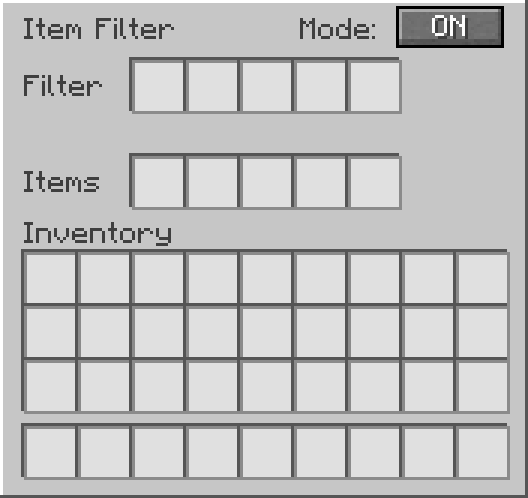
| 🖥️ Custom GUI | Includes filter slots, internal item slots, and an ON/OFF button. |
How It Works
Place the Item Filter like a vanilla hopper.
Items can enter from the top through hoppers or be pulled directly from inventories placed above the Item Filter.
Items leave through the direction the block is facing.
Inside the GUI:
- Filter slots define which items are allowed to pass.
- Items slots work as the internal hopper inventory.
- Mode ON allows only filtered items.
- Mode OFF allows any item to pass through.
When filter mode is ON, only items matching the filter slots can enter the Item Filter.
When filter mode is OFF, the Item Filter behaves like a normal hopper and allows any item to pass through.
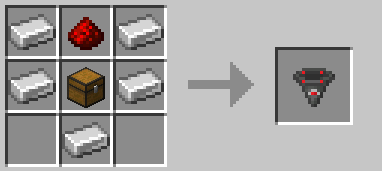
Recipe
GUI Preview
Support
Need help, found a bug, or want to suggest something?
Join the Discord support forum:
License
This project is licensed under the MIT License.
Available Versions
How to Install Item Filter on Your Server
Order Server
Order a Minecraft Java server with at least 3 GB RAM (4 GB recommended).
Set fabric Loader
In the panel under "Egg", select the fabric loader and matching Minecraft version (1.21.1).
Install Mod
Open the mod browser in the dashboard and search for "Item Filter". Click "Install" – done! Alternatively, upload the .jar via SFTP to the /mods folder.
Compatibility
Mod Loaders
Minecraft Versions
1.21.1
Server-side
✓ RequiredRecommended RAM
4 GB(min. 3 GB)Frequently Asked Questions
Item Filter server crashes on startup – what to do?
Most common cause: wrong fabric version or insufficient RAM. Check the server log (latest.log) for "OutOfMemoryError" or "Mixin" errors. With Mado Hosting: ensure at least 3 GB RAM is allocated and the loader matches the mod version (1.21.1). You can switch loaders with one click in the panel.
Is Item Filter compatible with fabric?
Item Filter officially supports fabric for Minecraft 1.21.1. The Mado dashboard automatically detects incompatible loader combinations.
Server lagging with Item Filter – how to optimize performance?
Recommended RAM: 4 GB (per 8 players). Use /spark profiler to check if Item Filter consumes the most tick time. Common fixes: reduce server view-distance to 8-10, install "performant" or "starlight" as supplementary mods on Forge. With Mado Hosting, your server runs on NVMe SSDs with dedicated CPU cores for minimal latency.
Similar Mods






Rent Modded Server
Install Item Filter with just one click on your server.