
Item Flow Monitor
Real-time item throughput monitoring for any container.
Screenshots
About this Mod
Real-time item throughput monitoring for Minecraft containers.
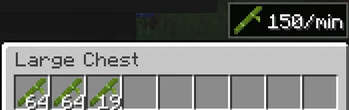
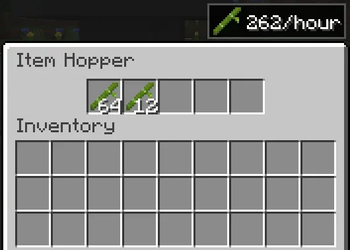
Item Flow Monitor adds an unobtrusive UI overlay to standard containers (chests, hoppers, furnaces, and more) that shows the rate of items flowing through them — in items/min or items/hour. Perfect for players who build farms and want to measure farm efficiency and production rates without manual counting, timers, or extra blocks.
This mod does not add any new blocks or items. It only adds an informational overlay to existing container screens.

Features
- Real-time flow rate — see items/min or items/hour directly in the container UI

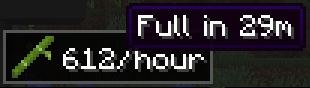
- Time-to-full estimate — hover over the rate to see when the container will be full

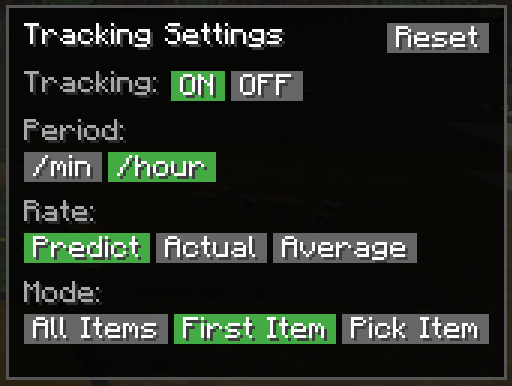
- Three calculation modes — Average (stable long-term), Actual (exact count per window), Predicted (real-time EMA estimate)
- All standard containers — chests, double chests, hoppers, furnaces, blast furnaces, smokers, barrels, dispensers, droppers, shulker boxes
- Flexible item tracking — track all items, auto-detect the first item, or manually select a specific one
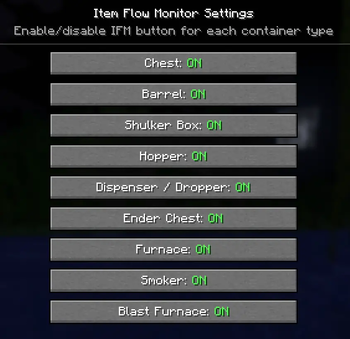
- Configurable via Mod Menu — toggle tracking per container type
- 12 languages — English, Русский, 中文, Español, Deutsch, Français, 日本語, 한국어, Português, Italiano, Polski, Українська
- Lightweight — observer-based architecture, zero overhead without active trackers
How to Use
- Install the mod (requires Fabric API)
- Open any container and click the IFM button
- Toggle tracking ON, choose your period and calculation mode
- The flow rate overlay appears in the corner of the container screen
- Hover over the rate to see estimated time until the container is full

Carpet Hopper Counters vs Item Flow Monitor
If you've used Carpet hopper counters to measure farm rates — Item Flow Monitor solves the same problem, but differently:
| Carpet Hopper Counters | Item Flow Monitor | |
|---|---|---|
| Setup | Hopper → wool block + /counter command |
Open any container, click one button |
| Where you see results | Chat via command | Directly in the container UI |
| Items | Destroyed by counter | Stay in the container |
| Use case | Technical testing, tick warp | Survival gameplay |
Compatibility
- Client + Server — install on both sides for accurate real-time data
- Lithium compatible — observer-based tracking, no hopper mixin conflicts
- Works with Mod Menu, Sodium, Iris, Fabric API
- Tested on Minecraft 1.21.11
FAQ
Q: Does it work on vanilla servers?
A: The mod requires server-side installation for tracking. Client-only mode is not currently supported.
Q: Does it affect performance?
A: No. The mod only tracks containers with active trackers. Zero overhead without trackers.
Q: Can I hide the overlay for specific container types?
A: Yes — configure through Mod Menu → Item Flow Monitor.
Available Versions
How to Install Item Flow Monitor on Your Server
Order Server
Order a Minecraft Java server with at least 3 GB RAM (4 GB recommended).
Set fabric Loader
In the panel under "Egg", select the fabric loader and matching Minecraft version (1.21.11).
Install Mod
Open the mod browser in the dashboard and search for "Item Flow Monitor". Click "Install" – done! Alternatively, upload the .jar via SFTP to the /mods folder.
Compatibility
Mod Loaders
Minecraft Versions
1.21.11
Server-side
✓ RequiredRecommended RAM
4 GB(min. 3 GB)Frequently Asked Questions
Item Flow Monitor server crashes on startup – what to do?
Most common cause: wrong fabric version or insufficient RAM. Check the server log (latest.log) for "OutOfMemoryError" or "Mixin" errors. With Mado Hosting: ensure at least 3 GB RAM is allocated and the loader matches the mod version (1.21.11). You can switch loaders with one click in the panel.
Is Item Flow Monitor compatible with fabric?
Item Flow Monitor officially supports fabric for Minecraft 1.21.11. The Mado dashboard automatically detects incompatible loader combinations.
Server lagging with Item Flow Monitor – how to optimize performance?
Recommended RAM: 4 GB (per 8 players). Use /spark profiler to check if Item Flow Monitor consumes the most tick time. Common fixes: reduce server view-distance to 8-10, install "performant" or "starlight" as supplementary mods on Forge. With Mado Hosting, your server runs on NVMe SSDs with dedicated CPU cores for minimal latency.
Similar Mods


Rent Modded Server
Install Item Flow Monitor with just one click on your server.