
Item Icon Exporter
A lightweight client-side utility to easily capture and batch-export transparent item icons for wikis and modpacks.
Screenshots


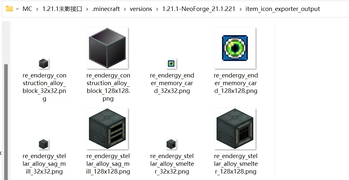
About this Mod
Item Icon Exporter
[English Description]
Need high-quality, transparent item icons for your wiki, modpack quests, or video thumbnails? Tired of manually cropping out backgrounds in Photoshop?
Item Icon Exporter is a highly practical, lightweight client-side utility mod. It allows you to instantly capture and export any in-game item or block into clean, transparent PNG images directly to your local drive!
✨ Key Features
- One-Click Export: Easily export the exact item you are currently holding, or batch export every unique item in your inventory with a single keypress! (Default Keys:
Numpad 4for Held Item,Numpad 5for Inventory). - Perfect Transparent Backgrounds: Accurately renders the item and automatically saves it with a 100% transparent background. Ready to use immediately!
- Smart Auto-Scaling for Oversized Items: Weapons or item models larger than the standard grid (like giant swords from other mods) are automatically recognized by a smart algorithm, perfectly scaled, and cropped to fit the image. Say goodbye to cut-off edges or manual config tweaking!
- Enchantment Glint Control: Want the raw item texture without the purple enchanted glow? The mod can be configured to automatically visually strip the glint from enchanted items, or export both enchanted and clean versions simultaneously!
- Smart Naming & Organization: Automatically groups your exports into timestamped folders (
yyyyMMddHHmmss). It names the files using the item's localized in-game name (e.g.,Stone_32x32.png) and automatically handles duplicate names (e.g.,Stone(1)_32x32.png). - Mapping File Generation: Generates a convenient
0Item Name and ID Mapping.txtfile in the export folder, allowing you to easily cross-reference the localized image names back to their exact registry IDs. - NBT & Data Component Support: Flawlessly distinguishes items that share the same ID but have different Data Components or NBTs. No variations are left behind during inventory batch exports!
- Multi-Size Generation: Need a standard 36x36 icon and a high-res 168x168 render at the same time? Configure the mod to output multiple resolutions simultaneously! (Supported limits: Size 16 up to an ultra-HD 2048!).
- Smart In-Game Feedback: Once the export is complete, a neat summary message will appear in your chat. Simply click the text to instantly open the output folder.
- Client-Side Only: You only need to install this on your client. It works perfectly on any multiplayer server!
⚙️ Configuration
You can find the config file at .minecraft/config/item_icon_exporter-client.toml.
savePath(Default: "item_icon_exporter_output"): The folder where exported images are saved. Supports absolute or relative paths.imageSizes(Default: [36, 168]): List of square image sizes to export. Input as integers (e.g., 32 means 32x32).glintExportMode(Default: 1): How to handle items with enchantment glint.1= Export ONLY the unenchanted icon (removes glint visually before exporting).2= Export ONLY the enchanted icon (keeps original glint).3= Export BOTH (exports one clean image, and another with a '_glint' suffix).
📦 Modpack Usage Permission
This mod can be freely included and bundled directly in any modpacks. You may put the .jar file inside your modpack for seamless usage by your players.
[中文介绍]
正在为整理维基(Wiki)、制作整合包任务书或是视频封面,苦恼怎么弄到高清的透明底物品图标吗?受够了在修图软件里辛苦地一点点抠去背景吗?
Item Icon Exporter(物品图标导出工具) 是一个极为实用且轻量的客户端辅助模组。它可以让你在游戏内,将任意物品或方块极速渲染为纯净、透明背景的 PNG 图片文件,并直接保存到你的电脑中!
✨ 核心功能
- 一键极速导出:只需按下快捷键,即可导出当前手持的物品;或者一键批量导出玩家背包内的所有不同的物品!(默认快捷键:
小键盘 4导出手中物品,小键盘 5导出整个背包)。 - 完美透明背景:精准渲染游戏内的物品原貌,并自动生成自带透明通道(Alpha)的图片。即开即用,再也不需要费时费力地去抠图!
- 超大尺寸物品自动适配:模组自带智能包围盒算法!遇到拔刀剑等模型严重超出格子的物品时,会自动探测物品实际大小,完美居中缩放并截取,彻底告别出框裁剪或四周出现大片留白,无需手动调整任何缩放配置!
- 附魔光效自由剥离:不想要附魔武器上那层紫色的耀光?你可以通过配置,让模组在导出带有附魔的物品时,自动为你剥离光效导出纯净版图标,或是同时导出“纯净 / 发光”两种版本供你挑选!
- 智能命名与归档:导出时会自动创建带有时间戳的专属文件夹(如
20241117123000)。图片名将自动采用玩家游戏语言的本地化名称(例如石头_32x32.png),并智能处理同名物品(如自动添加后缀石头(1))。 - 自动生成对照表:每次导出都会在对应文件夹下生成一份
0物品名称和物品ID对照表.txt,让你不仅拥有直观的图片名称,还能在制作整合包时轻松查找对应的物品注册表 ID! - 完美支持 NBT 与数据组件:即使是底层 ID 完全相同、仅依靠 1.21 数据组件或 NBT 区分的物品(例如各种不同形态的自定义道具),在批量导出时也能被精准识别,绝不遗漏任一形态!
- 多尺寸同时生成:得益于灵活的配置文件,你可以让它一次按键同时生成多种尺寸的图像!无论是 36x36 的标准图标还是 168x168 的高清图,一步到位。(支持范围:边长 16 至超清的 2048 均可)。
- 智能游戏内反馈:导出完成后,聊天栏会立刻生成一条成功提示。直接点击聊天框内的路径文字,就能一键打开图片所在的文件夹。
- 纯客户端模组:本模组只需安装在客户端上即可使用,你可以带着它进入任何多人服务器进行截图保存!
⚙️ 配置
配置文件位于 .minecraft/config/item_icon_exporter-client.toml。
savePath(默认: "item_icon_exporter_output"):图片保存路径。支持填入绝对路径或相对路径。imageSizes(默认: [36, 168]):要导出的图片尺寸列表(直接填入整数即可,代表正方形边长)。你可以随意添加多个尺寸的条目。glintExportMode(默认: 1):导出带有附魔光效的物品时的处理策略。1= 仅导出无光效纯净版图标(自动在渲染时剥离附魔发光表现)。2= 仅导出附魔图标(保留原本的发光表现)。3= 同时导出两种(导出一张无光效的原图,和一张带 '_glint' 后缀的有光效图)。
📦 整合包使用许可
Available Versions
How to Install Item Icon Exporter on Your Server
Order Server
Order a Minecraft Java server with at least 3 GB RAM (4 GB recommended).
Set forge Loader
In the panel under "Egg", select the forge loader and matching Minecraft version (1.21.1).
Install Mod
Open the mod browser in the dashboard and search for "Item Icon Exporter". Click "Install" – done! Alternatively, upload the .jar via SFTP to the /mods folder.
Compatibility
Mod Loaders
Minecraft Versions
1.21.1, 1.20.1
Server-side
✗ UnsupportedRecommended RAM
4 GB(min. 3 GB)Frequently Asked Questions
Item Icon Exporter server crashes on startup – what to do?
Most common cause: wrong forge version or insufficient RAM. Check the server log (latest.log) for "OutOfMemoryError" or "Mixin" errors. With Mado Hosting: ensure at least 3 GB RAM is allocated and the loader matches the mod version (1.21.1). You can switch loaders with one click in the panel.
Is Item Icon Exporter compatible with forge and neoforge?
Item Icon Exporter officially supports forge, neoforge for Minecraft 1.21.1, 1.20.1. The Mado dashboard automatically detects incompatible loader combinations.
Server lagging with Item Icon Exporter – how to optimize performance?
Recommended RAM: 4 GB (per 8 players). Use /spark profiler to check if Item Icon Exporter consumes the most tick time. Common fixes: reduce server view-distance to 8-10, install "performant" or "starlight" as supplementary mods on Forge. With Mado Hosting, your server runs on NVMe SSDs with dedicated CPU cores for minimal latency.
Rent Modded Server
Install Item Icon Exporter with just one click on your server.