
Item Name Changer
A completely client sided mod that allows players to change their item name even in servers without op
Screenshots
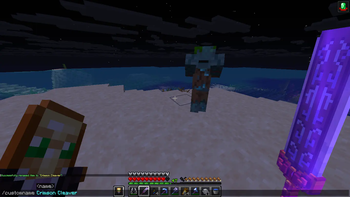
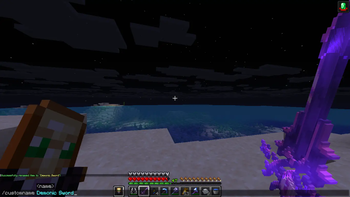
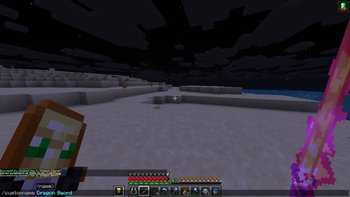
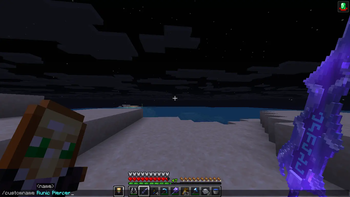
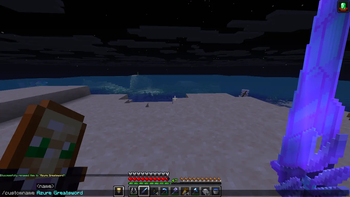
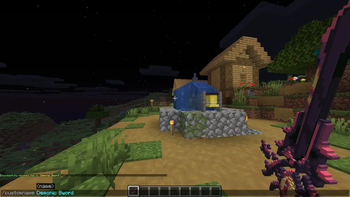
About this Mod
Item Name Changer (v1.2)
A lightweight Fabric mod that lets players rename and customize their items with powerful commands AND a brand-new GUI editor — no anvils or experience required!
✨ What’s New in v1.2
🔥 Brand New GUI Editor
- Fully interactive item editor
- Edit item name and lore visually
- Built-in color picker
- Formatting buttons (Bold, Italic, Underline, Strikethrough)
- Live preview system
- Clean and intuitive layout
📝 Lore Editing Support
- Add, remove, and edit multiple lore lines
- Fully persistent like item names
🎨 Better Customization
- Separate color controls for name and lore
- Easier formatting without memorizing codes
🧠 Important Note
If you're using resource packs with custom item models (name-based CIT):
👉 Use the command:/customname <name>If you just want to:
- Edit name
- Add lore
- Use colors & formatting easily
👉 Use the GUI (`config keybind from controls, default:g)
🔹 Features
- 🏷️ Rename items with custom names (supports formatting codes)
- 📝 Full lore editor (multi-line support)
- 🎨 Color picker GUI for easy styling
- 🖥️ Modern GUI editor (no commands needed)
- 🔄 Persistent storage - survives relog, server sync, GUI use
- 🌍 World-specific data - separate configs per world/server
- ⚡ Auto-restore engine - restores names/lore automatically
- 💻 Client-side only - works on any server
- 🪶 Lightweight & optimized
📋 Commands
/customname <name>
Rename the held item
- Example:
/customname My Cool Sword - Example:
/customname Golden Blade
/customname restore
Restores held item name from config
/customname restoreall
Restores all item name from config
🖼️ Resource Pack Used in Gallery
https://modrinth.com/resourcepack/fantasy-3d-weapons-cit
📦 Installation
- Install Fabric Loader
- Install Fabric API
- Download the mod JAR
- Place it in
.minecraft/mods
🔧 Requirements
- Minecraft 1.21.x
- Fabric Loader 0.17.2+
- Fabric API
- Java 21+
🎮 Use Cases
Perfect for:
- ⚔️ Survival players (no anvil needed)
- 🏗️ Creative builders
- 🎮 Minigame servers (Bedwars, Skywars, etc.)
- 🎭 Roleplay servers
- 🎨 Custom resource pack users (CIT support)
🛠️ Technical Details
- Client-side only
- Works on any server
- No permissions required
- Changes visible only to you
📜 License
MIT License
📞 Support
Found a bug or have an idea?
Open an issue on GitHub!
Made with ❤️ for the Fabric community
Available Versions
How to Install Item Name Changer on Your Server
Order Server
Order a Minecraft Java server with at least 3 GB RAM (4 GB recommended).
Set fabric Loader
In the panel under "Egg", select the fabric loader and matching Minecraft version (26.1.2).
Install Mod
Open the mod browser in the dashboard and search for "Item Name Changer". Click "Install" – done! Alternatively, upload the .jar via SFTP to the /mods folder.
Compatibility
Mod Loaders
Minecraft Versions
26.1.2, 26.1.1, 26.1 (+12 more)
Server-side
✗ UnsupportedRecommended RAM
4 GB(min. 3 GB)Frequently Asked Questions
Item Name Changer server crashes on startup – what to do?
Most common cause: wrong fabric version or insufficient RAM. Check the server log (latest.log) for "OutOfMemoryError" or "Mixin" errors. With Mado Hosting: ensure at least 3 GB RAM is allocated and the loader matches the mod version (26.1.2). You can switch loaders with one click in the panel.
Is Item Name Changer compatible with fabric?
Item Name Changer officially supports fabric for Minecraft 26.1.2, 26.1.1, 26.1. The Mado dashboard automatically detects incompatible loader combinations.
Server lagging with Item Name Changer – how to optimize performance?
Recommended RAM: 4 GB (per 8 players). Use /spark profiler to check if Item Name Changer consumes the most tick time. Common fixes: reduce server view-distance to 8-10, install "performant" or "starlight" as supplementary mods on Forge. With Mado Hosting, your server runs on NVMe SSDs with dedicated CPU cores for minimal latency.
Similar Mods






Rent Modded Server
Install Item Name Changer with just one click on your server.