
Item Name Recolorer
Colorize and format your item's custom name.
Screenshots
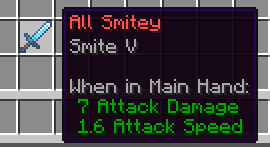
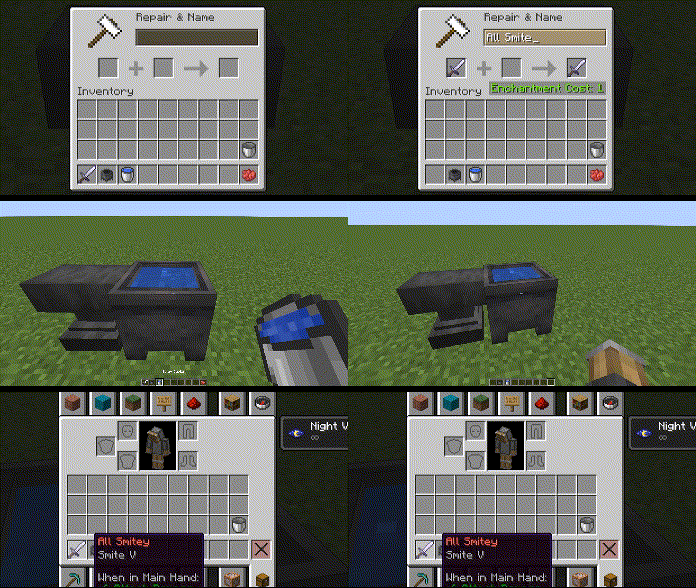
About this Mod
Features
- Recolor any item's name with any dye
- Apply custom RGB Hex coloring
- Apply Bold, Italics, Underline, Strikethrough, and Obfuscation
How recoloring works
Very simple. Place a cauldron, and fill it with water to any level
Any item you want to change MUST be renamed hrough the anvil first. You can add a space at the end to maintain its current/default name.
Once you've renamed your item with an anvil, toss it right into the cauldron filled with water
Now it's time to select a color and/or format
Say you wanted a red item name; you'd then toss red dye into the same cauldron, wait a few seconds and your item's custom name should be red. Note that when you give the item a dye in the cauldron, it will reset all formatting (removes bold, italics, underline, etc.). So be sure to set the color first!
Blue dye gives you blue, white dye gives you white, etc.
How reformatting works
Same thing with coloring. Toss the item and its format item in a cauldron of water.
Here's a list of possible formats and their corresponding item.
- Bold: Ink Sac
- Italics: Stick
- Underline: String
- Strikethrough: Feather
- Text Obfuscate: Glow Ink Sac
Again, setting the color of an item will reset all formatting to default. Color first, formats second.
You can apply multiple formats, including all of them at once.
Here's an example:
Custom RGB (Hex codes)
Let's say you want a fully red item name, the hex code for full red is FF 00 00.
Grab any paper item and rename it in the anvil as #FF0000.
You must have it start with # and no spacing. Finally, throw it in the cauldron with your item as if it were a dye and you can then get custom colors on your item.
See my other mods
Available Versions
How to Install Item Name Recolorer on Your Server
Order Server
Order a Minecraft Java server with at least 3 GB RAM (4 GB recommended).
Set datapack Loader
In the panel under "Egg", select the datapack loader and matching Minecraft version (1.21.11).
Install Mod
Open the mod browser in the dashboard and search for "Item Name Recolorer". Click "Install" – done! Alternatively, upload the .jar via SFTP to the /mods folder.
Compatibility
Mod Loaders
Minecraft Versions
1.21.11, 1.21.10, 1.21.9 (+9 more)
Server-side
✓ RequiredRecommended RAM
4 GB(min. 3 GB)Frequently Asked Questions
Item Name Recolorer server crashes on startup – what to do?
Most common cause: wrong datapack version or insufficient RAM. Check the server log (latest.log) for "OutOfMemoryError" or "Mixin" errors. With Mado Hosting: ensure at least 3 GB RAM is allocated and the loader matches the mod version (1.21.11). You can switch loaders with one click in the panel.
Is Item Name Recolorer compatible with datapack and fabric and forge and neoforge and quilt?
Item Name Recolorer officially supports datapack, fabric, forge, neoforge, quilt for Minecraft 1.21.11, 1.21.10, 1.21.9. Note: Forge and Fabric mods are NOT cross-compatible – pick one loader and stick with it. The Mado dashboard automatically detects incompatible loader combinations.
Server lagging with Item Name Recolorer – how to optimize performance?
Recommended RAM: 4 GB (per 8 players). Use /spark profiler to check if Item Name Recolorer consumes the most tick time. Common fixes: reduce server view-distance to 8-10, install "performant" or "starlight" as supplementary mods on Forge. With Mado Hosting, your server runs on NVMe SSDs with dedicated CPU cores for minimal latency.
Similar Mods



![[TaCZ] Timeless and Classics Zero](https://cdn.modrinth.com/data/SzzJttH8/fd27766d2bb8390d284696b1dbd358f87e081439_96.webp)


Rent Modded Server
Install Item Name Recolorer with just one click on your server.