
Item Seller
This is a mod that lets you select an item and then lets you automatically sell it
Screenshots
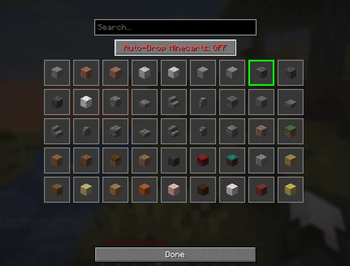
About this Mod
Item Seller for Minecraft 1.21.10
MAKE SURE THAT THIS MOD IS ALLOWED ON YOUR SERVER.
This mod was made with the usage of AI and only made for personal use expect bugs.
A client-side Fabric mod that automates selling a desired item by pressing a customizable hotkey (default: F6).
Features
- Press F6 (configurable) to automatically execute
/sellcommand once - Press F7 (configurable) to automatically execute
/sellcommand in a loop - Press F8 (configurable) to selected the desired item to sell
- Automatically moves the selected item from your inventory into the opened container
- Client-side only - works on servers that have the
/sellcommand - Customizable keybinding through Minecraft's controls menu
Requirements
- Minecraft 1.21.10
- Fabric Loader 0.16.9 or higher
- Fabric API 0.110.5+1.21.10 or higher
- Java 21
Installation
- Install Fabric Loader for Minecraft 1.21.10 from https://fabricmc.net/use/
- Download and install Fabric API from https://modrinth.com/mod/fabric-api
- Download and install this mod
- Place the JAR file into your
.minecraft/modsfolder - Launch Minecraft with the Fabric profile
Building from Source
Prerequisites
- Java Development Kit (JDK) 21 or higher
- Git (optional)
Build Steps
- Open a terminal/command prompt in the mod directory
- Run the build command:
On Windows:./gradlew buildgradlew.bat build - The compiled mod JAR will be in
build/libs/itemseller-1.0.0.jar
Usage
- Join a server that has the
/sellcommand enabled - Press F8 (or your custom keybinding) and select an item
- Press F7 (or your custom keybinding)
- The mod will:
- Execute
/sellcommand - Wait for the container to open
- Automatically move the selected item from your inventory to the container
- Press Esc and Loop
- Execute
Configuration
To change the keybinding:
- Open Minecraft
- Go to Options → Controls → Key Binds
- Scroll to the "Puuklys Item Seller" category
- Click on "Toggel Auto-Sell" and press your desired key
- Click "Done"
How It Works
- When you press the hotkey, the mod sends the
/sellcommand to the server - The mod waits up to 2 seconds for a container GUI to open
- Once the container opens, it scans your entire inventory for the desired item
- All found items are shift-clicked into the container automatically
Compatibility
- Client-side only (doesn't need to be installed on the server)
- Works with any server that has a
/sellcommand that opens a container - Compatible with most other Fabric mods
Troubleshooting
The mod doesn't move items:
- Make sure the
/sellcommand actually opens a container/GUI - Check that you have the desired item in your inventory
- Verify the server allows the
/sellcommand
Keybinding doesn't work:
- Check for keybinding conflicts in Controls settings
- Make sure the key isn't bound to another action
Build errors:
- Ensure you have JDK 21 or higher installed
- Check that you have internet connection (Gradle needs to download dependencies)
License
MIT License - Feel free to modify and distribute
Support
This mod was created for Minecraft 1.21.10 specifically. If you encounter issues, make sure:
- You're running the correct Minecraft version
- Fabric Loader and Fabric API are properly installed
- The server supports the
/sellcommand
Available Versions
How to Install Item Seller on Your Server
Order Server
Order a Minecraft Java server with at least 3 GB RAM (4 GB recommended).
Set fabric Loader
In the panel under "Egg", select the fabric loader and matching Minecraft version (1.21.10).
Install Mod
Open the mod browser in the dashboard and search for "Item Seller". Click "Install" – done! Alternatively, upload the .jar via SFTP to the /mods folder.
Compatibility
Mod Loaders
Minecraft Versions
1.21.10
Server-side
✗ UnsupportedRecommended RAM
4 GB(min. 3 GB)Frequently Asked Questions
Item Seller server crashes on startup – what to do?
Most common cause: wrong fabric version or insufficient RAM. Check the server log (latest.log) for "OutOfMemoryError" or "Mixin" errors. With Mado Hosting: ensure at least 3 GB RAM is allocated and the loader matches the mod version (1.21.10). You can switch loaders with one click in the panel.
Is Item Seller compatible with fabric?
Item Seller officially supports fabric for Minecraft 1.21.10. The Mado dashboard automatically detects incompatible loader combinations.
Server lagging with Item Seller – how to optimize performance?
Recommended RAM: 4 GB (per 8 players). Use /spark profiler to check if Item Seller consumes the most tick time. Common fixes: reduce server view-distance to 8-10, install "performant" or "starlight" as supplementary mods on Forge. With Mado Hosting, your server runs on NVMe SSDs with dedicated CPU cores for minimal latency.
Similar Mods



![CobbleDollars [Cobblemon Addon]](https://cdn.modrinth.com/data/s7N7AsqL/684040a264fc1d7f9b856ec5d2da39767398c7ad.png)

Rent Modded Server
Install Item Seller with just one click on your server.